

App store conversion
How to Improve App Store Conversion: Turn Views into Downloads
Improve app store conversion by making your first three screenshots match the visitor's goal: a clear benefit, real app proof, and another reason to install. Record your current performance for one audience, address message, price, and trust gaps, then compare a stronger screenshot set with the live version in a native store experiment. AppScreens lets you create that challenger without designing every size by hand.


Give your existing traffic a clearer reason to install
Make your first three screenshots sell the app's value in seconds. Use specific benefit captions, legible app content, and a story that matches the visitor's intent. Keep your live set as the control and test one stronger alternative. The opportunity is more downloads from the people already finding your app.
Keep your published AI or Canva screenshots as the control. Build an editable challenger in AppScreens with real captures, benefit captions, and a ready-to-go template. Automatic text fitting and store-size exports let you improve the message without hiring a designer or rebuilding each canvas.
Start free with one project, AI mode, and up to five designs with essential store-size exports. Manually upload the challenger to a native store experiment while your existing screenshots remain the control.
Start with one audience and a measured baseline
Choose one store, market, traffic source, and date range. Save the live screenshots and record the report's exact metric, exposure count, and downloads or acquisitions. Compare that audience with itself; a blended rate can change when the traffic mix changes, even if your screenshots stay the same.
App Store: Use Analytics > Acquisition > Sources in App Store Connect. Apple's overall conversion rate divides total downloads, including redownloads, and pre-orders by unique-device impressions. Track first-time downloads separately. Downloads can happen in search results, so total downloads divided by product-page views is not a page-visitor conversion rate.
Google Play: Use Grow users > Store performance > Conversion analysis for listing visitors, clicks, and CTR. Install, Open, and Pre-register clicks measure intent; completed acquisitions are in Statistics or Grow users overview. Match dates and available filters when reviewing trends. Different report coverage means subtracting totals does not measure failed installations.
This guide assumes relevant visitors already reach a listing they can install from. If your "views" are social reach, store visits are scarce, or users cannot download, use the broader no-downloads diagnosis first.
What should the first three screenshots say?
In AppAgent's 2017 analysis of 25,000+ visitors across five apps, the average store-listing visit lasted seven seconds. Apple's current guidance says the first one to three screenshots appear in search results when no app preview is available, depending on orientation. Your opening images need to earn attention in seconds.
A budgeting app does not need three variations of "Powerful finance tools." Give each screenshot a separate job, using real screens that support the claim:
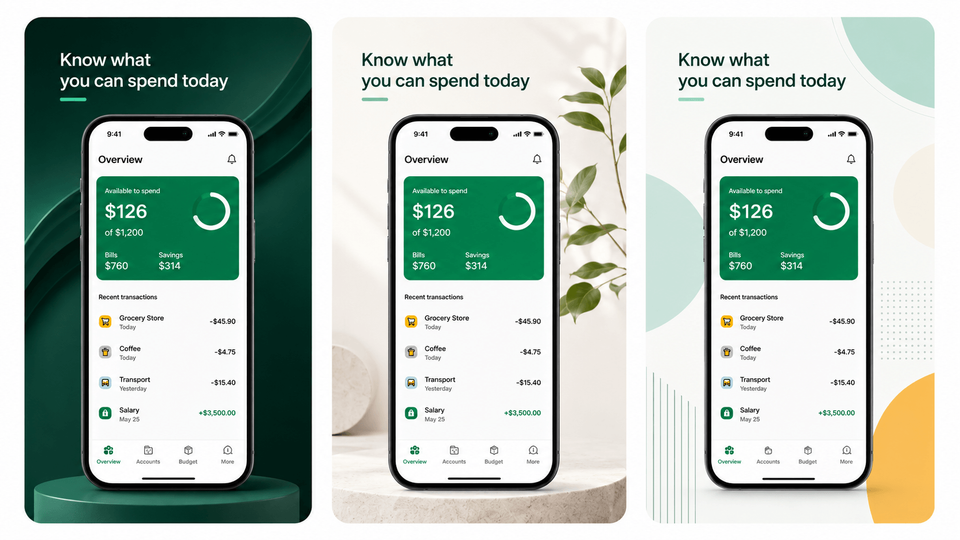
- First: the main outcome. "Know what you can spend today" above the available-budget screen makes the immediate value clear.
- Second: the useful detail. "See where your money goes" above the spending breakdown shows how the app explains the problem.
- Third: another reason to install. "Keep upcoming bills in view" above the bill calendar demonstrates a distinct benefit instead of repeating the overview.
Preview the first three together at listing size, with headlines and key app details readable without zooming. Show them to a target user for five seconds, hide them, and ask what the app does and why they would install it. Use the screenshot story and caption playbook to sharpen unclear answers.
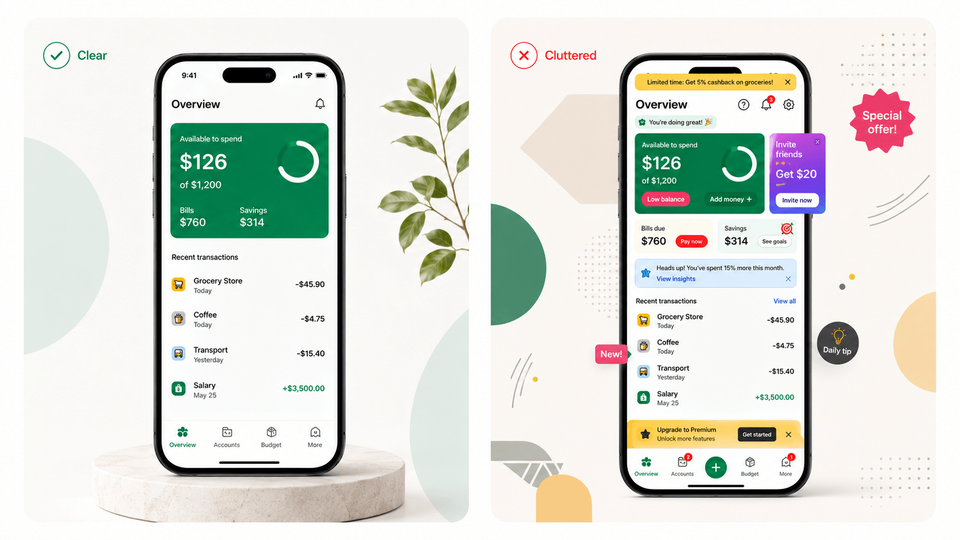
Avoid a logo-only opening, tiny app text, repeated captions, and AI decoration that obscures the product. Lead with the useful outcome, shorten crowded headlines, and enlarge the real detail that proves each claim. Keep invented features and unsupported badges out of the design.
Does the listing match the visitor's goal and earn trust?
Relevant visitors can still see the wrong message. Someone arriving from a "split household bills" campaign needs to see shared expenses, not an opening screenshot about investment charts. Compare the search or ad promise with the first caption and app screen. Lead with the feature that brought that audience here, then show how it works.
Check the offer alongside the creative. "Free budgeting" is confusing if the demonstrated feature requires a subscription. Make paid-feature and trial expectations accurate, and avoid implying that a paid app is free. Review recent ratings for recurring objections such as intrusive ads or missing functionality; address the underlying issue instead of covering it with a stronger claim.
Use current app UI and only genuine awards, ratings, or testimonials. Consistent typography and clear screenshots make the offer easier to assess. For a distinct paid audience, the Custom Product Pages guide explains how to give a campaign its own relevant screenshot story.
Could the message work better in another language?
If a market already brings relevant visitors but few downloads, check whether your screenshots make the app feel useful in that audience's language and context. ZiMAD reported a 36% conversion-rate increase in Japan after testing and adapting its App Store screenshot presentation for that market. The opportunity includes the imagery and examples, not only translated words.
Choose a market from your baseline and adapt the benefit as well as the wording. A budgeting screenshot might need local currency, familiar categories, and localized app UI. Review the full set with someone who understands the audience: does the caption sound natural, does the example feel relevant, and does the app deliver that experience? Check longer text and RTL layouts before testing.
Use the localization performance guide to assess the opportunity, then follow the screenshot localization workflow to create and review the next market's set.
What should the first A/B test look like?
Headspace reported a 34% average organic conversion-rate increase across iOS and Google Play compared with the preceding period during its December 2023 to May 2024 campaign with M+C Saatchi Performance. The campaign included 15 sets of screenshot A/B tests across markets, testing backgrounds, captions, and magnified app content. Start with the element your visitors struggle to understand.
Write a brief specific enough to build and evaluate. For a budgeting app, the question could be whether an outcome-led first caption helps people understand the spending breakdown. Keep the published set as the control and prepare this challenger:
- Audience and hypothesis: Visitors seeing your English screenshot set will respond to a specific spending outcome more than a generic analytics claim.
- Control and challenger: Change "Powerful analytics" to "See where your money goes." Keep the real spending screen, layout, screenshot order, price, and other listing assets fixed.
- Success metric: Use the native experiment's reported conversion metric on Apple, or select Unique user install clicks for a Google Play acquisition-intent test. Name the metric in your result; a Google click lift is not a completed-install lift.
- Decision: Use the store's result and confidence reporting to choose what to keep, then save the creative and result together. If the message and design both change, attribute the result to the complete set.
The native store runs the experiment. Follow the iOS Product Page Optimization guide or Google Play experiment guide for setup and interpreting the result.
For illustration, with stable eligible traffic, a 15% relative increase in download conversion turns 10,000 monthly downloads into 11,500: 1,500 extra downloads without buying more traffic. Explore the ASO performance examples and download calculator, then follow Sammy's screenshot testing walkthrough to prepare your next variant.
Build, export, and update the challenger in AppScreens
For your first AppScreens project, find your app and metadata with AI onboarding, choose a screenshot template or start from scratch, and upload real app captures. Add the captions from your test brief and adjust the framing, colors, and screenshot order. Your published set can remain the control while you build this editable alternative.
Automatic text resizing helps the new caption fit across sizes and translations. Preview each output for line breaks, cropping, and legibility, then export the required App Store and Google Play sizes from the responsive design. For localized versions, swap the app capture and supporting images per language so the UI, currency, and examples support the translated promise.
Start free with one project, AI mode, and up to five designs with essential store-size exports, then manually attach the challenger to the store experiment. Supported paid plans add direct uploads to App Store Connect, including PPO treatments and Custom Product Pages, and to Google Play's main listing. Export Google Play experiment files and attach them in Play Console.
When the app changes, replace the capture or update the caption, review the affected sizes and languages, and re-export. You keep the editable layout instead of commissioning another set or rebuilding canvases for every update. Follow the step-by-step screenshot workflow to take the brief through to store-ready files.
Give the next visitor a clearer reason to install
Build a stronger first-three screenshot story in AppScreens. Start with a template, add real app screens, sharpen the captions, and export a challenger while keeping the live set as your control. Keep the project editable for the next test, language, and app update.
FAQ
How do I improve my app store conversion rate?
Measure the same metric, source and market before choosing a change. Make the first three screenshots sell specific benefits using readable real app screens, match the campaign promise and price expectations, and localize for the audience. Write a test hypothesis and compare the current set with a clear alternative. Headspace reported a 34% average organic conversion-rate increase during a campaign with 15 sets of screenshot tests. AppScreens helps you produce and export the next variant quickly.
Why does my app get views but no downloads?
Once you confirm that the views are relevant store visits, check whether the listing explains a compelling benefit and matches the audience, language, price expectations and campaign that brought people there. Make that promise clear across the first three screenshots and show the real app delivering it. If the views are mostly social or ad views rather than store traffic, investigate the path to the listing first.
What is a good app store conversion rate?
There is no universal target. Conversion varies with the metric, category, country, traffic source, price and audience intent. Start with your own comparable baseline and relevant console peer groups. A category benchmark gives context, but your test should judge the chosen change against your current set in the same audience.
What should the first three app store screenshots show?
Give each image a different job: state the main user outcome, prove how the app delivers it with readable real UI, and add a second reason to install. Replace feature labels such as Dashboard with a specific benefit such as Know what you can spend today. AppScreens keeps captions and captures editable so you can test the message without rebuilding every store size.
Are App Store impressions the same as product page views?
No. Impressions measure exposure in eligible App Store placements; product-page views measure visits to the product page. Apple’s overall conversion metric divides downloads and pre-orders by unique-device impressions. People can install from search, so dividing total downloads by page views does not tell you what share of page visitors installed. Use the console’s defined metric consistently.
Does Google Play click-through rate mean completed downloads?
No. Listing reports distinguish Install, Open and Pre-register clicks from completed acquisitions. Check the experiment’s target metric and inspect completed acquisitions separately in Statistics or Grow users overview. Match dates and available filters, but account for different report coverage. A CTR improvement alone is not a measured completed-download increase.
Can I measure a redesign by comparing this week with last week?
A before-and-after change is a signal, but traffic sources, seasonality, ratings, pricing and other updates can affect it. Write a hypothesis and use a native store experiment for the screenshot comparison. Keep other listing elements fixed when you need to learn about one caption, image or order change.
Why does app store conversion differ by country?
Language, examples, price, audience expectations and traffic sources can differ. Test localized captions and matching app screens in markets you support. ZiMAD reported a 36% conversion increase after adapting screenshots for Japan. AppScreens lets you fit translated text and swap screenshots or images per language. See the localization results guide.
Sources and further reading
- Apple: screenshots on your product page and in search results
- AppAgent: 2017 research on store-listing visits
- M+C Saatchi Performance: Headspace's screenshot testing campaign
- SplitMetrics: ZiMAD's screenshot localization for Japan
- Apple: App Store Connect metrics
- Google Play: listing performance and click-through metrics
- Sammy's walkthrough of screenshot creation and testing