

App Store Localization ROI
Why Localization Matters: How Many More Downloads Can You Get If You Translate Your App and Store Meta?
Localization matters because users search, understand, trust, and install apps faster in their own language. For planning, use +15% to +40% more downloads as a practical range in markets that already show demand, with public examples ranging from +15% organic installs to +128% more iPhone downloads when localization fits the market.
Good-quality localized screenshots are where much of that value becomes visible: they make the first benefit clear, fit translated captions, use local examples, and give store visitors a reason to install. Screenshot-localization examples report +33% to +36% conversion gains, broader localization examples report +101% to +128% more downloads, and ASO A/B testing examples show why screenshot quality, icon, video, ratings, and store creative should be tested instead of guessed.
The hard part is keeping every localized asset correct: captions stop fitting, localized layouts need rebuilding, per-language screenshots or images need swapping, store sizes need re-exporting, upload files need checking, and the next app update can turn one simple change into repeated edits across many assets. Use the tables below to estimate the opportunity first, then choose the markets and screenshot workflow worth testing.


Quick Take
Localization can increase downloads when it matches real market demand and makes the store page easier to find, understand, and trust. Use +15% to +40% as a practical planning range for strong-fit markets, with +101% and +128% as reported results from public localization case studies.
The job is bigger than translation: local keywords, store metadata, screenshot captions, feature graphics, longer text, RTL checks, upload mapping, store-size exports, and market-by-market measurement all affect the result.
Prioritize the markets where the download opportunity justifies translation, caption fitting, localized screenshots, store-size exports, upload mapping, support, and measurement. Then localize the screenshot story before scaling into more languages.
Localization, Screenshot, and Store Listing Lift Examples
App localization can increase downloads when a market already has demand and the localized store page makes the app easier to find, understand, and trust. Screenshot and store-listing tests also show why the localized creative matters: the first screenshot, feature graphic, CPP, PPO, and Google Play experiment assets are close to the install decision. Use +15% to +40% as a practical planning range for strong-fit markets, and use larger case-study lifts as proof that well-fit localization can produce much bigger gains.
The evidence is strongest when localization is treated as an ASO screenshot workflow: local keyword research, translated metadata, localized screenshots, native-language visuals, Google Play graphic assets, PPO and CPP variants, and market-specific measurement. See why ASO testing matters for the broader evidence behind screenshot, caption, icon, and store creative tests.
Description localization still matters, but it should not carry the first impression alone. SplitMetrics and App Radar report that no more than 2% to 2.5% of product page visitors interact with the App Store description’s “Read more” area, which is why localized screenshots, captions, and first-screen creative need to explain the value quickly.
| Source / app | What was localized or tested | Reported result | Business takeaway |
|---|---|---|---|
| Distimo, The Impact of App Translations | Native-language support added by about 200 iPhone and iPad apps. | More than +128% iPhone downloads and about +26% revenue in the following week; iPad impact was much smaller. | Strong broad evidence that native-language support can create immediate download and revenue gains. |
| Coin Splash | Metadata adapted for six geos across English, French, Italian, and German. | +101% global downloads and +67% local-country downloads after 40 days. | Localized metadata can be a major growth lever when paired with a focused ASO and acquisition push. |
| Headspace | Systematic ASO with localization input, cultural nuance, professional translation, and experiments. | +40% visibility, +18% search installs, +8% CVR for local store listings, and +40% search installs in key non-English markets. | Market-by-market localization can improve visibility, search installs, conversion, and total install growth. |
| Koo on Google Play | Country-focused custom store listings with native-language messaging, screenshots, images, and feature graphics. | +15% organic installs in non-English languages in countries where the national language is not English. | Strong official Google Play case for localized store-listing visuals and copy. |
| Store funnel benchmarks | Search discovery, product page views, and page-to-install conversion. | Published ASO benchmarks cite around 65% of iOS discovery from App Store search and around 58% of Google Play discovery from search, 6% to 12% search-impression-to-product-page CTR, around 25% average App Store page-to-install conversion, around 33.4% iOS page-view-to-install conversion, and around 27.7% on Android. | Localization affects both discovery and conversion: local keywords help users find the app, and localized screenshots help users decide faster once they see the page. |
| First-screen screenshot benchmarks | Above-the-fold screenshot visibility, product page scrolling, and description reading. | Published ASO sources cite around 72% of iOS search sessions including at least one product page view, around 37% of iOS product page sessions not scrolling below the fold, around 90% of users not scrolling past the third screenshot, and no more than 2% to 2.5% of visitors interacting with the App Store description’s “Read more” area. | The first localized screenshots carry more weight than long translated description copy. Put the clearest local value proposition in the first three frames. |
| Screenshot update evidence | Screenshot creative updates across App Store and Google Play listings. | Cited around +6% downloads on iOS and +9% downloads on Google Play. Other published ASO benchmarks cite a median winning screenshot test lift around +11.8% conversion and screenshot design lifts around 20% to 35%. | Screenshots are not just translated packaging. The first screenshot hook, caption angle, order, proof, and visual hierarchy can change downloads. |
| Google Play experiment examples | Store listing experiments using screenshots, feature graphics, localized graphics, or listing creative. | Public examples include more than +20% installs, +45% installs, and +20% conversions. | Google Play localization should include screenshot sets and feature graphics, not only translated descriptions. |
| Apple PPO and CPP examples | Simply Piano tested an app preview video against a screenshots-only product page; Peak Brain Training tested three app icon variants. | Simply Piano’s original screenshots-only page performed 3% better over 12 days. Peak Brain Training’s winning brain icon delivered +8% conversion over 44 days. | PPO can validate whether video, icon, screenshot, or message changes actually help before rolling them into the default page. |
| SplitMetrics ASO asset tests | Angry Birds 2 tested screenshot, caption, icon, and store asset combinations; Darby Smart tested app icon redesigns. | Rovio’s best combination delivered +13% conversion and an estimated 2.5M additional installs in the first post-release week. Darby Smart’s winner reached 10.0% conversion vs a 5.7% baseline, reported as +73.7% more Get clicks. | Store creative tests can affect conversion and downloads even when they are not language tests. Treat localized screenshots as ASO assets worth testing. |
| Appbot WordBoard PPO example | Three app icon variants tested against the original in App Store Connect. | The best icon reached 2.21% CVR vs a 2.14% baseline, about +3.54% relative lift after a few days. Broader icon testing guidance reports typical icon-test swings around 5% to 40%. | Smaller creative lifts still matter at scale, especially when the same learnings inform localized screenshot and store listing variants. |
| Make App Magazine keyword experiment | App name and keywords researched from scratch across multiple languages. | Downloads rose from about 3,000 to 23,000 in one month, reported as +767%. | Metadata-only localization can unlock search demand before a full product localization project. |
| ZiMAD Magic Jigsaw Puzzles | Japanese App Store screenshots adapted to local visual expectations. | +36% conversion rate improvement. | Strong screenshot-localization example: visuals matter, not just translated words. |
| FiftyThree Paper | Chinese screenshot localization, screenshot order, and background treatments. | Localized screenshots performed +33% better than English screenshots; screenshot order test produced +17% more installs after scrolling. | Localized screenshots can change conversion even when the app is already familiar. Test language, order, captions, and visual framing by market instead of translating text alone. |
| World of Warships Blitz | Metadata, keywords, subtitles, and keyword fields localized across 12 App Store and Google Play localizations. | +35% average app store impressions, with up to +90% by country. | Top-of-funnel evidence: localization can create more discovery before conversion is measured. |
| CSA Research | Consumer language preference research, not app-store specific. | 2020 B2C research found 76% prefer products with information in their own language, and 40% never buy from websites in other languages. | Native-language information makes the product easier to understand and gives users fewer reasons to hesitate before the install or purchase decision. |
How Much Can Localization Increase Downloads?
For planning, use +15% to +40% as a realistic improvement range for a market that already shows demand. Reported results go higher when the app, metadata, screenshots, and support experience all feel local. Public examples include +15% organic installs from localized Google Play custom store listings, +33% to +36% conversion from localized screenshots, +40% search installs in key non-English markets, +101% global downloads after localized ASO, and Distimo’s +128% more iPhone downloads after native-language support.
Prioritize the first three screenshots when you localize. Apple says the first one to three screenshots can appear in search results when no app preview is available, and published ASO benchmarks cite around 37% of iOS product page sessions not scrolling below the fold and around 90% of users not scrolling past the third screenshot. Translate the description, but make the screenshot story clear first.
Extra downloads = current market downloads x localization improvement
If a country already sends you 2,000 monthly downloads in English, a +15% localization improvement is about 300 extra downloads per month. A +35% improvement is about 700. A +128% improvement is about 2,560. If you are entering a new market, use local keyword demand, impressions, store listing visitors, and small paid tests to estimate the baseline before scaling translation.
Simple Localization Gains Calculator
Use +15% to +40% for planning in markets with existing demand. Use +101% and +128% to model what public upper-end localization case studies have reported.
| Current monthly downloads in a market | +15% improvement | +35% improvement | +101% improvement | +128% improvement |
|---|---|---|---|---|
| 1,000 | +150 | +350 | +1,010 | +1,280 |
| 10,000 | +1,500 | +3,500 | +10,100 | +12,800 |
| 100,000 | +15,000 | +35,000 | +101,000 | +128,000 |
Category baselines change the math
Do not judge every localization test against one App Store average. Adapty reports an overall App Store conversion benchmark around 25%, but category benchmarks vary widely. Use the category baseline as context when you decide whether a localized screenshot test, PPO variant, or market-specific store page is a meaningful win.
| App Store category | Reported conversion benchmark | How to use it |
|---|---|---|
| Overall App Store average | Around 25% | A useful top-level benchmark for comparing category context before choosing localization tests. |
| Weather | Around 79.8% | High-intent categories can convert well when the value is obvious fast. |
| Navigation | Around 115% | Use reported category benchmarks as relative context, especially when the source metric can exceed a simple one-view-to-one-install interpretation. |
| Photo and Video | Around 60.8% | Visual categories need localized screenshots that show output quality, style, and use case quickly. |
| Shopping | Around 26.4% | Localized trust signals, currency, delivery context, and offers can matter as much as translated copy. |
| Social Networking | Around 13.1% | Lower baseline categories need sharper first screenshots and clearer local proof before scaling localization. |
Which store assets should you localize or test first?
Start with the assets closest to the install decision. Localized keywords can create discovery, but the app name, subtitle, icon, first screenshots, preview video, ratings, and visible product page proof decide whether that demand turns into downloads.
Test one major asset type at a time when traffic is limited. Complex icon, screenshot, caption, and video tests need more traffic to read cleanly, while smaller markets often need a simpler before-and-after measurement by locale.
| Asset | Evidence summary | Practical takeaway |
|---|---|---|
| App name, subtitle, icon, and search result appearance | Published ASO benchmarks cite around 65% of iOS discovery from App Store search and roughly 6% to 12% search-impression-to-product-page CTR. | Win the tap before users reach the product page. Localize the app name, subtitle, icon context, and visible screenshot preview when search demand differs by market. |
| App icon | Apple reported +8% conversion from Peak Brain Training’s icon PPO test. SplitMetrics reported Darby Smart’s winning icon produced +73.7% more Get clicks and reached 10% conversion. Appbot reported WordBoard at 2.21% CVR vs a 2.14% baseline. | Prioritize icon PPO when the current icon is unclear, generic, too close to competitors, or weak at communicating the app’s core value. |
| First three screenshots | SplitMetrics reported Rovio / Angry Birds 2 achieved a +13% conversion lift and about 2.5M additional installs in the first post-release week from screenshot and creative testing. Screenshot guidance also says most users do not scroll far through galleries. | Test the first three screenshots first. They carry most of the visible screenshot burden, especially when localized captions, product proof, or market-specific benefits change. |
| App preview video | Apple’s Simply Piano PPO case found the screenshots-only original performed 3% better than the variant with an app preview video. | Do not assume video improves conversion. Test app previews against screenshots-only layouts before rolling them into every localization. |
| Description text | Public ASO benchmark sources commonly show users relying more on visuals than long description copy. The stronger sourced claim is that only a minority of iOS users read or scroll through the full description. | Use the description for clarity, compliance, keyword context, and persuasion, but do not treat it as higher leverage than icon, screenshots, preview video, ratings, or above-the-fold proof. |
| Ratings and reviews | Published ASO benchmarks cite apps with 4.5+ ratings installing around 1.7x the rate of apps under 4.0. Onde states a 3-star app converts around 50% less than a 5-star app. | Treat ratings, review quality, volume, and recency as ASO conversion assets. Localization can improve the pitch, but weak trust signals still reduce install intent. |
For a pitch deck or growth plan, use this claim: app localization improves discovery, conversion, and downloads when it matches local search behavior and local buying context. Model +15%, +35%, and +128% scenarios, then prioritize the markets where the download opportunity justifies translation, caption fitting, localized screenshots, store-size exports, upload mapping, QA, and support.
When localization is worth testing
Test localization when the market already sends impressions, downloads, revenue, reviews, support requests, or paid traffic, and when local-language keywords show real demand. It is also worth testing when competitors are localized, the category depends on trust, or the first three screenshots can make the app’s value clearer in the user’s own language. Start with one market, localize metadata and screenshots well, measure by locale, then scale after proof. For cleaner learning, test one priority market first. If traffic is high enough, Apple Product Page Optimization can test screenshot or app preview treatments across selected localizations, but read results by market before applying one winner to every locale.
Fastest Workflow: Localize Store Screenshots with AppScreens
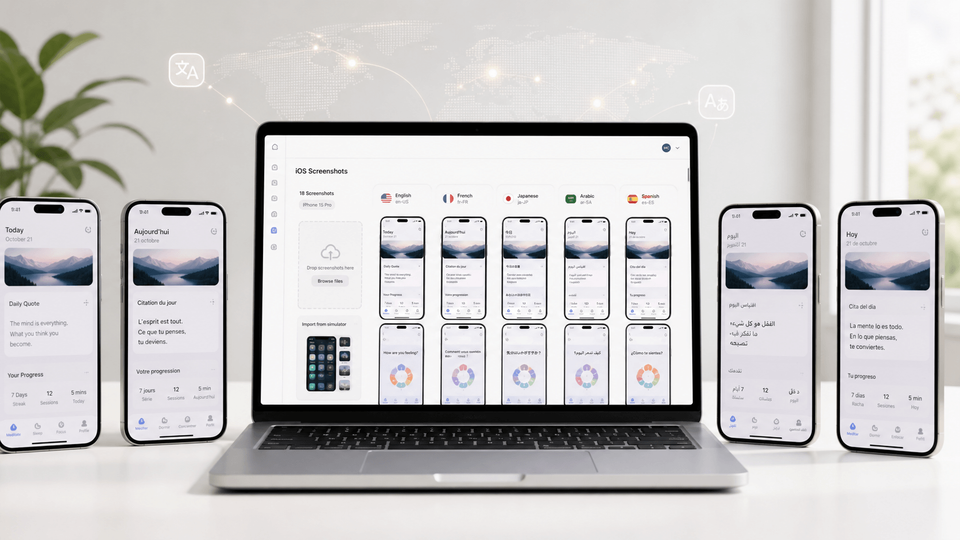
Once the market opportunity is worth testing, the fastest way to act on localization is to keep captions, text fitting, per-language screenshots, per-language images, store-ready exports, uploads, variants, and future updates inside one editable project. AppScreens lets you turn real app screens into localized App Store and Google Play screenshot sets, then export or upload the right assets without rebuilding every size and language as separate files.
Localization adds more than translation. Teams need translated captions, longer-text checks, RTL support, per-language screenshots, per-market images, layout QA, exports, localized uploads, and store checks. AppScreens supports 80+ localizations, AI translation, automatic text resizing, RTL languages, per-language screenshot changes, per-language image changes, App Store Connect upload, and Google Play workflows.
1. Start from one screenshot project
Add clean app screens, choose a reusable template, apply brand styling, and write benefit-led captions that explain the app’s value fast.
2. Translate and adapt by locale
Use AI translation, adjust longer copy, support RTL languages, and swap screenshots or images per language when the local product story changes.
3. Export or upload store-ready assets
Generate required App Store and Google Play sizes, keep variants separate for testing, and avoid redoing captions, localized layouts, per-language images, exports, and upload files across markets.
Even a modest localization project scales quickly: eight screenshots across 3 device sizes and 12 languages becomes 288 files before PPO, CPP, or Google Play experiment variants.
AppScreens turns that workload into one editable screenshot workflow for localization, resizing, exports, uploads, future releases, and ASO tests.
Which Languages Should You Localize First?
Before translating every store asset, shortlist the markets where localization can change downloads, revenue, paid traffic, or trust. Use the full guide to compare which languages to localize first by reach, spending power, app category, and the caption fitting, localized screenshot, export, upload, and support work required.
Apple lists App Store metadata support as specific languages and locales, so a stronger rollout follows the actual App Store localizations available in App Store Connect. Apple maps each country or region to a default language and additional supported languages, and the language a user sees can depend on country, device settings, your added localizations, and your app's primary language. The audience estimates below are rounded native, first-language, or practical written-locale planning signals.
Most apps begin with an English base such as English (U.S.) or English (U.K.). English also acts as a practical fallback in some App Store countries where a local language is not available or not added to your listing.
| Language strategy | App Store locales to add | Main coverage | Audience / market signal |
|---|---|---|---|
| English base | en-USen-GBen-AUen-CA |
| ~370Mi |
| Chinese | zh-Hanszh-Hant |
| ~990M / ~32Mi |
| Spanish | es-MXes-ES |
| ~500Mi |
| Hindi | hi |
| ~350Mi |
| Arabic | ar |
| ~335Mi |
| Portuguese | pt-BRpt-PT |
| ~250M / ~220Mi |
| Japanese | ja |
| ~125Mi |
| Vietnamese | vi |
| ~85Mi |
| Turkish | tr |
| ~85Mi |
| Indonesian | id |
| ~80Mi |
| Korean | ko |
| ~80M / ~52Mi |
| French | fr-FRfr-CA |
| ~75M / ~8Mi |
| German | de-DE |
| ~75Mi |
| Thai | th |
| ~20M / ~70Mi |
| Italian | it |
| ~66Mi |
| Polish | pl |
| ~40Mi |
| Malay | ms |
| ~27Mi |
| Dutch | nl-NL |
| ~25M / ~30Mi |
| Swedish | sv |
| ~10Mi |
| Danish | da |
| ~6Mi |
| Norwegian | no |
| ~5Mi |
| Finnish | fi |
| ~5Mi |
Native / first-language estimates are rounded and should be treated as planning signals, not exact counts. App Store locales such as zh-Hans, zh-Hant, es-MX, es-ES, pt-BR, fr-FR, and fr-CA are commercial localization choices, not always separate spoken languages. Written locales such as Simplified Chinese and Traditional Chinese do not have native speakers themselves, so the table uses the closest relevant spoken-language or market proxy.
Sources: Apple's App Store localization table for supported App Store locales and language display behavior; Ethnologue for broad global first-language speaker estimates; Instituto Cervantes for the Spanish native-speaker estimate; Statistics Canada for French Canada / Canada-specific French audience; and World Bank SP.POP.TOTL only where country or storefront population signals are shown.
Why Localization Gets More Downloads
Localization gets more downloads because it improves both sides of the store funnel. Metadata helps Apple and Google match your app to local-language searches. Screenshots, feature graphics, videos, and CPP/PPO variants help users understand the value fast enough to install.
1. Local Search Demand
Directly translating English keywords often misses how people actually search. Research app category terms, problem terms, feature terms, and competitor language in the target market.
2. Faster Comprehension
A localized first screenshot makes the value proposition easier to understand before the user reads the long description. This matters on small screens and in crowded categories.
3. Trust and Fit
Local currency, dates, names, maps, food, sport, benefits, and support signals reduce the sense that the app was built only for another market.
Platform reality check
Apple supports localized app metadata across many locales and lets custom product pages include different screenshots, previews, promotional text, and keywords. Google Play lets you add translations and localized graphic assets; Google also notes that if you add text translations without localized graphics, the default-language graphics are shown. That is the practical reason to localize screenshots alongside title, subtitle, keywords, short description, and full description.
AppScreens keeps those localized assets connected in one editable project: required App Store screenshot sizes, Google Play screenshot sizes, localized screenshot exports, App Store Connect upload, Google Play workflows, Custom Product Page assets, Product Page Optimization variants, Google Play experiment assets, and future screenshot updates.
A Practical Store-Listing Localization Workflow
Start with the market where the business case is strongest, prove the download impact, then reuse the workflow for the next market. This keeps localization tied to downloads, not translation volume.
1. Pick one test market with evidence
Choose a market with existing installs, store listing visitors, paid traffic, reviews, competitor activity, category demand, and a realistic category baseline. Good first candidates are often Japanese, German, French, Spanish, Brazilian Portuguese, Korean, Arabic, or Hindi depending on your app category and monetization model.
2. Localize metadata before the full app if you need a demand test
For an App Store demand test, localize the app name, subtitle, keyword field, description, promotional text, and screenshot captions. For Google Play, localize title, short description, full description, screenshots, feature graphic, and video captions; use the Google Play feature graphic generator when the graphic needs its own localized treatment.
3. Build localized screenshots as separate variants
In AppScreens, keep the screenshot set editable by locale: swap translated captions, adjust layout for longer text, update the UI screens if visible text matters, and export every required App Store and Google Play size. Keep PPO and CPP screenshot variants and Google Play experiment versions separate so results stay readable.
4. QA like a release asset, not like a translation file
Check truncation, line breaks, RTL direction, font coverage, UI-language mismatch, screenshots uploaded to the wrong locale, and claims that do not match the localized app build.
5. Measure by market and funnel stage
Track impressions, keyword rankings, product page views, store listing visitors, conversion rate, first-time downloads, revenue, retention, ratings, and review sentiment. A visibility win without conversion means your keywords are working but your message may not be. Treat ratings as part of the funnel too: published ASO benchmarks cite 4.5+ rated apps installing around 1.7x the rate of apps below 4.0.
For structured PPO tests, allocate enough traffic to read the result, run the test long enough to avoid noisy early winners, and wait for confidence before rolling out changes. Apple allows Product Page Optimization tests to run for up to 90 days; icons also require a new app version when you want to ship the winning icon broadly.
Use the App Screenshot Localization Checklist
This article is focused on download gains and market ROI. For the full production checklist, use the dedicated App Screenshot Localization Checklist for 2026, which covers caption translation, layout QA, visible UI, local examples, asset uploads, and App Store plus Google Play review.
Open the full checklistExamples: What Localization Looks Like in Real Store Assets
Fitness app entering Japan
Localize the first screenshot around habit building, show Japanese UI text, use metric units, adapt before-and-after claims carefully, and test a Japan-specific CPP for search terms around home workouts or stretching.
Finance app entering Germany
Prioritize trust proof, local currency, German copy length, clear data-security language, and screenshots that show the actual product rather than abstract lifestyle imagery.
Game entering Brazil
Localize event screenshots, gameplay captions, feature graphic, and social proof. Test whether character-led, reward-led, or gameplay-led first screenshots convert best in Portuguese (Brazil).
Productivity app entering Spanish-speaking markets
Avoid one Spanish translation for every region if terminology differs. Test benefit-led captions for Mexico, Spain, and Spanish-speaking U.S. users separately when traffic allows.
Common Localization Mistakes That Hurt Results
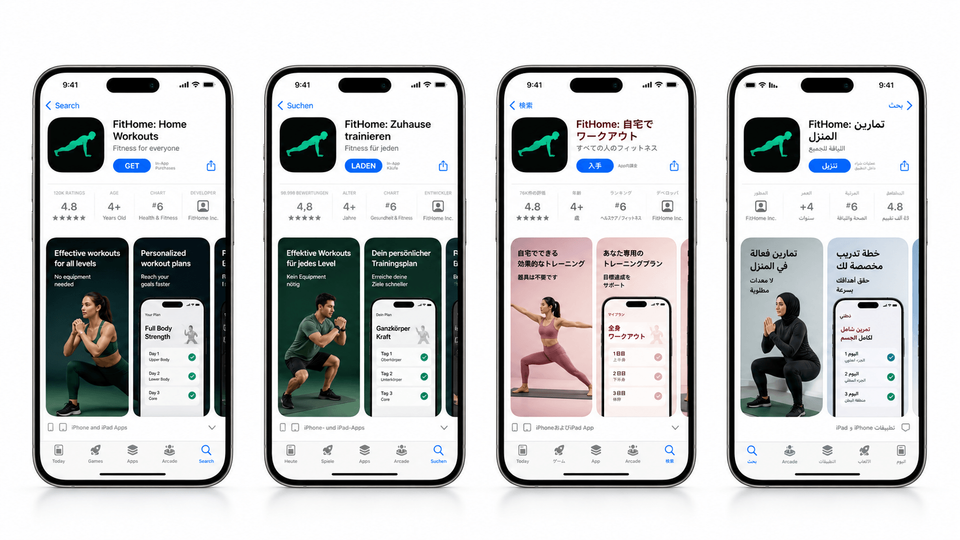
Most localization problems are not translation problems. They are screenshot production problems: captions stop fitting, screenshots no longer match the app, upload folders get mapped to the wrong locale, or one copied file falls out of sync after the next app update. Use the screenshot localization checklist before publishing.
What not to do yet
Do not translate every language at once. Do not promise a fully localized product if onboarding, billing, support, or the app UI is still English-only. Start with one high-opportunity market, localize the visible store promise honestly, check the first three screenshots, then scale once the market proves traction.
| Mistake | Use this rule | Why it matters |
|---|---|---|
| Translating keywords literally | Research local search behavior, synonyms, competitors, and category language from scratch. | Literal translation can miss how people in that market actually search. |
| Localizing copy but not screenshots | Translate captions, visible UI, feature graphics, and video captions. | The visual story should match the localized metadata. |
| Uploading raw localized screenshots as final creative | Use raw captures as source material, then add benefit-led captions, visual hierarchy, local examples, and store-ready design. | Raw screenshots show the interface, but they often do not explain the outcome, localize the pitch, or give visitors a clear reason to install. |
| Using one global screenshot order | Reorder screenshots around the local market’s strongest motivation, proof point, or feature demand. | The best first reason to install can change by locale. |
| Ignoring text expansion, fonts, and RTL | Check longer captions, line breaks, font coverage, automatic text resizing, and right-to-left layout before export. | A screenshot that looks polished in English can look cramped, broken, or unreadable after translation. |
| Hiding behind machine translation | Use native review for priority markets. | Screenshots, feature claims, idioms, legal wording, and subscription language need human judgment. |
| Promising a localized app that does not exist | Be clear about what is localized. | Store metadata can test demand, but the app experience must catch up before you scale spend. |
| Letting cloned locale files fall out of sync | Keep captions, per-language screenshots, per-language images, exports, uploads, and future variants connected in one editable workflow. | One caption, screenshot, or product update can otherwise create repeated edits across device sizes, languages, CPP/PPO variants, Play experiments, export folders, and upload mapping. |
| Uploading assets to the wrong locale or store context | Check App Store Connect, Custom Product Pages, Product Page Optimization treatments, Google Play custom listings, and Play experiment assets before publishing. | Localized screenshots only help when the right files reach the right market, device, page, experiment, and campaign. |
| Measuring only global downloads | Measure by locale, source, and test treatment. | Localization can win in Germany while losing in France, improve search while leaving browse flat, or create a blended PPO result that hides market-specific screenshot and translation problems. |
| Using one case study as the plan | Use +15% to +40% as a planning range for strong-fit markets, and use +101% or +128% to model what public upper-end localization cases produced. | The biggest wins came from market demand, product fit, local search behavior, screenshot quality, support readiness, and disciplined measurement. |
Ready to localize screenshots without redoing every asset?
Start with AppScreens templates, turn raw app screens into polished App Store and Google Play screenshots, translate the set, keep captions fitting, swap per-language screenshots or images, create variants, and export or upload localized store assets from one editable project.
FAQ
How many more downloads can app localization get?
Use +15% to +40% as a practical planning range for a well-chosen market. Strong public examples go higher, including +101% global downloads after localized ASO and +128% more iPhone downloads after adding native-language support.
Is translating app store metadata enough?
Metadata is useful for testing search demand, but priority markets need localized screenshots, feature graphics, app preview captions, visible UI, examples, pricing, and support cues to improve conversion. Users install faster when the store page feels native, not just translated. AppScreens handles this through localized screenshot sets.
Are localized screenshots more important than translated descriptions?
Both matter, but screenshots often affect comprehension earlier. Apple says the first one to three screenshots can appear in search results when no app preview is available, and Chartboost's Storemaven-based glossary says 100% of visitors are exposed to first-impression screenshots before they tap, scroll, or explore. Translate the description, but prioritize the first three screenshots, benefit captions, and visible UI for priority markets.
Should I localize every app store screenshot?
Start with the first three screenshots, visible UI, benefit captions, Google Play feature graphic, app preview captions, and market-specific proof. Expand the rest of the gallery after the market shows traction. AppScreens lets teams keep localized screenshot sets editable across captions, text fitting, per-language screenshots or images, exports, uploads, and future updates.
What app store elements should be localized first?
Start with the app name or title, subtitle or short description, keyword field where available, description, promotional text, first three screenshots, Google Play feature graphic, video captions, and poster frames. Use AppScreens to localize App Store and Google Play screenshots while keeping assets editable for future updates.
Which languages should I localize my app into first?
Start with markets where localization can change downloads, revenue, or paid traffic performance, not a generic language list. Use App Store analytics, Google Play data, category demand, monetization fit, support readiness, and the app localization language guide at app localization language guide to choose the first markets.
Can I localize screenshots before the whole app?
Yes. Localized screenshots are a practical way to test market demand before a full product localization project. Start from a clean AppScreens screenshot set, adapt the captions and visible UI promise, then scale into localized screenshot sets once the market proves traction. Keep the store promise aligned with the actual app experience.
Can I test localized screenshots with Product Page Optimization?
Yes. Apple Product Page Optimization can test screenshot, app preview, and app icon treatments across selected localizations. Use it when traffic is high enough to learn from the result. For cleaner localization learning, test one priority market first, then scale after you can read performance by locale. Use AppScreens to create PPO screenshot variants with text fitting, per-language assets, exports, uploads, and future edits connected.
How should I calculate localization ROI?
Multiply current market downloads by improvement scenarios such as 15%, 35%, and 128%, then compare incremental downloads and revenue with translation, design, QA, support, and upload costs. Include the screenshot work behind translated captions, text fitting, RTL layouts, per-language screenshots or images, feature graphics, app previews, export folders, and upload mapping. AppScreens keeps localized screenshots editable so captions, layouts, per-language assets, exports, uploads, and future updates stay connected, while variants are faster to create without rebuilding every size and language by hand.
How does AppScreens make app screenshot localization faster?
AppScreens starts from the same fast screenshot workflow used for one-off launch sets, then scales into localization: AI onboarding, templates, AI captions, AI translation, automatic text resizing, RTL review, per-language screenshots or images, and localized App Store and Google Play exports or uploads. It supports 80+ localizations. Start with screenshot localization.
Do I need a designer for localized app screenshots?
No. A designer can help with custom creative direction, but AppScreens lets founders, marketers, developers, and agencies localize from a template-based project. Use AI captions, AI translation, automatic resizing, RTL checks, per-language screenshots, per-language images, exports, uploads, and variants so localized captions, layouts, assets, and future changes stay connected. Compare scale needs on pricing.
What are common app localization mistakes?
Common mistakes include translating only metadata, uploading raw localized screenshots as final creative, ignoring long text, skipping font and RTL checks, using non-local examples, letting cloned locale files fall out of sync, mapping screenshots to the wrong locale or store page, using one case study as the whole plan, and promising an in-app experience the product does not support yet. Use the screenshot checklist at screenshot localization checklist.
Sources
- Distimo, The Impact of App Translations
- Coin Splash ASO localization case study
- Headspace systematic ASO case study
- Google Play Koo custom store listing case study
- Apple Product Page Optimization examples
- Adapty App Store conversion rate benchmarks
- Digital Applied ASO statistics
- ASO Mobile App Store and Google Play screenshot guide
- Appalize app icon A/B testing guide
- Onde ratings and reviews conversion lesson
- SplitMetrics and App Radar App Store description behavior guide
- SplitMetrics Rovio screenshot and store asset testing case study
- SplitMetrics Darby Smart app icon testing case study
- Appbot WordBoard Product Page Optimization case study
- Make App Magazine keyword localization experiment
- ZiMAD Japanese screenshot localization case study
- FiftyThree Chinese screenshot localization case study
- World of Warships Blitz localization case study
- AppScreens: screenshot update evidence
- AppScreens: Google Play Store Listing Experiment examples
- AppScreens: Product Page Optimization examples
- AppScreens: Custom Product Page conversion examples
- Apple App Store localizations reference
- Apple custom product pages documentation
- Apple Product Page Optimization localizations documentation
- Apple product page screenshot guidance
- Chartboost, App Store screenshot view rate glossary
- Google Play translate and localize your app
- Google Play translation services
- CSA Research Can’t Read, Won’t Buy B2C summary
