

Custom Product Pages
Custom Product Pages for iOS in 2026: Screenshot Variants for Paid Traffic and Search Intent
Custom Product Pages are targeted iOS App Store pages for paid campaigns, Apple Ads groups, keyword intent, audiences, locales, and feature campaigns. Use them when your default screenshots are too broad for the promise that got the user to tap or search.
The practical rule is simple: the ad promise and the first three screenshots should say the same thing. Raw app captures show the interface, but CPP screenshots need to sell the specific outcome that each traffic source expects.
This matters because users decide quickly. Our ASO testing guide cites benchmarks where 37% of iOS product page sessions do not scroll below the fold, 90% of users do not scroll past the third screenshot, and only about 15% scroll through the full description.
Create a Custom Product Page when the traffic source has a different intent than your default App Store page. If the ad, keyword, audience, locale, or feature promise changes what the user expects to see first, the first three screenshots should change too.
Use AppScreens to create matching Custom Product Page screenshot variants from one editable project, with text fitting, per-language assets, store-ready exports, uploads, localization, variants, and future updates.

Quick Take
Use Custom Product Pages when one default App Store page cannot match every campaign, Apple Ads group, keyword intent, audience, locale, or feature promise. The first three screenshots should repeat the reason the user clicked or searched.
CPPs can use unique URLs for campaigns and assigned keywords for relevant App Store search results. Measure each page by conversion, downloads, retention, proceeds, CPI, and traffic quality before rolling the idea into more campaigns.
The first screen matters more than the long description. ASO benchmarks cited in our testing guide put 37% of iOS product page sessions above the fold, 90% of users at or before screenshot three, and screenshot test winners around +11.8% median conversion lift.
AppScreens is the fast path when you want downloads without becoming a designer or figuring out every size yourself: duplicate one editable project, change the promise and screen order, use AI-assisted captions, localize the set, then export or upload store-ready iPhone and iPad assets.
Best trigger
A traffic source already tells you what the visitor cares about.
Best variant
A focused screenshot story, not a color-only design refresh.
Best measure
Conversion, downloads, retention, proceeds, CPI, and source quality.
Fastest Workflow: Build CPP Screenshot Variants in AppScreens
Custom Product Pages work when the App Store page repeats the promise that brought the user there. The fastest workflow is AppScreens: duplicate your default screenshot project, rewrite the first three screenshots for the campaign promise, swap real app screens where needed, localize the set, then export or upload store-ready iPhone and iPad assets from one editable project.
Raw screenshots are important source material, but paid traffic needs a focused story. AppScreens turns those raw captures into polished CPP screenshot variants with App Store screenshot templates, AI-assisted captions, device frames, brand styling, localization, required App Store sizes, and reusable projects for future campaigns.
A practical CPP screenshot set usually works like this: screenshot 1 mirrors the ad, keyword, audience, or feature promise; screenshot 2 proves that promise with real UI; screenshot 3 shows the outcome, trust cue, setup speed, or next-step context. Later screenshots should support the story without repeating the same claim.
1. Duplicate the default project
Start from the screenshot set that already explains the app, then rename the duplicate after the campaign, keyword group, audience, or locale.
2. Rewrite the first three screenshots
Match screenshot 1 to the ad or keyword promise, use screenshot 2 for feature proof, and use screenshot 3 for trust, outcome, or next-step context.
3. Localize and resize once
Localize App Store screenshots, adjust longer text, change screenshots or images per language, and generate the required iPhone and iPad sizes without rebuilding every canvas by hand.
4. Export, upload, and reuse
Export high-resolution PNGs, map uploads to the right CPP, device size, and locale, and create iPhone and iPad screenshots that stay editable for the next Apple Ads group, seasonal campaign, locale, PPO test, or CPP update.
What are CPPs?
Apple says custom product pages let developers publish up to 70 additional versions of an iPhone or iPad App Store product page. Each page can vary screenshots, promotional text, and app preview videos, and each page has a unique URL for campaigns, Apple Ads, and other traffic sources.
Apple has announced another CPP layer for fall 2026: Creative Asset images and videos for tailored product page headers and search results. Our Apple Creative Assets guide tracks what is confirmed, what remains unknown, and how the new Asset Library review flow will work.
Apple also publishes CPP performance examples: developers see a 2.5 percentage point conversion-rate increase on average when referring people to a custom product page, compared with the average default product page conversion rate Apple lists. Its examples include CBS Sports reporting a 20% conversion-rate result for a March Madness custom page, and State of Survival reporting a 33% conversion-rate result plus a 14% lower cost per install for an RPG-focused page.
Screenshot quality matters because the first frames carry the campaign promise. Broader ASO testing examples range from about +4% to +61%, and localization examples report +101% to +128% more downloads when the market fit is real. Those examples explain why CPP screenshots are conversion assets, not decoration: the first frames carry the campaign promise, and stronger screenshot creative can turn the same traffic into more installs.
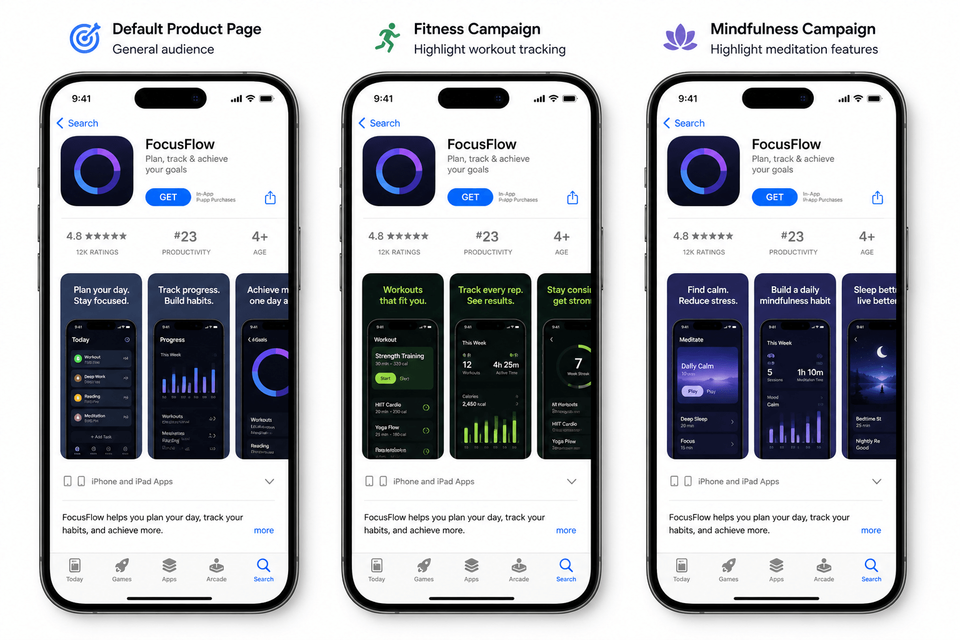
A CPP does not replace your default product page. It gives you a targeted landing page for a specific user intent. A budgeting app might keep the default page broad, then create one custom product page for debt payoff keywords, one for couples budgeting ads, and one for tax-season traffic.
What changes
Screenshots, app previews, promotional text, selected keywords, and optional deep links.
What stays fixed
App name, icon, default description, ratings, privacy details, and the core app record.
Best job
Matching the App Store page to a campaign promise, search intent, feature, or audience segment.
The practical rule
If the user clicked an ad for one specific feature, the first screenshot on the App Store should show that feature. If it does not, create a custom product page.
The performance upside comes from relevance, not from having more pages for its own sake. Use the A/B testing guide to estimate what a higher conversion rate means in downloads, and the localization ROI guide when the audience difference is market or language driven.
CPP vs PPO: which one should you use?
Use Custom Product Pages when you already know the traffic intent, such as a paid campaign, Apple Ads group, keyword group, audience, feature, or locale. Use Product Page Optimization when you want to test screenshots, app previews, or icons on your default product page. AppScreens supports both paths in one editable project, so teams can create PPO and CPP screenshot variants with text fitting, per-language assets, store-ready exports, uploads, localization, variants, and future updates.
- Default product page: broad app story for general App Store traffic.
- Custom Product Page: targeted page for known campaign, keyword, audience, feature, or locale intent.
- Product Page Optimization: controlled test on the default product page to learn which treatment converts better.
When should you use custom product pages?
Use custom product pages when the traffic source already tells you what the visitor cares about. CPPs are not a replacement for a strong default page. They are a way to stop forcing every visitor through the same broad screenshot story.
| Use case | Traffic signal | Screenshot approach |
|---|---|---|
| Apple Ads feature ad group | Search terms around one feature or problem. | Make screenshot 1 show the feature, screenshot 2 show the outcome, screenshot 3 show proof. |
| Competitor campaign | Users are comparing alternatives. | Lead with the clearest differentiator, not a generic category claim. |
| Seasonal campaign | The ad or keyword has a time-bound moment. | Use seasonal context in examples, captions, and screenshot order. |
| Audience-specific paid social | The channel, creative, or influencer defines the audience. | Show the audience's use case instead of the broad product tour. |
| Localized campaign | Market, language, or culture changes the best proof. | Localize App Store screenshots, examples, captions, currencies, and feature order. |
Do not create a CPP for every tiny idea
The limit is generous, but every page still needs assets, upload mapping, and enough traffic to measure. Start with pages that map to real traffic: active paid campaigns, high-spend Apple Ads groups, major product features, seasonal launches, or keywords where the default screenshots are clearly too broad.
- Do not create a CPP for a tiny copy idea with no traffic source.
- Do not create a CPP for a cosmetic redesign that does not change intent.
- Do not create a CPP when the page cannot get enough traffic to measure.
- Do not create a CPP for a claim the product experience does not support.
- Do not create a localized CPP if the app, support, pricing, or onboarding is not ready for that market.
How To Measure CPP Screenshot Variants
A CPP win is not only a prettier page. Measure whether the matched screenshot story improves the economics of the traffic source that uses it. Start with conversion rate and downloads, then check CPI, retention, proceeds, and source quality before rolling the idea into more campaigns or your wider ASO screenshot workflow.
Apple says Custom Product Page metrics become available after the page receives at least five first-time downloads, so low-traffic pages may need more time before the data is useful.
Measure page performance
- Compare CPP conversion rate against the default product page.
- Review downloads and redownloads by page and source.
- Check whether the page gets enough traffic before calling a result.
Measure traffic quality
- Watch retention, proceeds, and in-app purchase quality after install.
- Compare CPI against the default-page campaign.
- Promote screenshot promises that attract users who stay, not only users who tap.
Screenshot Variants By Audience
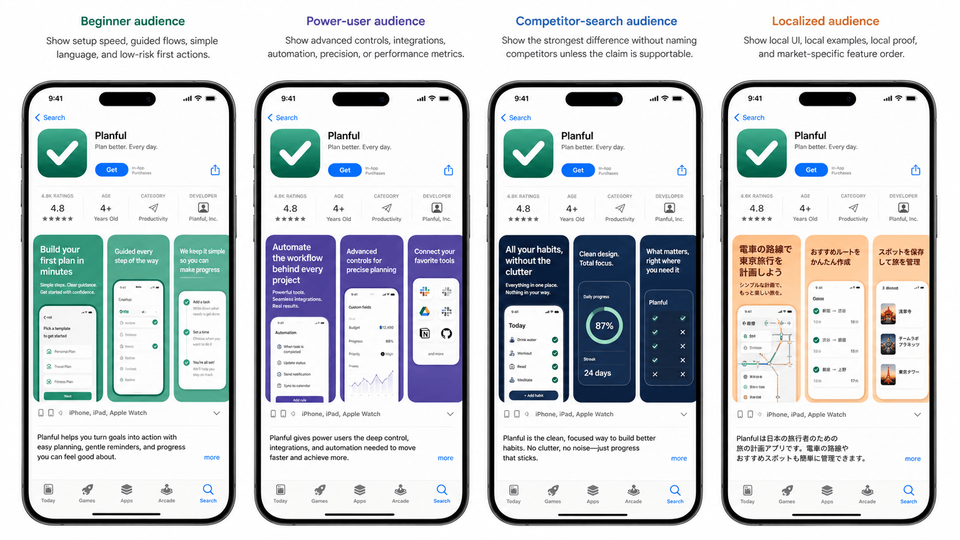
A good CPP screenshot variant is not just a new background color. It changes the promise, proof, and order of the screenshot set so the page matches why that audience arrived.
Beginner audience
Show setup speed, guided flows, simple language, and low-risk first actions.
First screenshot example
“Build your first plan in minutes”
Power-user audience
Show advanced controls, integrations, automation, precision, or performance metrics.
First screenshot example
“Automate reports, approvals, and deadlines”
Competitor-search audience
Show the strongest difference without naming competitors inside screenshots unless you are certain the claim is allowed and supportable.
First screenshot example
“All your habits, without the clutter”
Localized audience
Show local UI, local examples, local proof, and market-specific feature order.
First screenshot example
“Plan your Tokyo trip by train line”
Audience variant checklist
Keyword matching for iOS screenshots
Apple says custom product pages can be assigned keywords in App Store Connect so they can appear in search results for selected keywords instead of your default page. That turns keyword-matched screenshots from a paid-campaign tactic into an organic search relevance workflow too.
The screenshot text itself is not a metadata field you should stuff with keywords. The useful part is intent matching: if someone searches for a specific feature, the screenshots should show that feature immediately.
How to map keywords to CPP screenshots
- Group keywords by intent: feature, competitor, seasonal, problem, audience, or location.
- Pick the strongest traffic group: start where impressions, spend, or strategic value justify a custom page.
- Write one screenshot promise: summarize what that keyword group expects to see.
- Create matching first-three screenshots: hook, feature proof, and reason to trust.
- Assign keywords carefully: keep keyword combinations unique to one custom product page.
- Measure separately: compare default page and CPP performance in App Analytics.
| Keyword intent | Poor screenshot match | Better CPP screenshot match |
|---|---|---|
| Meal planner for families | Generic recipe feed. | Weekly family plan, serving sizes, shopping list, and budget view. |
| Invoice app for freelancers | Dashboard with total revenue. | Create invoice, send reminder, and track paid status. |
| Beginner workout app | Advanced training analytics. | Low-impact plan, simple timers, and progress streak. |
| Travel phrasebook Japan | Global language selection screen. | Japanese phrases, transit examples, and offline access. |
Keyword matching checklist
- Use keywords only where the CPP genuinely matches the search intent.
- Do not create multiple CPPs with overlapping keyword combinations.
- Make the first screenshot readable from search result context.
- Use the same language in Apple Ads creative, CPP promotional text, and screenshot captions where it is natural.
- Review performance by source, because paid and organic visitors may behave differently.
Examples of CPP screenshot plans
The easiest way to plan app store custom product pages is to write the page like a campaign brief. One page, one audience, one screenshot story.
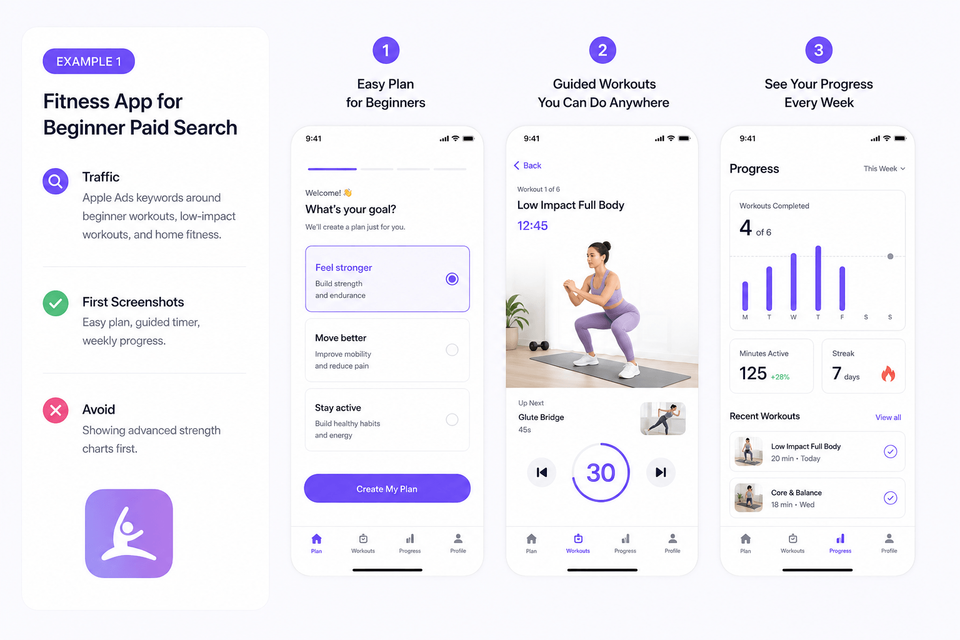
Example 1: Fitness app for beginner paid search
Traffic
Apple Ads keywords around beginner workouts, low-impact workouts, and home fitness.
First screenshots
Easy plan, guided timer, weekly progress.
Avoid
Showing advanced strength charts first.
Example 2: Finance app for competitor campaigns
Traffic
Users searching for apps in the same category.
First screenshots
Main differentiator, clean setup, privacy or bank-level security proof.
Avoid
Vague “manage money better” captions.
Example 3: Travel app for seasonal paid social
Traffic
Summer travel ads, email promotions, and influencer links.
First screenshots
Trip builder, saved places, offline maps, booking reminders.
Avoid
A generic app home screen with no seasonal context.
CPP Planning Checklist
Use this checklist before you open App Store Connect or start designing in AppScreens. The goal is to keep each CPP tied to a real acquisition workflow, not a loose creative idea.
Apple’s App Store Connect Help confirms the setup details behind this checklist: keyword assignment, search visibility, iOS 18 deep links, App Review requirements, unique page URLs, and page-level App Analytics metrics.
The parts that break are specific: translated captions stop fitting, localized layouts need rebuilding, per-language screenshots or images need market-specific swaps, and exported files still need device, locale, and CPP mapping before they are ready to publish. Keep variants in one editable AppScreens project so one future caption, screenshot, or localization change does not become repeated edits across every campaign page.
1. Page strategy
- One traffic source or keyword group is named.
- One user intent is written in plain language.
- The CPP has a clear owner and campaign date.
- The page name in App Store Connect is descriptive.
2. Screenshot production
- Screenshot 1 matches the ad or keyword promise.
- Screenshots 2 and 3 prove the first claim.
- Captions fit every device size and orientation, including the required App Store screenshot sizes.
- Localized captions, screenshots, and images are adapted, not only translated.
3. App Store Connect setup
- Screenshots, app previews, and promotional text are ready.
- Selected keywords are relevant and unique to this page.
- Deep link is configured if the app supports the destination.
- Files are mapped to the correct CPP, device size, and locale before upload.
- Metadata is submitted before launch, then the live CPP is checked from the campaign link.
4. Measurement
- Campaign links use the correct CPP URL.
- Apple Ads ad variations are mapped to the right page.
- The live page is checked from the campaign link before spend begins.
- App Analytics is checked by page, source, and market.
- Winners feed the next PPO, CPP, or default-page update.
Build the variant before you submit the page
Use the AppScreens CPP workflow above to create the screenshot set, then use this checklist to confirm the page strategy, App Store Connect setup, and measurement plan before launch.
Common Mistakes
| Mistake | Use this rule | Why it matters |
|---|---|---|
| Creating CPPs without traffic | Create each page with a clear distribution path. | A custom product page needs Apple Ads, a unique URL, organic keyword assignment, web campaign, email, influencer link, or paid social; without traffic, it is unused metadata. |
| Changing visuals but not intent | Change the promise, proof, feature focus, or audience relevance. | A new color palette does not make a useful CPP. |
| Sending ads to the wrong page | Match the page opening to the ad promise. | If the ad says “invoice clients faster” and the CPP starts with a generic dashboard, users have to connect the promise themselves. Put the promised feature and outcome in the first screenshots. |
| Overlapping keyword assignments | Keep keyword combinations unique to a single custom product page. | Apple recommends unique keyword combinations, so search-intent pages need tracking to avoid collisions. |
| Measuring only installs | Check retention and proceeds, then compare against default page performance. | A page can increase conversion but attract lower-quality users. |
| Treating translation as localization | Check text fit, RTL layout, local examples, per-language screenshots, and market-specific images. | A translated caption can overflow, shrink too far, or mismatch the UI. Use the screenshot localization checklist before publishing localized CPPs. |
| Assuming exported files are finished | Map every file to the right CPP, App Store screenshot size, locale, and campaign link, then check the live page. | CPP, PPO, and localized files can be correct as images but wrong in App Store Connect if they are uploaded to the wrong page, size, language, or campaign destination. |
| Managing each CPP as a disconnected mockup | Keep screenshots, captions, localized assets, exports, uploads, and future updates connected in one editable AppScreens project. | A later app screen, feature name, price claim, or localized caption change can become repeated edits across every CPP if the variants live as separate rendered files. AppScreens keeps captions, text fitting, per-language assets, exports, uploads, and future updates together. |
Create CPP Screenshot Variants With AppScreens
Use AppScreens when you want downloads, automation, fast CPP screenshot sets, fewer repeated caption and export edits, correct App Store sizes without figuring them out yourself, and polished variants without becoming a designer. Create one editable screenshot project, duplicate it for paid campaigns, rewrite captions with AI assistance, swap UI captures, localize pages, generate required iPhone and iPad sizes, then export or upload store-ready assets without rebuilding every file by hand.
AppScreens is trusted by 150,000+ app professionals and has powered 12M+ screenshot exports for teams that need polished store assets across launches, languages, tests, and campaigns.
FAQ
What are custom product pages on iOS?
Custom product pages are additional versions of an iOS App Store product page. Each page can use different screenshots, app previews, and promotional text, and each version has a unique URL for campaigns, keywords, audiences, or features. For AppScreens CPP workflows, see PPO and CPP screenshot variants.
How many custom product pages can an app have?
Apple says you can publish up to 70 additional custom product pages for an iPhone or iPad app.
Can App Store custom product pages appear in search results?
Yes. Apple says custom product pages can appear in relevant search results when selected keywords are assigned in App Store Connect.
What are keyword matched screenshots iOS teams should create first?
Start with keyword groups that reveal clear intent, such as competitor, feature, seasonal, local, or problem-aware searches. Build screenshots that show the matching feature, use case, or outcome in the first three frames.
Can custom product pages improve paid traffic performance?
Yes, when the screenshot set matches the ad promise. CPPs are strongest when campaigns, keywords, influencer links, or referral sources need a more specific message than the default App Store product page.
How does AppScreens help create custom product page screenshots?
AppScreens lets teams duplicate the default screenshot project, use AI captions to sharpen campaign-specific messaging, create audience-specific CPP variants, fit longer captions, adjust per-language screenshots or images, export required App Store sizes, and upload App Store Connect assets without rebuilding every canvas by hand.
What screenshots should I use on a Custom Product Page?
Use screenshots that match the campaign, keyword, audience, locale, or feature promise that brought the visitor to the page. Screenshot 1 should repeat the main promise, screenshot 2 should prove it with real UI, and screenshot 3 should show outcome, trust, setup speed, or next-step context. Use AppScreens to create and localize CPP screenshot variants with one editable project, text fitting, per-language assets, store-ready exports, uploads, and future updates.
Can I make a campaign-specific screenshot set quickly?
Yes. Start with the current AppScreens project, duplicate it, change the first screenshot promise, use AI captions for the campaign angle, adjust the screenshots, then export or upload the CPP assets. For paid traffic, use PPO and CPP screenshot variants so the ad promise matches the store page.
What is the difference between CPP and PPO?
Custom Product Pages are separate App Store pages for specific audiences, campaigns, keywords, or links. Product Page Optimization tests treatments on the default product page. Use CPPs to match intent and PPO to test what converts better. For a testing-first guide, see Product Page Optimization guide.
Which custom product pages should I build first?
Build CPPs first for paid campaigns, competitor-intent keywords, high-value features, seasonal offers, major locales, and audience segments where the default screenshots are too generic. Use AppScreens to create and organize PPO and CPP screenshot variants from the same editable project.
Can I use AppScreens for paid traffic landing variants?
Yes. Use AppScreens to build Custom Product Page screenshot variants for Apple Ads, paid social, influencer links, partner campaigns, seasonal campaigns, and feature-specific audiences. Start from PPO and CPP screenshot variants and compare pricing when upload, localization, or team workflows matter.
Read on
Sources
- Apple Developer: Custom Product Pages, reviewed
. - Apple App Store Connect Help: Configure multiple product page versions, reviewed
. - Apple App Store Connect Analytics: Custom Product Pages, reviewed
. - Apple Developer: Creating Your Product Page, reviewed
. - AppScreens: Why ASO Matters: A/B Testing Downloads
