Product Page Optimization
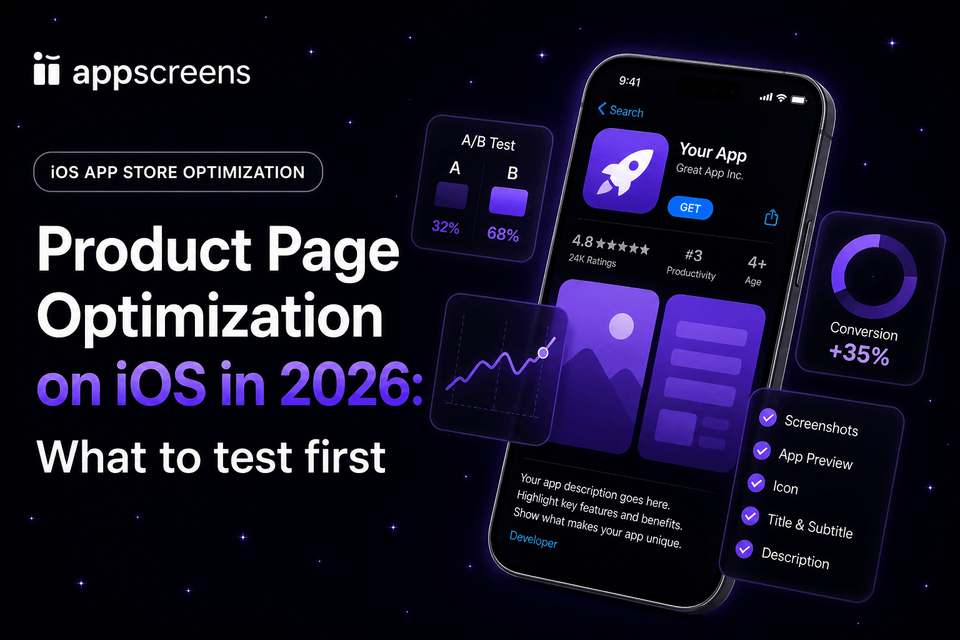
Product Page Optimization on iOS in 2026: What to Test First
Start Product Page Optimization on iOS with your first screenshot, then test caption angle, then screenshot order. These tests are close to the install decision, easier to interpret than a broad redesign, and faster to build than icon or app preview experiments.
This is why ASO A/B testing matters: the assets users see early have the most leverage. Ratings and reviews create trust context, but screenshots and app previews explain the value before many visitors read the description. Public examples include Rovio’s +13% conversion lift and estimated 2.5M additional installs from screenshot and creative testing, Peak Brain Training’s +8% icon lift, and WordBoard’s +3.54% icon lift. For PPO, your first three screenshots should usually do the heavy lifting: hook, outcome, and proof.
Apple has also announced new Creative Asset images and videos for product page headers and search results, with Product Page Optimization support planned for fall 2026. Read our Apple Creative Assets guide for the confirmed placements, timing, Asset Library workflow, and specifications published so far.
Once you have the hypothesis, the hard part is making every treatment usable: captions need to fit, device sizes need exporting, localized screenshots need the right market assets, files need mapping to the right treatment, and simple future changes can become repeated edits across many screenshots. AppScreens helps with that workflow by letting you duplicate one editable screenshot project, change one clear PPO idea, use text fitting and per-language assets, then export or upload store-ready App Store assets.
Quick Take
Quick take: start iOS Product Page Optimization with the first screenshot, then test caption angle, then screenshot order. These tests sit close to the install decision, are easier to interpret than broad redesigns, and are faster to produce than icon or app preview experiments. The first three screenshots should carry the hook, outcome, and proof before users rely on longer description copy. Public benchmarks cite 37% of iOS product page sessions not scrolling below the fold and 90% of users not scrolling past the third screenshot.
- First screenshot: test whether the opening promise explains the main user outcome quickly.
- Caption angle: change the message while keeping the same UI, frame, and layout system.
- Screenshot order: move proof, workflow, or the strongest feature earlier without rebuilding every asset.
Use AppScreens when you are ready to build treatments: duplicate one screenshot project, change one hypothesis at a time, restyle the existing project into a new visual direction in a few clicks, fit captions, swap per-language screenshots or images where needed, export the required device sizes, and upload the treatment while the winning idea stays editable for future CPP, PPO, ASO, and localization variants.
PPO and ASO Examples That Show What to Test First
These examples show why first-impression assets deserve the first tests. Screenshot, icon, app preview, and localization changes have moved conversion, Get clicks, and downloads in public examples. For PPO, use that evidence to test the first screenshot, first-three story, caption angle, icon, app preview, and localized screenshot message before small design tweaks.
| Source / app | Asset tested | Reported result | What to test first |
|---|---|---|---|
| First-screen behavior benchmarks | Above-the-fold visibility, screenshot scrolling, and description engagement. | Published ASO sources cite around 37% of iOS product page sessions not scrolling below the fold, around 90% of users not scrolling past the third screenshot, and about 15% of iOS users scrolling through the full description. | Start with screenshot 1, caption angle, and first-three order before lower-page copy or small visual polish. |
| SplitMetrics, Angry Birds 2 / Rovio | Screenshots, captions, icon, portrait and landscape creative combinations. | Best combination delivered +13% conversion, estimated as about 2.5M additional installs in the first post-release week. | Test the first screenshot hook, caption angle, screenshot order, and creative format before minor styling changes. |
| Apple Developer, Simply Piano | App preview video against the screenshots-only original product page. | The original screenshots-only page performed 3% better over 12 days. | Do not assume video wins. Test app previews against strong screenshots before rolling video into every product page. |
| Apple Developer, Peak Brain Training | Three app icon variants in a Product Page Optimization test. | Winning brain icon delivered +8% conversion over 44 days. | Test icon concepts when recognition, category clarity, or brand fit is the main conversion issue. |
| Appbot, WordBoard | Three app icon variants against the original in App Store Connect. | Best icon reached 2.21% CVR vs a 2.14% baseline, about +3.54% relative lift after a few days. | Small lifts still matter at scale, but avoid reading early PPO results too aggressively. |
| Localization examples | Localized metadata, screenshots, captions, and market-specific creative. | Localization examples report +101% to +128% more downloads, with screenshot-localization examples at +33% to +36% conversion gains. | When a market has demand, test localized screenshot captions and market-specific proof. See the localization download lift examples. |
Need the broader cross-platform evidence set? Read the ASO A/B testing download guide.
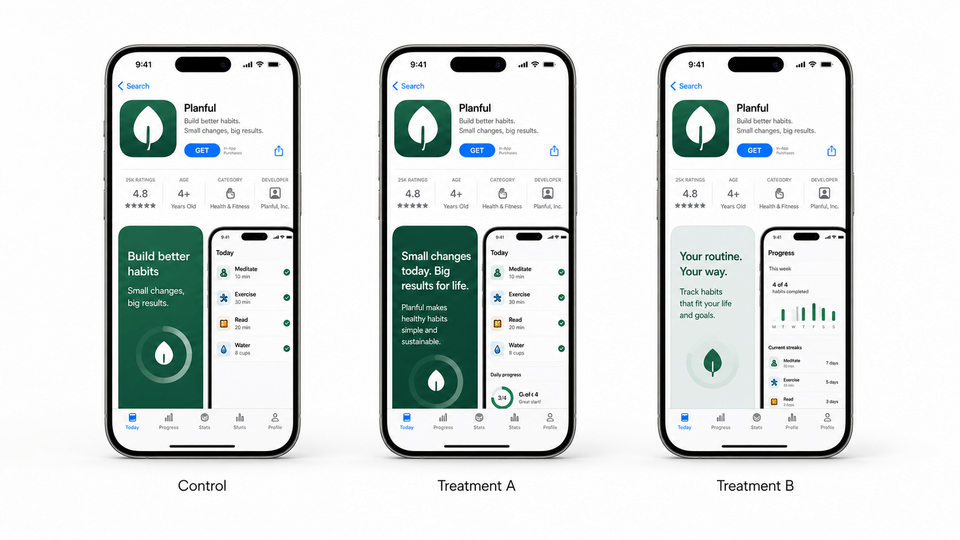
Fastest workflow: build PPO screenshot variants in AppScreens
AppScreens is built for PPO screenshot production. Start with clean app screens, choose a reusable screenshot template, add AI-assisted captions, apply device frames and brand styling, then duplicate the project into treatment sets for first screenshot, caption angle, order, or localized messaging tests. For style tests, restyle the existing project into a new visual direction in a few clicks, then export or upload the PPO treatment instead of rebuilding each screenshot file.
PPO screenshot work scales quickly. Six screenshots across 3 device sizes and 3 treatments becomes 54 exported files before localization, App Review submission, naming checks, upload mapping, or follow-up variants. AppScreens keeps the control, treatments, captions, text fitting, per-language assets, store-ready exports, uploads, and future screenshot changes in one editable project.
- Build the control screenshot set from real app screens.
- Duplicate the project for Treatment A, Treatment B, and Treatment C where needed.
- Change one clear variable: first screenshot, caption angle, screenshot order, localized message, or restyled visual direction.
- Export the required App Store screenshot sizes for each treatment.
- Submit treatment metadata for App Review before the planned test window.
- Use App Analytics results to apply the winning screenshot or plan the next test.
What is PPO?
Product Page Optimization, or PPO, is Apple’s native A/B testing feature for the default App Store product page. It lets you compare different app icons, screenshots, and app preview videos against your original page and review results in App Analytics.
Apple says you can test up to three alternate product page versions, called treatments, against the original. Tests can include app icons, screenshots, and app previews; can run for up to 90 days; and should wait for a treatment to be declared better or worse than the baseline with at least 90% confidence before you apply it. Apple Product Page Optimization guide.
PPO is for testing the default App Store product page. If you need a different screenshot story for a paid campaign, keyword group, audience, or feature promise, use Custom Product Pages instead, then keep the screenshot system consistent in AppScreens.
Apple example numbers to calibrate expectations
Apple’s public PPO examples are useful because the wins are believable, not magic. Simply Piano tested one app preview treatment for 12 days; the original screenshot-only page outperformed the video treatment by 3% at 100% confidence. Peak Brain Training tested three icon treatments for 44 days; the winning brain icon improved conversion by 8% with more than 98% confidence.
Use those numbers as a planning lens: a clear screenshot, preview, or icon test can matter, but the biggest benefit is learning which promise deserves wider rollout. For more context on how A/B test improvements turn into downloads, read our ASO testing guide.
Assets you can test
Icons, screenshots, and app preview videos.
Best use
Improving the default App Store page for store traffic.
Main constraint
You need App Review approval for treatment metadata before the test starts.
What should you test first?
Test the part of the product page that carries the clearest decision-making weight and the lowest production cost. For most teams, that means app store PPO screenshots before icons or videos.
Good screenshot quality is worth testing because the upside can be measurable. Public screenshot and creative tests include Rovio / Angry Birds 2 at +13% conversion and about 2.5M additional installs, while broader ASO testing examples include WordBoard at +3.54%, Peak Brain Training at +8%, Darby Smart at +73.7% more Get clicks, and screenshot benchmark evidence around +11.8% median winning lift. Localization can be even more material when the market fit is there: localization examples report +101% to +128% more downloads, and screenshot localization examples report +33% to +36% conversion gains. Use those results to choose the first PPO hypothesis, then let App Store traffic show which screenshot message earns the install. When localization is part of the plan, use the AppScreens localization workflow to translate, adapt, preview, export, and upload localized screenshot sets.
Simple rule: test screenshots first when the issue is message clarity, benefit order, product understanding, or visual trust. Test icons when recognition or category fit is the problem. Test app previews when motion explains the value better than static images. Test review-led proof when ratings, review themes, privacy, quality, or reliability are the reason users hesitate.
| Priority | Test | Why first | Good hypothesis |
|---|---|---|---|
| 1 | First screenshot | It frames the whole store page and is visible before users evaluate the rest of the set. | A benefit-led first screenshot will improve conversion because users understand the main outcome faster. |
| 2 | Caption angle | You can change the message while keeping the same app UI, template, and device frames. | A time-saving angle will beat a feature-list angle because the audience is trying to finish a task quickly. |
| 3 | Screenshot order | It tests the story sequence without rebuilding every asset. | Putting proof before advanced features will improve conversion because users need trust before depth. |
Test icons or app previews later when the hypothesis points there. Test icons when recognition, category fit, or brand clarity is the issue. Test app previews when motion proves the value better than static screenshots. Test a broad redesign only when you are intentionally testing a new positioning direction, not when you need to learn which single message worked.
Quick prioritization checklist
- Can the test be explained in one sentence?
- Will the difference be obvious to a user in under three seconds?
- Can you export every required device size, fit localized captions, and map each treatment without repeated file edits?
- Are you testing one idea, not five ideas bundled together?
- Will the result change what you do next?
First screenshot
Test the hook before the polish
The first screenshot should answer: “Why should this app matter to me right now?” If your first screenshot only shows a dashboard, menu, map, feed, or blank onboarding state, you are asking users to infer the value.
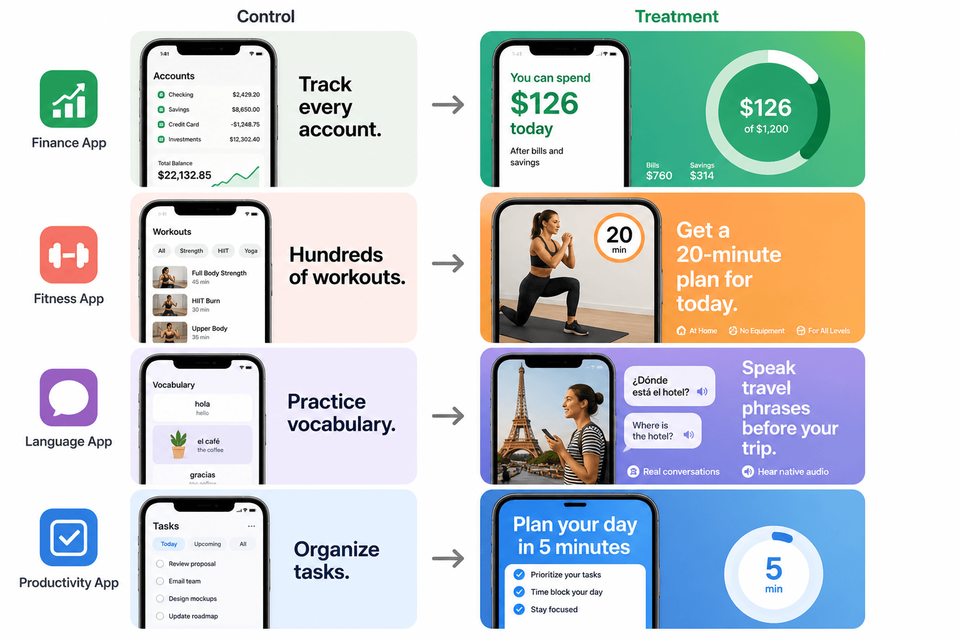
Example first screenshot tests
Finance app
Control: “Track every account.”
Treatment: “Know what you can spend today.”
Fitness app
Control: “Hundreds of workouts.”
Treatment: “Get a 20-minute plan for today.”
Language app
Control: “Practice vocabulary.”
Treatment: “Speak travel phrases before your trip.”
Productivity app
Control: “Organize tasks.”
Treatment: “Plan your day in five minutes.”
Caption angle
Test what you say before changing the whole design
Caption angle is often the cleanest way to test app store screenshots because it changes the persuasion strategy without changing the screenshot system. In AppScreens, you can duplicate the project, keep the same template, and rewrite captions for each treatment.
Outcome angle
Lead with the result the user wants.
Example: “Sleep better tonight.”
Speed angle
Lead with saved time or reduced effort.
Example: “Send invoices in 30 seconds.”
Trust angle
Lead with control, safety, proof, or reliability.
Example: “Private journaling, locked by default.”
Caption test checklist
- Keep the same screenshots, layout, device frame, and background where possible.
- Change only the caption promise and supporting order.
- Use real user language from reviews, support emails, sales calls, or onboarding surveys.
- Keep captions short enough to scan on small devices.
- Avoid claims you cannot prove or that App Review may reject.
Screenshot order
Test the story sequence
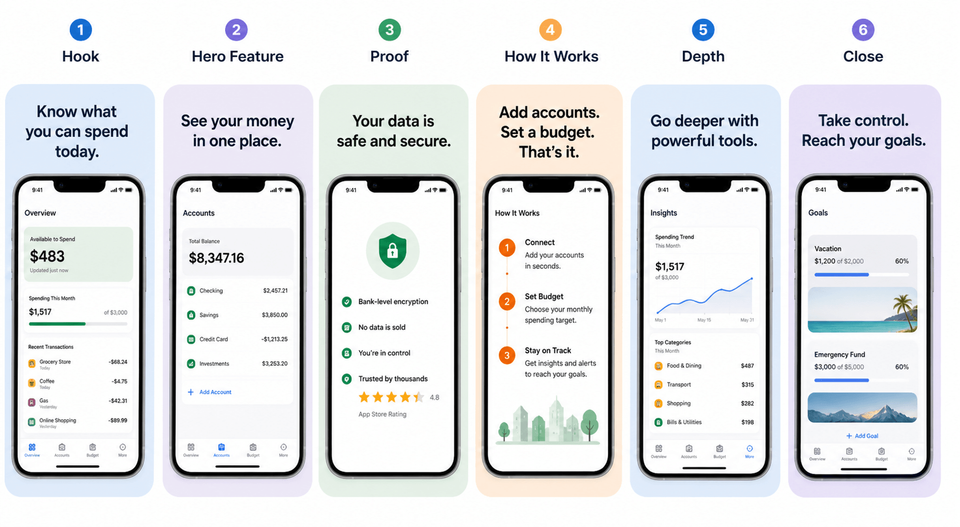
Screenshot order matters because most users will not study every frame. Your first three screenshots need to carry the strongest conversion story: hook, outcome, evidence. Later screenshots can handle secondary features, integrations, customization, or deeper use cases.
A practical order to test
- Hook: the user problem or desired result.
- Hero feature: the main screen that delivers the result.
- Proof: trust, privacy, quality, rating-safe proof, or visible reliability.
- How it works: the key workflow steps.
- Depth: secondary features, integrations, or power-user benefits.
- Close: a final benefit or category-specific differentiator.
Common mistakes
| Mistake | Use this rule | Why it matters |
|---|---|---|
| Testing raw screenshots as finished creative | Use raw captures as source material, then add benefit-led captions, hierarchy, and store-ready design. | Raw screens show the interface, but they often do not explain the outcome clearly enough for a fair PPO test. Use the App Store screenshot workflow when the source screens need to become polished test assets. |
| Testing a full redesign first | Start with a clearer isolated treatment. | If captions, order, colors, device frames, backgrounds, and UI screens all change, you may learn that something changed, but not why. |
| Making variants too similar | Make the difference meaningful to the user. | Tiny color tweaks and minor wording changes can take too long to read. |
| Mixing locales too early | Start with one important market or a tightly related locale group. | Localized screenshots may need different value propositions, not just translated captions. |
| Using PPO for campaign-specific traffic | Use PPO for the default App Store page. Use Custom Product Pages when the screenshot story needs to match a campaign, keyword, audience, or feature promise. | PPO tests the default product page. CPPs are the better fit when the message should change by traffic source. |
| Splitting limited traffic across too many treatments | Use fewer treatments when traffic is limited, and test the strongest hypothesis first. | Too many variants can slow the path to a readable result and make weak signals look more important than they are. |
| Changing paid traffic during the test | Keep campaign targeting and traffic mix stable while a PPO test is running. | Campaign launches, targeting changes, or featuring can shift the audience mix and make results harder to interpret. |
| Applying a winner too early | Wait for the treatment to be declared better or worse than baseline with at least 90% confidence. | Apple recommends waiting before applying or stopping based on results. |
Simple test plan
Use the first three tests to find the clearest default product-page story. Then use localization as the fourth test when the base story is strong enough to adapt for a priority market. Localization is not just translation: captions, examples, screenshots, reading direction, and proof may need to change by market.
If traffic is limited, start with one strong treatment instead of three. A slower but cleaner PPO test is better than splitting impressions across weak variants and waiting for a result that does not change the next decision.
Test 1: First screenshot hook
Compare a feature-led first screenshot against an outcome-led first screenshot.
Test 2: Caption angle
Keep the same visuals and test outcome, speed, trust, or use-case messaging.
Test 3: Screenshot order
Move proof or the highest-intent feature earlier and measure whether conversion improves.
Test 4: Localized variant
Once the base story is working, adapt captions, examples, and UI screens for a priority market.
PPO setup checklist
- Write the hypothesis before opening App Store Connect.
- Create one to three treatments, but use fewer treatments if traffic is limited.
- Export every required device size for each treatment.
- Prepare localized screenshots only for the locales included in the test.
- Confirm every treatment uses the right device screenshots before submission.
- Check that captions fit on the smallest exported size.
- Verify localized screenshots only appear in the locales included in the test.
- Save the control set so you can apply the winner or build the next test from it.
- Submit treatment assets for App Review before the planned test window.
- Monitor impressions, conversion rate, improvement, and confidence in App Analytics.
- Record the result, even if the original wins.
Build your next PPO screenshot test in AppScreens
Start with a real screenshot set, duplicate it into treatments, change one hypothesis, export required App Store sizes, and keep captions, per-language assets, localized variants, CPP pages, future PPO tests, and App Store Connect uploads connected in one editable project.
FAQ
What should I test first with product page optimization iOS?
Test the first screenshot first because it sets the page narrative and is easier to interpret than a full redesign. Public benchmarks cite 72% of iOS product page sessions ending without scrolling and 90% of users not scrolling past the third screenshot, so the first three screenshots should carry the hook, outcome, and proof. Then test caption angle, screenshot order, localized messaging, and feature-specific variants. AppScreens helps teams build Product Page Optimization screenshots with caption fitting, required App Store sizes, per-language assets, exports, uploads, and future edits managed inside each screenshot project.
Can I test app store PPO screenshots without changing my icon?
Yes. PPO can test screenshots without alternate app icons. Screenshot and preview treatments can be submitted for review independently of a new app version when no alternate icon is included.
Should I test screenshots, icons, or app previews first?
Test screenshots first when you need to improve message clarity, benefit order, product understanding, or visual trust. Rovio / Angry Birds 2 reported +13% conversion and about 2.5M additional installs from screenshot and creative testing. Test icons when recognition, brand fit, or category clarity is the issue: Peak Brain Training reported +8% icon conversion and WordBoard reported about +3.54% relative icon lift. Test app previews when motion explains the app better than static screenshots, but do not assume video wins: Apple's Simply Piano example found the screenshots-only original performed 3% better than the video treatment.
What is the difference between PPO and Custom Product Pages?
Product Page Optimization tests treatments on the default App Store product page. Custom Product Pages are separate pages for campaign, keyword, audience, or feature-specific traffic. Use PPO to improve the default listing, and use CPPs when the screenshot story should change by traffic source.
How many PPO treatments should I use?
Apple supports up to three treatments, but fewer treatments are better when traffic is limited. Two clear treatments are easier to read than three weak ones because each treatment receives more data.
How long should an App Store PPO test run?
A PPO test can run for up to 90 days. Use Apple's duration estimate, watch confidence, and avoid applying a result until the treatment is clearly better or worse than the baseline.
How does AppScreens prepare Product Page Optimization screenshots?
AppScreens lets teams start from a launch screenshot set, duplicate the current project, change one test idea, restyle the existing project into a new visual direction in a few clicks, use AI captions, fit text across device sizes, swap per-language screenshots or images, export required App Store sizes, upload assets, and keep every treatment editable. That avoids cloned files falling out of sync when captions, localized layouts, screenshots, exports, uploads, or future variants change. Build variants with PPO screenshot variants.
What screenshot variants work best for PPO?
Strong PPO variants test one clear idea: a new first screenshot promise, different benefit angle, alternate proof point, reordered first three screenshots, new feature focus, localized message, or a restyled visual direction. Published screenshot benchmark evidence cites around +11.8% median winning lift, and localization examples report +101% to +128% more downloads with screenshot-localization examples at +33% to +36% conversion gains. Use AppScreens restyling when the hypothesis is a new style direction, then export or upload the treatment without rebuilding cloned screenshot files.
Can I create PPO screenshot variants without a designer?
Yes. AppScreens templates and AI captions help non-designers create credible PPO variants without starting from a blank canvas. Use a ready-made template, change the first hook or caption angle, keep the UI accurate, then export or upload the treatment for testing.
Should I run separate PPO tests for localized screenshots?
Yes when the market has enough traffic. Localized PPO tests should compare messages that make sense for that audience, not only translated English captions. Localization examples report +101% to +128% more downloads, and screenshot-localization examples report +33% to +36% conversion gains. Use AppScreens localization to fit longer captions, support RTL, swap per-language screenshots or images, export localized App Store assets, and keep PPO screenshots editable by treatment.
Where can I create PPO screenshot variants?
Create Product Page Optimization screenshots in AppScreens using PPO and CPP screenshot variants. Start from an existing screenshot set, duplicate the project, change one message, localize if needed, fit captions, export store-ready sizes, and upload assets without rebuilding cloned files. Compare pricing when you need more projects, uploads, localizations, variants, or team workflows.
Read On
Sources
- Apple Developer: Product Page Optimization
- App Store Connect Help: Configure product page optimization test treatments
- App Store Connect Analytics Help: Product Page Optimization
- App Store Connect Help: Apply a test treatment to your product page
- SplitMetrics: Rovio Angry Birds 2 screenshot testing case study
- Appbot: WordBoard Product Page Optimization icon test
- SplitMetrics: Darby Smart app icon testing case study
- Adapty: App Store conversion rate benchmarks
- Digital Applied: ASO statistics
- ASO Mobile: App Store and Google Play screenshot guide
- AppScreens: Why ASO Matters: A/B Testing Downloads
