

After your app launch
Why Is My App Not Getting Downloads? What to Check First
Low downloads can start with an unavailable listing, too little exposure, the wrong audience, or a store page that does not give people a reason to install. Check those in order before spending another weekend redesigning screenshots or buying traffic. The useful first question is where interested people stop: before they reach the store, on the listing, or after installation.


Find the missing step before choosing the fix
Check availability, reliable traffic data, audience fit, and store conversion. If hardly anyone reaches the listing, work on discovery. If relevant visitors arrive but rarely install, check the offer and A/B test a clearer screenshot message. If people download but do not stay or pay, investigate the app experience next.
When the screenshot message is the problem, AppScreens helps you fix it quickly: use templates, real app captures, editable captions, automatic text fitting, and store-ready sizes. You can build a stronger alternative without hiring a designer or starting separate design files for every device and language.
1. Can your intended users actually download the app?
Open the exact public store link you share with potential users. Check it on a supported device in the market you are targeting, rather than relying on the preview inside your developer account. Confirm that the public release is available and that the listing shows the price you intended.
- Release: Is the app publicly available, or are you sharing a test, pre-order, or pre-registration link?
- Country and device: Can the people you are reaching use the listing with their country, operating system, and device?
- Destination: Does the link in your website, ad, or social profile open the correct app and store?
- Price: Does the visible upfront price match the offer you described? Can people distinguish a free download from paid features?
- Reported errors: If someone cannot install, get the exact message, country, device, and OS version so you can reproduce it.
Fix a blocked release or broken link before judging the creative. For submission problems, use the App Store and Google Play rejection guide.
2. Do the numbers show no traffic, no downloads, or missing data?
Pick one date range, country, and traffic source. Then compare exposure with the actions that follow it. A social video view, a store impression, a product-page visit, an install-button click, and a completed download describe different steps. Record the console's metric names alongside the numbers so you compare the same thing next week.
Missing data does not mean zero. Apple's metric definitions require at least five first-time downloads or pre-orders for App Store metrics, and five first-time downloads for download metrics. A blank report for a new app is different from a confirmed count of zero.
| Signal | Likely next investigation | First action |
|---|---|---|
| Little relevant store exposure | Discovery and audience demand | Check availability, search language, and one relevant acquisition channel. |
| Social or ad views, few store visits | The link, audience, or message before the store | Follow the same path as the visitor and compare the promise with the listing. |
| Relevant store visits, weak response | Listing conversion | Check price and trust, then test a clearer first-three screenshot story. |
| Downloads, few returning or paying users | Activation, retention, or payment | Find where new users stop inside the app. |
On Google Play, check completed acquisitions separately from listing clicks. The listing performance report covers Install, Open, and Pre-register clicks; those are not all completed new downloads. Avoid subtracting totals from differently scoped reports to estimate failed installations.
3. How will the right people discover the app?
A live listing gives people somewhere to download. You still need a route that brings interested users to it. Check whether the app name and metadata describe the problem in the words your audience uses, and whether your website, launch posts, or campaigns give people a clear reason to visit the store.
- Search: Compare your store wording with the task users want to complete. An unfamiliar brand name alone may not communicate what the app does.
- Referrals: Demonstrate one useful outcome in a community or channel where that problem already matters. Link to the correct store page.
- Campaigns: Follow the ad-to-store path. A broad audience may generate attention without bringing people who want the app.
- Learning: Record which source sends interested visitors before expanding to several channels at once.
If nobody relevant is seeing the listing, another screenshot color change will give you little information. Prepare a clear set, then work on attracting the people it is meant to persuade. Our ASO performance guide separates discovery, creative, and localization examples so you can choose the lever that matches the problem.
4. Does the listing match the audience you are reaching?
Inspect the sources and countries that send visitors. Someone clicking an ad for five-ingredient dinners should immediately recognize that use case on the store page. A listing focused on calorie charts could attract the wrong expectations even if the app supports both meal planning and nutrition tracking.
Language and price expectations matter here too. Start with a market you can serve, make the offer understandable, and check whether the app itself supports what the listing promises. Localized metadata can help the right audience discover the app; localized screenshots can help that audience understand it once they arrive.
Coin Splash reported 101% more global Google Play downloads after 40 days of localized metadata and doubled paid-acquisition spending. That combined campaign illustrates why you should identify both the audience and the acquisition change when explaining growth. Use the localization results guide to evaluate your next market. AppScreens can prepare its translated captions and per-language app images without rebuilding each store size.
5. Are relevant visitors getting a clear reason to install?
Once interested people reach the listing, check what they see: the price, ratings, main promise, and screenshots that prove it. Show the first three screenshots briefly to a potential user without explaining the app. Ask what it helps them do and why they would download it. If the answer is unclear, you have a specific screenshot problem to fix.
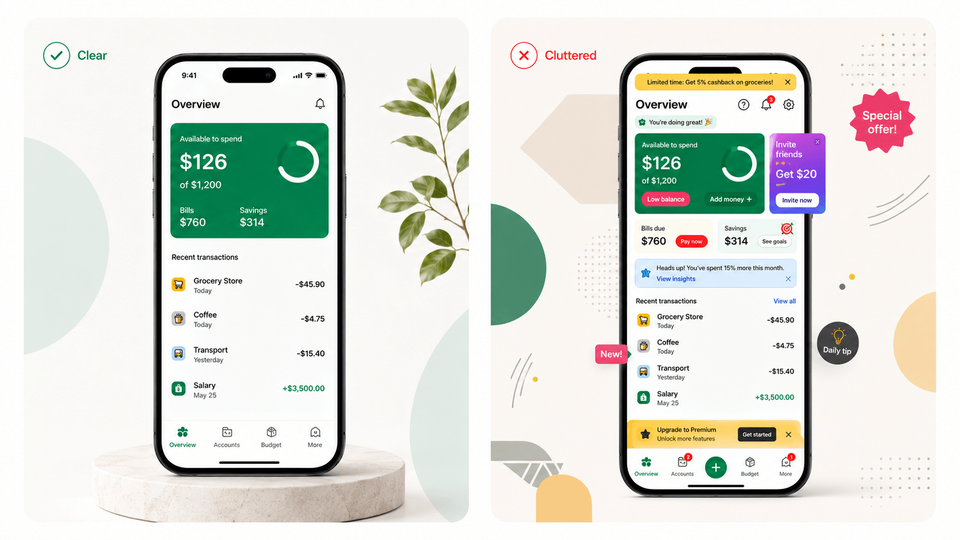
Good screenshots can make existing traffic more valuable. OLBG reported a 45% conversion improvement in one screenshot test and 61% across its screenshot optimization work. For the detailed caption, feature-order, and design work, follow the screenshot optimization playbook and screenshot testing walkthrough.
Leave the published set as your control and build one clearer alternative in AppScreens. Choose a template, add real captures, and edit the benefit captions. Automatic text fitting and store-ready exports save repeating the same layout changes across sizes. Start free with one project and up to five exported screenshots. Supported paid uploads cover App Store Connect, including configured PPO treatments, and the Google Play main listing; export Play experiment variants and attach them in Play Console. The stores measure the experiment.
6. Are downloads happening, but users are leaving or not paying?
That is a different problem from getting the install. Check whether new users reach the feature the listing promised, complete the first useful action, return, or encounter a paywall before experiencing value. Separate those events from store downloads in your notes.
Screenshots should set accurate expectations about paid features and the app experience. If people install for a benefit they cannot find, fix the mismatch. If the promise is clear but onboarding fails or the app crashes, a new screenshot background will not repair that experience.
What should I fix first this week?
- Verify the public install path. Resolve the wrong link, release status, country, device, or price problem first.
- Write down the earliest weak step. Use the same source, market, and period. Keep missing analytics separate from confirmed zero activity.
- Choose the matching action. Improve discovery for low exposure, audience targeting for irrelevant visits, the screenshot message for weak store response, or the app experience for poor activation.
- Record the change and its outcome. Keep the old assets and baseline. Use a controlled store experiment for a screenshot hypothesis; a higher weekly total alone does not identify the cause.
Found a screenshot problem? Build the next version quickly
Turn the diagnosis into a useful change. AppScreens keeps your captions, app captures, localized images, and store sizes editable, so the next screenshot test or app update starts from a project you can reuse.
FAQ
Why is my app not getting downloads?
Check the public listing, country and device availability, price and store link first. Then compare relevant exposure with downloads for the same source, market and period. Little exposure points to discovery; visits without downloads point to audience fit or listing conversion. Downloads followed by low usage or payment need a separate investigation inside the app.
How do I tell whether my app has a visibility or conversion problem?
Look at the earliest weak step. Few relevant store impressions or visits suggest a discovery problem. Relevant visitors reaching the listing but rarely installing suggest a conversion problem. Social views, store impressions, page visits, install clicks and completed downloads measure different actions, so record the exact metric names and compare matching dates and audiences.
Why is App Store Connect showing no analytics for my new app?
Missing data is different from a confirmed count of zero. Apple App Store metrics require at least five first-time downloads or pre-orders, while download metrics require five first-time downloads. Check the metric definition and filters before deciding that nobody has seen or downloaded the app.
How can I get more app downloads without buying ads?
First identify whether you need more relevant visitors or a stronger response from existing traffic. Make the app’s purpose clear in its name and metadata, demonstrate a useful outcome in a relevant community or referral channel, and check that the store message matches it. If visitors arrive but rarely install, use AppScreens to prepare clearer screenshot captions and real product proof for a store experiment.
Should I change my screenshots if my app has zero downloads?
Verify availability, the store link, the intended price and the meaning of any missing analytics first. Correct inaccurate or unreadable screenshots immediately. If the listing is accessible and relevant people see it but cannot explain the benefit, create a clearer alternative in AppScreens. Screenshot testing needs relevant traffic to measure a conversion difference.
Why do people click my ads but not download the app?
Follow the same ad-to-store path as the visitor. Check the destination link, country and device support, price expectations, and whether the listing immediately shows the use case promised by the ad. A campaign may produce attention from people who do not want the app. Separate that audience problem from a weak response among relevant store visitors.
Will better screenshots fix low subscription conversion?
Screenshots can set more accurate expectations, but downloads followed by low activation, retention or paid conversion need investigation inside the app. Check whether people reach the promised feature, complete a useful action, return and understand the paid offer. Keep those events separate from store downloads.
How can AppScreens help after I find the download problem?
When the listing’s screenshot message is unclear, AppScreens helps you create an alternative without hiring a designer or calculating each store size. Use templates, real app captures, editable captions, automatic text fitting and per-language assets. Start free with one project and up to five exported screenshots. Apple and Google run the experiment; supported paid AppScreens uploads save repeated file selection at supported store destinations.