
AppScreens MCPComing soon



App Store Screenshots from Your AI Agent
Coming soon: create and update App Store and Google Play screenshots from Claude Code, Claude Desktop, Codex or Cursor. AppScreens MCP turns your real app captures into editable designs. Ask for new captions, layout changes or translations, review the preview and export the sizes you need.
Public MCP access is not open yet. Build the reusable project in AppScreens today. Developer API
claude · ~/cookbook-ios
Refresh our App Store screenshots with the new meal-planner capture and show me a preview.
appscreensget_project
CookBook · 3 screenshots · en-US, de-DE
appscreensplan_device_screenshot_import
meal-planner.png → screenshot 2 · iPhone
appscreensassign_device_screenshots
Assigned to en-US and de-DE · layout unchanged
appscreensrender_project_preview
en-US · iPhone with Dynamic Island (medium) · 3 pages


Preview ready. Say “export” when you’re happy, or open the project in AppScreens to fine-tune it.
App professionals
Screenshots exported
Developer days saved














Workflow
Create and edit App Store screenshots with your AI agent
Make the next screenshot update a conversation. Ask for a clearer headline, a new app capture or another language, then review the finished design. Keep the layout you love and change what your next release needs.
- 1
Start with your app and design
Use a saved screenshot project or choose a template. Bring the real app captures you want customers to see.
- 2
Ask for the changes you need
Refresh a headline, replace an outdated screen or translate the captions. Your agent updates the editable project without rebuilding every device and language.
- 3
Review the screenshots together
Your agent receives the rendered screenshot, so you can review text fit and layout together. Ask for another change or open the same design in AppScreens.
- 4
Export the finished set
Get the selected sizes and languages as full-resolution assets. Approve store delivery separately when you want to send them to your listing.
CookBook · Screenshot update
Change the meal-planner headline to “Plan your week in minutes.” Add a German version and keep the design the same.
AppScreensget_project_text
Found the meal-planner headline in the saved project
AppScreensreplace_project_text
Updated English and German captions
AppScreensrender_project_preview
Rendered both languages with the existing layout
English

German
Both previews are ready. The layout is unchanged. Want to adjust the copy or export these screenshots?
Refine it in the conversation
Ask for another edit and compare the new preview before exporting.
Pick up in the visual editor
Open the same saved project to adjust framing, colours or captions yourself.

Claude Code, Codex, Cursor and Claude Desktop
One hosted connection for every agent
Choose your AI tool and add the AppScreens connection. Sign in through your browser and approve the access your agent needs.
Step 1 · Add the MCP server
Private-testing configuration preview. Public access is not open, so these commands will connect only after the hosted service and your account are enabled.
Claude Code · Terminal
claude mcp add --transport http appscreens https://api.appscreens.com/mcpStep 2 · Approve access
- 1Run the command above to add AppScreens.
- 2Open /mcp in Claude Code, select AppScreens and start authentication.
- 3Sign in to AppScreens in your browser and approve access, then return to Claude Code.
Any other MCP client
Choose Streamable HTTP and add the AppScreens endpoint. Supported clients use browser-based OAuth approval. Scoped API keys for REST, CI, scripts and clients that cannot complete OAuth are coming soon with the Developer API.
https://api.appscreens.com/mcp
Approved testers will receive the connection guide, read-only connection test and troubleshooting for each client. Team workspaces may need an administrator to allow custom connections.
Capabilities
What your agent can do in AppScreens
Create the first screenshot set, refresh it for the next release and prepare localized assets. Your project stays editable, so agent automation and hands-on design work together.
Connect and check access
Connect your account and check what your agent can do before starting a screenshot job.
- get_account_setup
- start_subscription_setup
- get_account_capabilities
- get_account_usage
Set up an app
Create the app record, link approved store credentials and validate the connection without sharing credentials in chat.
- create_app
- start_app_credential_setup
- link_app_credential
- validate_app_credentials
Find or create the design
Browse templates, create or duplicate a project, choose its languages and output targets, and add, clone or reorder screenshot pages.
- list_templates
- list_languages
- list_render_targets
- create_project
- set_project_settings
Bring in real assets
Bring your real app captures into the project and match each image to the right device and language. Keep the screenshot UI faithful to your app.
- create_asset_upload
- get_asset_upload
- complete_asset_upload
- assign_device_screenshots
Edit the project
Ask your agent to change captions, resize text, swap colours or move design elements. Keep the result editable and preview the changes before export.
- get_project_text
- replace_project_text
- export_project_design_document
- import_project_design_document
Review the result
Catch missing assets, render a page or contact sheet and review the screenshots before the full export.
- validate_export
- render_project_preview
- wait_for_operation
- get_preview_image
Export and download
Render the full set in the background, follow its progress and download the finished assets. Find earlier exports in your project history.
- start_project_export
- wait_for_operation
- list_exports
- get_export_download
Manage store work
Prepare listing copy and draft-release changes alongside your screenshots. Review the destination and approve delivery when the set is ready.
- get_store_metadata_guidance
- preview_store_metadata
- preview_store_release
- create_store_release
- deploy_store_screenshots
- get_deployment
Recover safely
See who changed the project, return to a selected saved version and prevent accidental overwrites.
- list_project_versions
- get_project_version
- restore_project_version
Built for real projects
Your agent does the work. You stay in control.
See the screenshots before you export them. Keep saved versions to return to, and approve the destination before your agent sends assets or changes to a store.
MCP for your agent
Work on screenshots in a conversation, with previews you can approve.
REST for your pipeline
Run the same project operations from scripts and CI. Developer API →
Private-testing AppScreens MCP request: a proposal to replace screenshot 2 in English and German is approved, the project revision and pre-export checks pass, the export is ready, and store delivery is not sent because it needs a separate approval.
Stay in control
- Choose which actions your agent can perform.
- Keep store credentials in AppScreens, out of your chat.
- Protect newer edits from being overwritten and return to a saved version.
- Catch missing assets and export issues before rendering the final set.
- Approve the store destination before sending screenshots or listing changes.
Store work with separate approval
Update supported listing copy, prepare an Apple version or Google draft release, and send screenshots to the destination you approve. Build uploads, review submission and publication stay in your store release workflow.
The editor is still yours
See the AppScreens design workflow in action. Your agent works with an editable project that you can open and refine yourself.
Try the visual editor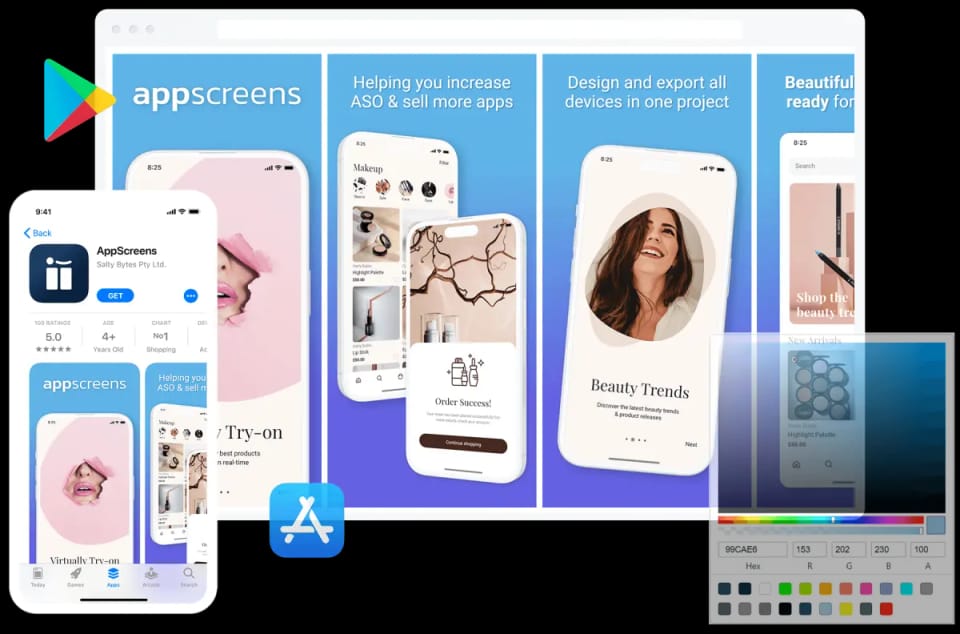

We've Boosted Downloads for over 200,000 App Developers
Real feedback from app builders shipping faster and looking sharper on the App Store and Google Play.

“Special thanks to @AppScreens their tool saved us hours!”

“It's a really great tool, thank you!”
“Thanks so much for the great tool. I managed to create screenshots for my App and I don't have any technical experience.”

“I am really impressed 🤩 It has a lot of potential. I'll definitely keep using it.”
“Special thanks to @AppScreens their tool saved us hours!”
“It's a really great tool, thank you!”
“Thanks so much for the great tool. I managed to create screenshots for my App and I don't have any technical experience.”
“I am really impressed 🤩 It has a lot of potential. I'll definitely keep using it.”

“It has helped us save countless hours, meet store standardized dimensions and elevate the quality of our screenshots.”
“Perfect for generating promotion images for App Store! Perfect to auto translate and manage multiple translations and variations”
“Well worth the money, saves hours and hours of kicking around. Highly recommend!”
“I don't think I could release my app without this tool. It single handedly creates all the output sizes I need to release my app to the Apple App Store and Google Play Store, from one design.”
“It has helped us save countless hours, meet store standardized dimensions and elevate the quality of our screenshots.”
“Perfect for generating promotion images for App Store! Perfect to auto translate and manage multiple translations and variations”
“Well worth the money, saves hours and hours of kicking around. Highly recommend!”
“I don't think I could release my app without this tool. It single handedly creates all the output sizes I need to release my app to the Apple App Store and Google Play Store, from one design.”

“The thing I love about this tool is that you can export the screenshots to fit all device sizes in one single click.”

“Great for indie devs or small teams! It's super easy to use and saves you a lot of time, all without compromising design flexibility.”
“You can focus on creating pretty screenshots & polishing marketing phrases. Truly an awesome product!”
“The thing I love about this tool is that you can export the screenshots to fit all device sizes in one single click.”
“Great for indie devs or small teams! It's super easy to use and saves you a lot of time, all without compromising design flexibility.”
“You can focus on creating pretty screenshots & polishing marketing phrases. Truly an awesome product!”
One workspace
Everything you need to ship your store listing
AppScreens is a browser-based App Store and Google Play screenshot designer: one editable project exports every required iPhone, iPad and Android size in 80+ languages and uploads to App Store Connect and Google Play Console.
Create
Optimize
- Screenshot LocalizationTranslate captions and adapt each locale.
- PPO and Custom Product PagesPrepare variants for tests and audiences.
- Screenshot FeedbackGet a free ASO review of your app listing.
- App Store Screenshot SizesFind the right iPhone and iPad dimensions.
- Google Play Screenshot SizesCheck Android dimensions and requirements.
AppScreens MCP questions
Can’t find the answer you’re looking for? Reach out to our customer support team.
Create the screenshot project your agent will work with
Build your editable screenshot set in AppScreens today. Private MCP testing will bring the same project into your AI workflow for updates, localization, previews, exports and approved store work.
© 2026 AppScreens, a registered business name of Salty Bytes Pty Ltd. All rights reserved | v1.1.260