ASO A/B Testing
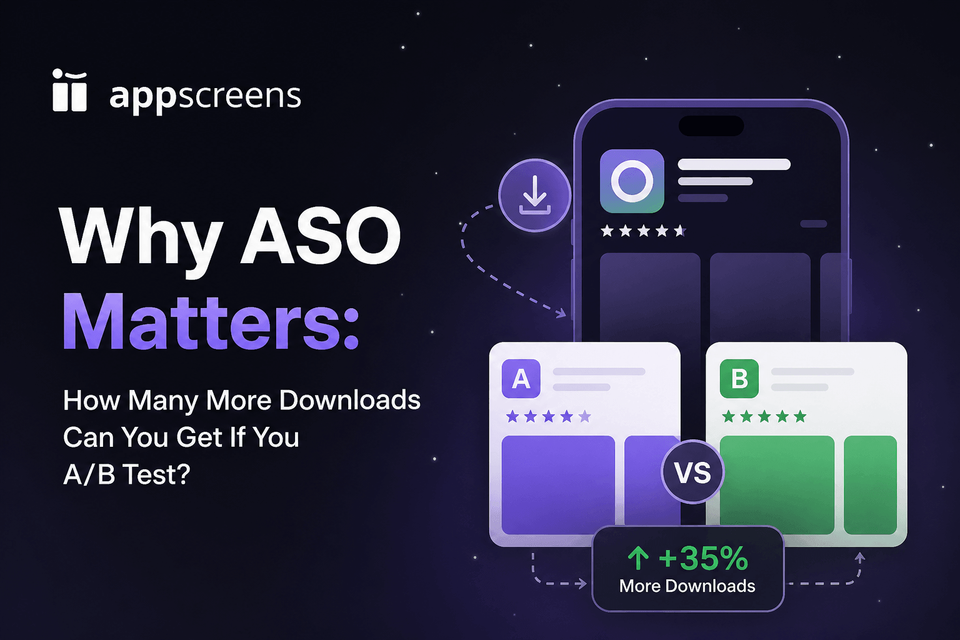
Why ASO Matters: How Many More Downloads Can You Get If You A/B Test?
ASO matters because A/B testing can turn the same store traffic into more installs without buying more ads. Public case studies show why it is worth testing: OLBG reported +61% conversion from iOS screenshot optimization, Darby Smart saw +73.7% more Get clicks from an icon test, and localization examples report +101% to +128% more downloads.
The practical lesson is to test the asset closest to the install decision: keyword visibility, the icon, the first screenshot, app preview video, localized creative, PPO, CPP, or a Google Play experiment. The math becomes meaningful quickly: at 10,000 monthly downloads, a +15% lift is about 1,500 extra installs from traffic you already have.
The tables below show the reported result, what changed, and what each example means for your next test. Then the calculator translates lift percentages into download numbers at your current scale, so you can decide which screenshot, icon, video, localization, PPO, CPP, or Google Play variant is worth producing next.
If you want to get a free ASO screenshot assessment for your app, start with a Screenshot Review to spot the first-impression issues worth fixing before you build variants.

Quick Take
ASO A/B testing matters because it shows which store asset earns the next install: keyword visibility, icon clarity, first screenshots, app preview video, localized creative, feature graphics, PPO, CPP, or Google Play experiments. Public cases make the upside tangible: +61% conversion from iOS screenshot testing, +73.7% more Get clicks from an icon test, and +101% to +128% more downloads from localization examples.
Start with the asset closest to the install decision: search appearance, icon, screenshot 1, the first-three story, app preview video, localized screenshots, ratings context, or the Google Play feature graphic. At 10,000 monthly downloads, a +15% lift is about 1,500 extra installs without buying more traffic. Use AppScreens when variants need restyling, captions that fit, per-language assets, store-ready exports, uploads, localization, and future updates in one editable project.
If you want to get a free ASO screenshot assessment for your app, start with a Screenshot Review to spot the first-impression issues worth fixing before you build variants.
What Public ASO Results Suggest Testing First
Public ASO, PPO, screenshot, icon, localization, ratings, and Google Play experiment examples show that store-page work can change discovery, conversion, and downloads without changing the product itself. The strongest pattern is clear: test the ASO lever closest to the growth bottleneck first.
Use the first table for ASO results from keyword visibility, localization, custom listings, store funnel benchmarks, category benchmarks, and ratings. Use the second table for creative test results from screenshots, icons, app previews, PPO, CPP, and Google Play experiments. If you are planning an iOS test, pair this list with the Product Page Optimization testing guide so the first PPO experiment changes one high-impact asset instead of redesigning the whole page.
ASO Results From Keywords, Localization, Listings, And Ratings
| Source / app | What was tested | Reported result | Business takeaway |
|---|---|---|---|
| Digital Applied and Adapty | Search discovery, search-result CTR, product page views, and page-to-install conversion. | Digital Applied cites around 65% of iOS discovery from App Store search, around 58% of Google Play discovery from search, around 33.4% iOS tap-through-to-install, and around 27.7% on Google Play. Adapty lists roughly 6% to 12% impression-to-product-page CTR from search results. | Test the app name, subtitle, icon, and visible screenshot preview. Users need a reason to tap before they ever reach the full product page. |
| Category conversion benchmarks | App Store product page conversion by category. | Adapty reports an overall App Store conversion benchmark around 25%, with category examples around 79.8% for Weather, 115% for Navigation, 60.8% for Photo and Video, 26.4% for Shopping, and 13.1% for Social Networking. | Judge ASO test impact against your category baseline. A useful lift in Social Networking will not look like a Weather, Navigation, or Photo and Video benchmark. |
| Phiture, Deezer | International ASO for Turkey: audit, keyword research, localized text and visual assets, iterative testing, and keyword optimization. | Phiture reports +61% downloads after the first keyword optimization round on iOS, +53% on Android, and +2% organic CVR. | When a market has demand, test keyword strategy, localized listing copy, and localized creative together instead of treating ASO as a screenshot-only task. |
| Moburst, Discovery | Broad ASO campaign covering app-store discoverability, A/B testing of visual and textual store assets, keyword research, and metadata iterations. | Moburst reports +61% organic downloads, 365% growth in top-50 rankings, 4,600 new keyword rankings, and 226 newly ranked #1 search results. | If discovery is the problem, test metadata, keywords, visuals, and product-page conversion together. ASO lift can come from ranking gains and conversion gains. |
| Google Play experiments | Store listing experiments for text, graphics, videos, screenshots, icons, and localized listings. | Google’s public examples include Tapps Games at more than +20% installs, Kongregate at +45% installs, and Pincer Games at +20% conversions. | On Google Play, test screenshot sets, feature graphics, icons, videos, and localized text when the listing promise needs proof. |
| Distimo app translations | Native-language support added by about 200 iPhone and iPad apps. | Distimo reported more than +128% iPhone downloads and about +26% revenue in the following week. | Localization can change downloads fast when language is blocking discovery, understanding, or trust. |
| Coin Splash localization | Localized ASO metadata across six geos using English, French, Italian, and German. | App Guardians reports +101% global downloads and +67% local-country downloads after 40 days. | Localized metadata can be a direct download lever before or alongside localized screenshot production. |
| Headspace localized ASO | Systematic ASO with localization input, cultural nuance, professional translation, and experiments. | Reported results include +40% visibility, +18% search installs, +8% CVR for local store listings, +40% search installs in key non-English markets, and +13% installs overall. | Local keywords, local copy, and local creative should be measured by visibility, search installs, and conversion, not translation completion alone. |
| Google Play, Koo | Country-focused custom store listings with native-language messaging, screenshots, images, and feature graphics. | Google reports +15% organic installs in non-English languages in countries where the national language is not English. | Custom listings and localization should include visuals, not only translated descriptions. |
| Make App Magazine keyword experiment | App name and keywords researched from scratch across multiple languages. | Downloads rose from about 3,000 to 23,000 in one month, reported as +767%. | Metadata-only ASO can unlock search demand, but screenshot and listing creative still need to convert the new traffic. |
| Ratings and reviews benchmarks | App rating quality, review volume, and review recency. | Published ASO benchmarks cite apps with 4.5+ ratings installing around 1.7x the rate of apps under 4.0. Onde states a 3-star app converts around 50% less than a 5-star app. | Do not judge creative tests in isolation when ratings are weak. Ratings and reviews are conversion assets, not just trust signals. |
Creative Test Results From Screenshots, Icons, App Previews, And PPO
| Source / app | What was tested | Reported result | Business takeaway |
|---|---|---|---|
| SplitMetrics, OLBG | iOS screenshot experiments for background, first-three order, interface treatment, and feature emphasis. | OLBG reported a +61% conversion boost from iOS screenshot optimization. One screenshot test improved conversion by 45%; another showed the plain-background set performing 10% to 13% worse than the themed set. | Screenshot tests can produce large gains, and common design advice can lose. Test the first three screenshots with your own audience. |
| SplitMetrics, Angry Birds 2 / Rovio | Screenshots, captions, icon, portrait and landscape asset combinations. | Best combination delivered +13% conversion, estimated as about 2.5M additional installs in the first post-release week. | Test the first screenshot hook, caption angle, asset orientation, and screenshot order before smaller visual tweaks. |
| Apple Developer, Simply Piano | App preview video against the screenshots-only original product page. | The original screenshots-only page performed 3% better over 12 days. | Do not assume video wins. Test app preview videos against strong screenshots before rolling video into every market or campaign. |
| Apple Developer, Peak Brain Training | Three app icon variants in a Product Page Optimization test. | Winning brain icon delivered +8% conversion over 44 days. | Prioritize icon PPO when the current icon is generic, unclear, too close to competitors, or weak at communicating the app’s value. |
| SplitMetrics, Darby Smart | App icon redesign. | Winning icon reached 10.0% conversion vs a 5.7% baseline, reported as +73.7% more Get clicks. | If the icon does not quickly explain the category or benefit, test simpler, clearer icon concepts before changing the rest of the page. |
| Appbot, WordBoard | Three app icon variants against the original in App Store Connect. | Best icon reached 2.21% CVR vs a 2.14% baseline, about +3.54% relative lift after a few days. | Small lifts still matter at scale. Avoid reading early PPO results too aggressively when the test has only run for a few days. |
| Sensor Tower, Skoda Little Driver | Screenshot order, lifestyle screenshot design, and customized screenshot backgrounds. | Reordering screenshots lifted installs by 6.4% versus control, customized backgrounds lifted installs by 4.4%, and Sensor Tower concluded the experiment showed up to a 16.6% install increase. | Screenshot order matters because most visitors only see the first visible assets. Put the clearest app value first. |
| Reddit developer report | Two alternative icons against the original for an unnamed fishing game. | The developer reported the fish icon performing with a +42.84% improvement in the first two weeks. | Icon tests can uncover a clearer category signal, especially when the current icon does not explain the app fast enough. |
| Screenshot benchmark evidence | App Store and Google Play screenshot creative updates. | Published ASO benchmarks cite a median winning screenshot test lift around +11.8% conversion, while screenshot design guidance reports possible conversion lifts around 20% to 35% when the creative clearly improves the first impression. | Treat screenshots as conversion assets. Test first-three messaging, caption hierarchy, benefit order, proof, and layout. |
| ZiMAD screenshot localization | Localized App Store screenshots for Magic Jigsaw Puzzles in Japan. | SplitMetrics reports a +36% conversion-rate improvement. | Localized screenshots are store creative, not admin. Test local caption meaning, proof, layout, and visual examples. |
| FiftyThree screenshot localization | Chinese localized screenshots and screenshot order. | Localized screenshots performed +33% better than English screenshots, and a screenshot order test produced +17% more installs after scrolling. | When a market matters, test translated screenshots, native examples, and first-three order instead of relying on English creative. |
| Digital Applied, ASO Mobile, and Sensor Tower | Above-the-fold visibility, screenshot scrolling, and description engagement. | Digital Applied cites 72% of iOS product-page sessions ending without scrolling. ASO Mobile says around 90% of users do not scroll past the third screenshot. Sensor Tower reported a 17% average screenshot scroll rate in one experiment, and says SplitMetrics sees only 1% of users reading the full description across experiments. | Test first-impression assets before long description copy: icon, app preview, first screenshot, first-three order, and the caption story above the fold. |
How To Estimate Extra Downloads From An ASO Test
Use this simple formula: monthly downloads multiplied by the reported lift percentage equals the extra downloads that same percentage represents at your scale. It makes the upside of a screenshot, icon, localization, PPO, CPP, or Google Play experiment concrete.
| Current monthly downloads | +4% win | +15% win | +61% win |
|---|---|---|---|
| 1,000 | +40 downloads | +150 downloads | +610 downloads |
| 10,000 | +400 downloads | +1,500 downloads | +6,100 downloads |
| 50,000 | +2,000 downloads | +7,500 downloads | +30,500 downloads |
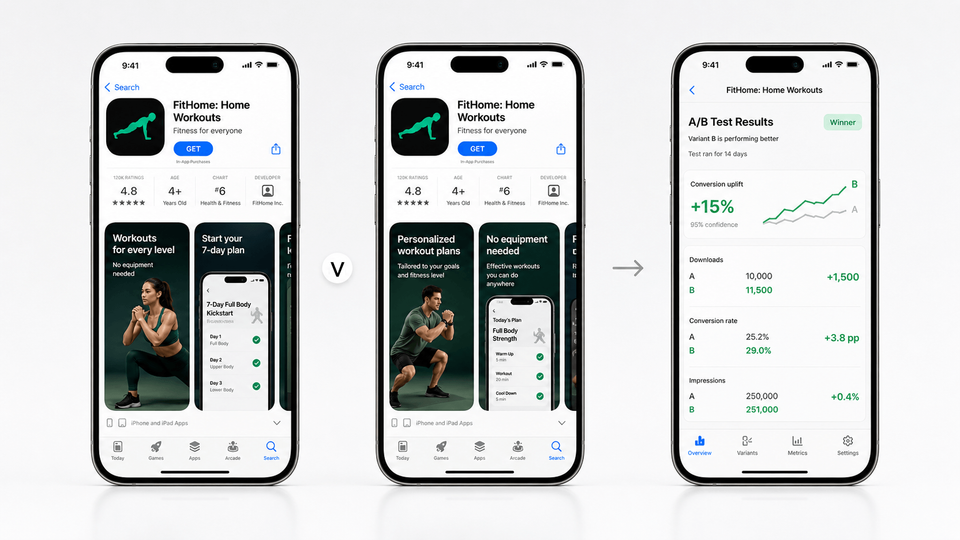
Fastest Workflow: Turn ASO Ideas Into Test-Ready Screenshots
The fastest way to act on an ASO opportunity is the ASO screenshot workflow in AppScreens. Start with your real app screens, choose reusable App Store screenshot templates, add AI-assisted captions, apply brand styling and device frames, duplicate the project for variants, restyle the existing project into a new visual direction in a few clicks, then export or upload the assets each test needs.
Screenshot testing scales quickly. Five screens across 4 store sizes, 6 languages, and 3 test variants becomes 360 screenshot assets before captions stop fitting, localized layouts need rebuilding, per-language screenshots or images need swapping, store sizes need re-exporting, and upload files need mapping to the right treatment. AppScreens keeps the control, variants, text fitting, per-language assets, store-ready exports, uploads, localization, and future updates in one editable project so a winning idea becomes the next baseline instead of another folder of cloned files.
1. Choose one testable idea
Test the first screenshot, first-three story, caption angle, proof point, localized screenshot set, or Google Play feature graphic. On Google Play, use Store Listing Experiments when you want real Play Store visitors to compare screenshot sets, feature graphics, localized graphics, or custom store listing assets.
2. Duplicate or restyle the project
Keep the existing screenshot set as the control, then change one visible variable or restyle the project into a new screenshot direction in a few clicks.
3. Export every required asset
Export or upload App Store screenshots, Google Play screenshots, feature graphics, localized sets, Product Page Optimization and Custom Product Page screenshot variants, or variants for Google Play Store Listing Experiments from the same project.
4. Upload, measure, and roll forward
Upload the variant, record the hypothesis, wait for a reliable result, then turn the winner into the next editable baseline.
What To Test First
Start where the current funnel is weakest. If users are not finding the app, test keywords, app name, subtitle, short description, custom listings, and localization. If users see the page but do not install, test the icon, first screenshot, first-three story, app preview, feature graphic, ratings context, and localized creative. AppScreens keeps the creative side fast: captions fit, per-language screenshots and images stay editable, store sizes can be re-exported, upload files stay mapped, and future changes remain connected to the same project.
1. Search-result appearance
Test app name, subtitle, icon, and visible screenshot preview when search impressions are not becoming product page views.
2. Icon and ratings context
Test icon concepts when the category signal is weak, and read creative tests alongside ratings, review quality, and review recency.
3. First screenshot and first-three story
Test hook, proof, caption angle, and screenshot order. Public screenshot guidance says most users do not scroll past the third screenshot.
4. Localization
Test local keywords, native-language listing copy, localized screenshots, feature graphics, and market-specific proof. For deeper translation ROI, read the localization ROI guide.
5. Feature graphic and app preview
For Google Play, test whether the feature graphic and first screenshot agree on the same promise. On iOS, test app preview video against strong screenshot-only pages.
6. CPP and PPO variants
Use Apple Product Page Optimization for default page tests and Custom Product Pages for intent-specific audiences, campaigns, or feature launches.
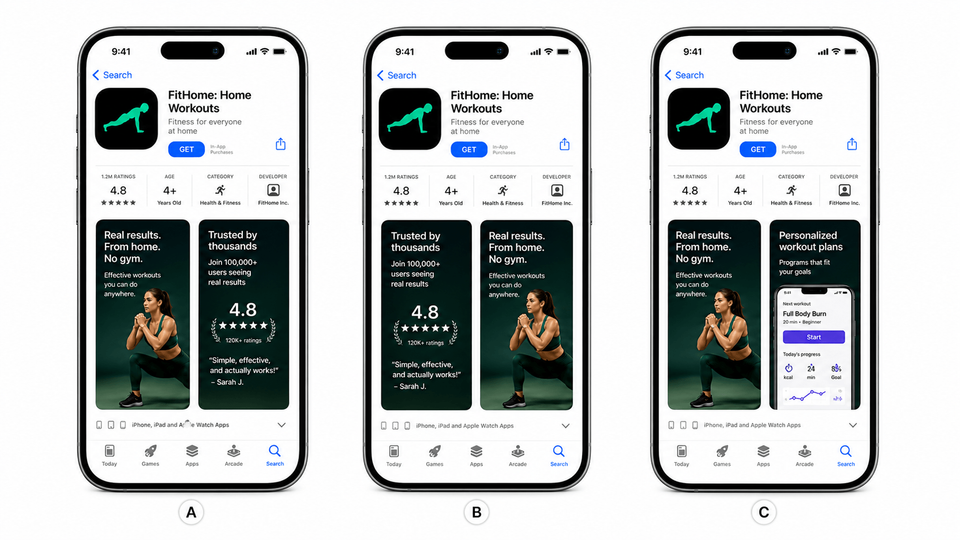
Example Tests You Can Run
Productivity app
Control: “Manage tasks and projects.”
Variant: “Plan today in five minutes.”
Tests outcome clarity against generic feature language.
Fitness app
Control: Screens ordered by feature depth.
Variant: Screens ordered by beginner journey.
Tests whether the first-three sequence matches new user intent.
Finance app
Control: Dashboard-first screenshot.
Variant: Security and control-first screenshot.
Tests whether trust must come before workflow.
Game
Control: Plain gameplay screenshots.
Variant: Character-led screenshots with action captions.
Tests whether the creative frames the gameplay emotion faster.
Travel app
Control: Default screenshot set.
Variant: Airport transfer CPP with matching captions.
Tests intent-matched store pages for high-intent traffic.
Common Mistakes That Make ASO Tests Misleading
| Mistake | Use this rule | Why it matters |
|---|---|---|
| Testing tiny changes too early | Test a real positioning difference first. | If traffic is limited, a small background shade or caption punctuation test will usually produce noise. |
| Changing five things at once | Isolate the hook, order, color, caption, or app UI change when possible. | A complete redesign can win, but you may not know what caused the improvement. |
| Ignoring traffic source | Segment results by source when intent differs. | Search, browse, Apple Ads, paid social, and email traffic often behave differently, so one source's winner may not win everywhere. |
| Copying another app’s winning style | Use category context before borrowing a pattern. | A style that wins for one app, category, or traffic source can lose for another. Use public examples to choose what to test, not what to copy. |
| Skipping localized screenshot checks | Check translated captions, text fit, RTL layout, per-language screenshots, and market-specific proof before export. | Translated captions can overflow, localized layouts can break, and market-specific screenshots or images can be mapped to the wrong language. AppScreens keeps text fitting, per-language assets, localized exports, uploads, and future edits connected in one project; use the localization ROI guide when the test is mainly about new markets. |
| Stopping before confidence or context | Wait for enough confidence, time, and traffic before applying the result. | Apple advises waiting for at least 90% confidence, and Google Play tests should avoid weekday or campaign bias. |
Turn ASO Upside Into Screenshot Variants You Can Test
ASO testing only works when your team can produce clear variants and turn the winner into the next store-ready set. Use AppScreens to keep one editable project for the control, restyled screenshot variants, localized sets, PPO treatments, CPP assets, Google Play experiment files, text fitting, per-language assets, store-ready exports, uploads, and future release updates.
FAQ
Does ASO really increase downloads?
Yes, when it improves discoverability or conversion. Public examples show ASO wins from keyword work, localized listings, screenshots, icons, app previews, PPO, CPP, and Google Play experiments. The practical lesson is to test the asset closest to the growth bottleneck first. AppScreens gives teams a repeatable ASO screenshot workflow for creating, localizing, exporting, and uploading variants worth testing.
How many more downloads can ASO A/B testing get?
It depends on traffic, category, baseline quality, and what you test. Public examples range from small creative lifts to headline wins such as +61% conversion from iOS screenshot testing and +101% to +128% more downloads from localization examples. At 10,000 monthly downloads, +4% is about 400 extra installs and +15% is about 1,500, so even modest winners can be worth producing when they become the new baseline.
What should I A/B test first for ASO?
Start with the asset closest to the install decision: search-result appearance, app icon, first screenshot hook, first three screenshot order, app preview video, localized screenshots, Google Play feature graphic, ratings context, or CPP and PPO variants. AppScreens makes screenshot and listing-creative tests faster because the existing project can be restyled into a new direction in a few clicks, captions can be rewritten, translated text can be fitted, per-language screenshots or images can be swapped, store sizes can be re-exported, and upload files stay mapped to the right treatment. See the ASO screenshot workflow.
Can App Store screenshots be A/B tested?
Yes. Apple Product Page Optimization supports tests for screenshots, app previews, and app icons on the default product page. Custom Product Pages also let teams tailor screenshots for specific audiences, keywords, campaigns, and traffic sources. AppScreens supports Product Page Optimization screenshots and CPP screenshot variants.
Can Google Play screenshots be A/B tested?
Yes. Google Play Store Listing Experiments support testing store listing assets with real Play Store visitors before applying changes to the main listing or custom store listings. AppScreens creates Google Play screenshot and feature graphic variants for those tests.
How does AppScreens support ASO testing?
AppScreens lets teams duplicate a screenshot project, restyle it into a new visual direction in a few clicks, change one clear variable, use AI captions, fit text across sizes, swap per-language screenshots or images, export the right App Store and Google Play assets, upload treatments, and keep winning versions editable for future releases. For a small app, this can start from a fast one-off screenshot set; paid plans add direct uploads, more projects, more localizations, more screenshots, advanced variants, and team workflows. Compare pricing.
Can I start ASO screenshot testing without a designer?
Yes. Use AppScreens AI onboarding to get store context, choose a ready-made screenshot template, upload real app screens, generate ASO-friendly captions, and export a clean first set. Then duplicate the project to test a new hook, order, caption, or localized message.
Should I test localized screenshots?
Yes for markets that already show demand or receive paid traffic. Localized screenshots test whether native captions, examples, currencies, UI language, and market-specific proof improve conversion compared with a generic English set. AppScreens makes this practical through screenshot localization: translated captions can be fitted, RTL layouts can be checked, per-language screenshots or images can be swapped, and localized assets can be exported or uploaded from one editable project.
Is ASO worth it for small apps?
Yes when the app has enough store traffic to learn from, and the first screenshot set does not need to be expensive or slow. AppScreens gives small teams a fast path from real app screens to AI-assisted, template-based, store-ready screenshots, with free export options for many basic launches and paid upgrades when direct uploads, more screenshots, more projects, localization, variants, or team workflows matter.
Read on
If you are turning ASO testing into a repeatable screenshot workflow, these guides are useful next steps:
Sources
- Apple Developer: Product Page Optimization
- Apple Developer: Custom Product Pages
- Google Play Console: Store listing experiments
- Play Console Help: Run A/B tests on your store listing
- Play Console Help: Create custom store listings
- Sensor Tower: A/B testing app conversion case study
- Phiture: Deezer international ASO case study
- Moburst: Discovery ASO case study
- SplitMetrics: OLBG iOS screenshot optimization case study
- SplitMetrics: Rovio Angry Birds 2 screenshot testing case study
- SplitMetrics: Darby Smart app icon testing case study
- Appbot: WordBoard Product Page Optimization icon test
- Reddit: developer-reported Product Page Optimization icon test
- Distimo: The Impact of App Translations
- App Guardians: Coin Splash ASO localization case study
- Phiture: Headspace systematic ASO case study
- Google Play: Koo custom store listing case study
- Make App Magazine: keyword localization experiment
- SplitMetrics: ZiMAD screenshot localization case study
- SplitMetrics: FiftyThree screenshot localization case study
- Adapty: App Store conversion rate benchmarks
- Digital Applied: ASO statistics
- ASO Mobile: App Store and Google Play screenshot guide
- Onde: ratings and reviews influence conversions
Check current Apple, Google, and source guidance before launching ASO tests.
