

App screenshot localization
App Screenshot Localization Checklist for 2026
Localization is not just translation. It is how your store screenshots make the app feel native, clear, and worth installing in each market. Public examples covered in our localization ROI guide show +101% to +128% more downloads from localization, and screenshot localization examples report +33% to +36% conversion gains.
Use this checklist to choose markets, plan the localized screenshot story, prepare app-screen context, translate captions and metadata together, adapt layouts for long text and RTL, QA every version, and publish the right assets to App Store Connect, Google Play, CPP, PPO, and custom store listings.
The fastest repeatable workflow is AppScreens localization: find your app with AI onboarding, pull in app context and metadata, choose a ready-to-go template or start from scratch, upload clean app screens, generate or edit benefit-led captions, preview every size and language, then translate, adapt, export, or upload localized App Store and Google Play assets from one editable project.
AppScreens works for a fast first screenshot set and scales when the workflow grows into 80+ languages, RTL layouts, per-language screenshot overrides, App Store Connect uploads, Google Play workflows, CPP, PPO, and custom store listings.

Quick Take
Localization is not just translation. A strong localized screenshot set adapts the market, message, visible app UI, examples, layout, file exports, upload mapping, and QA for each App Store locale or Google Play language.
Use this checklist to choose target markets, plan the localized screenshot story, prepare raw app screens in each language, translate captions and metadata together, check long text and RTL layouts, QA every version, then upload the right assets to App Store Connect and Google Play.
AppScreens keeps that workflow in one editable project with AI translation, automatic text resizing, per-language screenshot and image changes, RTL support, store-ready exports, and upload workflows.
FYI: What Screenshot Localization Includes
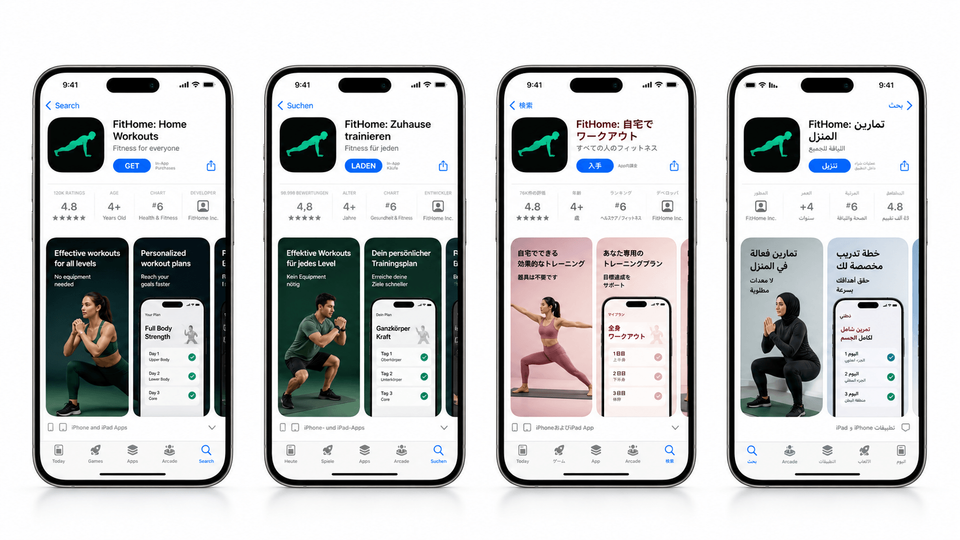
App screenshot localization adapts the store screenshot set for each market, not just the caption text. A complete localized set can change captions, visible app UI, sample data, proof points, currencies, dates, units, images, feature order, RTL direction, export targets, and upload mapping. AppScreens is the fastest workflow when teams need localized App Store and Google Play screenshots from one editable project.
1. Decide What Screenshots Need To Prove
Before localization, create the strongest default screenshot set you can. Choose the promise, proof points, first screenshot, and feature order before you translate anything. If the original screenshot story is unclear, localization only multiplies the confusion across more languages.
When you have enough traffic, test the base screenshot story in your primary country or market with ASO A/B testing before you roll the same story into every locale. The App Store Screenshot Optimization Playbook can help you decide what each screenshot should communicate.
If you do not already have a converting layout, use a proven App Store screenshot template instead of designing every market from scratch. You can also start with our guide to making app store screenshots before you begin localizing.
2. Choose Markets, Languages, And Locales
Pick App Store locales, Google Play languages, and country variants based on demand, revenue, paid traffic, support readiness, and product fit. Start with countries already showing impressions, installs, revenue, support requests, or paid traffic plans. Then add markets where the app is genuinely ready. Use the languages and locales guide when you need a language shortlist or spending-power sanity check.
Confirm the app can actually support each market: pricing, payments, onboarding, support, compliance, local expectations, and product availability. Do not let screenshots overpromise a local experience the product cannot deliver.
Apple localizations are not the same as countries, and Google Play language or custom store listing targeting is a different system again. Treat locale selection as a shortlist, then validate whether each market needs unique screenshots, feature graphics, product examples, pricing, or support.
Do not choose languages by population alone. A smaller market with spending power, category demand, local support, and a ready product experience can beat a larger market where the app cannot yet deliver.
Apple lists App Store metadata support as specific languages and locales, so a stronger rollout follows the actual App Store localizations available in App Store Connect. Apple maps each country or region to a default language and additional supported languages, and the language a user sees can depend on country, device settings, your added localizations, and your app's primary language. The audience estimates below are rounded native, first-language, or practical written-locale planning signals.
Most apps begin with an English base such as English (U.S.) or English (U.K.). English also acts as a practical fallback in some App Store countries where a local language is not available or not added to your listing.
| Language strategy | App Store locales to add | Main coverage | Audience / market signal |
|---|---|---|---|
| English base | en-USen-GBen-AUen-CA |
| ~370Mi |
| Chinese | zh-Hanszh-Hant |
| ~990M / ~32Mi |
| Spanish | es-MXes-ES |
| ~500Mi |
| Hindi | hi |
| ~350Mi |
| Arabic | ar |
| ~335Mi |
| Portuguese | pt-BRpt-PT |
| ~250M / ~220Mi |
| Japanese | ja |
| ~125Mi |
| Vietnamese | vi |
| ~85Mi |
| Turkish | tr |
| ~85Mi |
| Indonesian | id |
| ~80Mi |
| Korean | ko |
| ~80M / ~52Mi |
| French | fr-FRfr-CA |
| ~75M / ~8Mi |
| German | de-DE |
| ~75Mi |
| Thai | th |
| ~20M / ~70Mi |
| Italian | it |
| ~66Mi |
| Polish | pl |
| ~40Mi |
| Malay | ms |
| ~27Mi |
| Dutch | nl-NL |
| ~25M / ~30Mi |
| Swedish | sv |
| ~10Mi |
| Danish | da |
| ~6Mi |
| Norwegian | no |
| ~5Mi |
| Finnish | fi |
| ~5Mi |
Native / first-language estimates are rounded and should be treated as planning signals, not exact counts. App Store locales such as zh-Hans, zh-Hant, es-MX, es-ES, pt-BR, fr-FR, and fr-CA are commercial localization choices, not always separate spoken languages. Written locales such as Simplified Chinese and Traditional Chinese do not have native speakers themselves, so the table uses the closest relevant spoken-language or market proxy.
Sources: Apple's App Store localization table for supported App Store locales and language display behavior; Ethnologue for broad global first-language speaker estimates; Instituto Cervantes for the Spanish native-speaker estimate; Statistics Canada for French Canada / Canada-specific French audience; and World Bank SP.POP.TOTL only where country or storefront population signals are shown.
3. Plan The Localized Story And Examples
Good app screenshot localization is closer to store-listing adaptation than text replacement. Decide what changes by market: caption angle, proof points, category examples, currencies, units, maps, holidays, local terminology, and screenshot order. A grocery app might talk about "shopping" in one market and "groceries" in another. A finance app may need local banks, currency, tax language, and trust cues. A travel app may need different maps, units, seasons, and holidays.
| Checklist item | What to check | Example |
|---|---|---|
| Base screenshot story | Does the localized set still sell the main outcome in the right order? | The first screenshot may need a different promise or proof point by market. |
| Caption meaning | Is the value proposition native, not literal? | "Save time" may need a more specific local benefit. |
| Text length | Will the planned caption still fit once translated? | German and Finnish often need more space than English. |
| UI shown inside the phone | Are app screens, sample data, and buttons localized? | A finance app should show local currency and date formats. |
| Cultural relevance | Does the example match local expectations? | Weather, sport, maps, food, holidays, and payments vary by market. |
| Feature order | Should the first screenshot, proof point, or feature sequence change? | A local payment method may matter more than a generic dashboard screenshot. |
Finance app
Default: USD, U.S. dates, and U.S. bank-style examples.
Localized: EUR, German date format, local bank-style examples, and a trust-led caption.
Fitness app
Default: miles, pounds, English UI, and U.S. food examples.
Localized: kilometers, kilograms, translated UI, local food examples, and local goal language.
Education app
Default: U.S. grade levels, U.S. exam wording, and generic parent/student copy.
Localized: local school terms, exam names, handwriting examples, and native parent/student wording.
AppScreens keeps localized variants inside one project, so you can adapt the story for each market without rebuilding the entire screenshot set from scratch.
4. Prepare Raw App Screens In Each Language
Localize the app UI first where visible, then capture raw app screens for each target language or market. These screenshots give translators and reviewers the visual context they need: which words appear in the app, what the user is doing, what the caption points to, and whether the final store screenshot will feel honest. If you need the capture workflow, use the guide to taking app store screenshots.
Visible UI text
Buttons, tabs, empty states, onboarding labels, alerts, and feature names.
Local formats
Dates, times, currencies, decimals, units, addresses, phone numbers, and names.
Visual assets
Maps, flags, product examples, food, clothing, sport, holidays, payments, and social proof.
If the caption is localized but the phone screen is still English, users notice. Use raw localized app screens in AppScreens, then turn those captures into polished screenshot sets with consistent layouts and store-ready sizes.
How AppScreens Keeps Localization Production Manageable
AppScreens is built for the screenshot work that slows teams down: turning real app screens into polished, localized, test-ready App Store and Google Play screenshots, then exporting or uploading the right assets without rebuilding every size, language, variant, and upload by hand.
Start with one editable screenshot project, choose a reusable template, add AI-assisted captions, apply brand styling, translate captions with AI guidance, adapt longer text and RTL layouts, override raw screenshots or images per language, then export or upload store-ready assets for App Store Connect and Google Play workflows.
Translate and adapt
Translate captions into 80+ languages, support RTL, adjust longer text, and keep terminology aligned with the app and metadata.
Change local assets
Swap raw screenshots, images, examples, currencies, maps, feature graphics, and proof points per language or market.
Export or upload
Create required App Store and Google Play sizes, build CPP, PPO, and custom listing variants, then export or upload the right localized assets.
Localization adds production work fast.
Eight screenshots across 3 device sizes and 12 languages becomes 288 assets before testing variants, feature graphics, localized uploads, or future updates. AppScreens keeps that work inside one editable project you can translate, resize, adapt, QA, export, upload, and update.
AppScreens is free to start. Free users can use AI mode, create one project, export up to 5 screenshots, and manually upload the files to App Store Connect or Google Play. Upgrade when speed matters across more projects, direct uploads, localization, variants, team workflows, or client work.
5. Translate Captions, Glossary, And Store Metadata
Translate the message, not just the words. Keep captions aligned with store metadata, in-app terms, glossary choices, and local search language. Screenshot captions are sales copy, so a literal translation can be correct and still feel awkward. For the upside and market logic behind translation work, read the localization ROI guide.
Do
- Keep the first screenshot benefit obvious.
- Use local keyword language where it reads naturally.
- Rewrite idioms, slang, and jokes instead of translating them word for word.
- Give translators screenshot context, not isolated strings.
- Keep captions, app UI terms, metadata, and glossary choices consistent.
Avoid
- One global English screenshot set for every market.
- Machine translation with no human review for your most important locales.
- Captions that translate but no longer match the UI evidence.
- Hard-coded measurements, currencies, or dates inside screenshots.
Use AppScreens localization to generate or refine localized screenshot captions, then review important markets with a native speaker before upload.
6. Create Or Update Localized Screenshot Sets
Build each localized set with AI translation, AI-assisted captions, AI guidance, AI project restyling, responsive layouts, automatic text resizing across sizes and languages, RTL support, script-safe fonts, per-language raw screenshot overrides, per-language image changes, feature graphics with the Google Play feature graphic generator, custom sizes, and store-ready export targets for App Store screenshot sizes and Google Play screenshot sizes. AppScreens keeps those variants inside one editable project instead of scattered design files.
Use AppScreens localization when you need to translate, resize, adapt, test, export, and upload localized App Store and Google Play screenshots without rebuilding every canvas by hand.
Production checklist
In general design tools, this often means duplicating projects, copying styles between Figma, Canva, PSD, or Sketch files, and trying to keep every localized set aligned by hand. Those files bloat quickly, and captions, screenshots, device sizes, and export folders get mismanaged.
AppScreens keeps localized screenshot sets inside one project: add a language or size variant to a project, update captions and raw app screens, review layout changes, then export or upload store-ready assets without rebuilding the same design over and over.
7. QA Before Upload
Review language, UI consistency, local examples, claims, layout, device sizes, export folders, feature graphics, and store mapping before upload. Use native reviewers for important markets.
Language QA
- Native reviewer approved captions and UI text.
- No untranslated strings remain in screenshots.
- Glossary terms match the app and store metadata.
- Plural forms, gender, honorifics, and tone are correct.
Visual QA
- No clipping, overlap, poor wrapping, or broken punctuation.
- RTL screenshots use the correct direction and alignment.
- Images, colors, icons, maps, and examples suit the market.
- All files match required store sizes and device groups.
Store QA
- App Store locale, Google Play language, and export folder match.
- Feature graphic is localized where the message changes.
- CPP/PPO or custom listing variants use the correct creative set.
- Screenshots are ordered by the local selling story.
Performance QA
- Baseline conversion rate is recorded before launch.
- Country-level installs and product page views are monitored.
- Localized experiments test one major creative idea at a time.
- Winning variants are promoted into the main screenshot set.
8. Upload Localized Assets To The App Stores
Upload each screenshot set to the right App Store locale, Google Play language, custom product page, product page optimization test, or custom store listing. Double-check device groups, file order, feature graphics, and market-specific variants before you apply changes.
Manual upload means finding the right exported folder, matching it to the right language or locale, dragging the right files into the right device slot, and repeating that work across every localized set. Use the upload screenshots to App Store Connect guide when you need a release-day check.
Bonus tip: check the final screenshot order.
App Store Connect does not always keep the order you drop in.
The asset count grows quickly. One project with 4 output sizes across iPhone, iPad, and Android, 10 screenshots per output, and 10 languages can become 400 individual assets to find, match, drag, reorder, and verify. It is a real time burden before you even get to CPP/PPO variants, feature graphics, or Google Play custom store listings.
App Store Connect
Upload the right screenshots to each locale, device family, Product Page Optimization treatment, or Custom Product Page.
Google Play Console
Upload localized screenshots, feature graphics, and custom store listing assets to the correct language and country variant.
AppScreens supports App Store Connect upload and Google Play upload workflows, so localized screenshots, feature graphics, CPP/PPO variants, and custom store listing assets stay connected to the right project, language, device group, and destination. That turns localized upload work into a repeatable workflow instead of a manual file-matching task.
Common Mistakes
| Mistake | Use this rule | Why it matters |
|---|---|---|
| Only translating the big caption | Localize UI, sample data, button labels, and feature graphics too. | Those details can still tell users the screenshot was not made for them. |
| Translating before the app is ready | Confirm pricing, payments, onboarding, support, compliance, and product availability first. | A polished listing can backfire if the app opens into an unsupported market experience. |
| Ignoring text expansion | Design flexible caption and layout space for longer languages. | A caption that fits in English can break in German, Finnish, Tamil, or Urdu if the layout is too rigid. |
| Duplicating design files for every language | Keep variants in AppScreens instead of copied Figma, Canva, PSD, or Sketch files. | Copied files drift: captions, raw screens, sizes, and variants stop matching. |
| Using blank-canvas or pretty mockup workflows for localization | Use AppScreens when screenshots need templates, AI captions, localization, variants, store sizes, exports, and upload workflows. | General design and mockup tools can create attractive visuals, but localized screenshot production adds translation, resizing, export, upload, and QA work. |
| Targeting the wrong customers | Balance reach with spending power, support readiness, category demand, and product fit. | A smaller high-spend market can beat a larger unsupported market. |
| Forgetting Google Play feature graphics | Localize feature graphics with the screenshot set. Use examples for layout ideas. | Graphics can contain local text, claims, or examples that need review. |
Localize screenshots without rebuilding every file
Create localized App Store and Google Play screenshots without starting from a blank canvas. Use AI onboarding, choose a ready-to-go template or start from scratch, upload real app screens, edit captions and design, translate the set, create variants, then export or upload store-ready assets from one editable project.
FAQ
What is app screenshot localization?
App screenshot localization adapts store screenshots for each language and market, including captions, UI text, layouts, examples, imagery, feature graphics, and store-specific upload assets. Use AppScreens localization to keep translation, QA, exports, and uploads in one workflow.
What is the difference between app localization and screenshot localization?
App localization changes the product experience. Screenshot localization changes the store-facing creative that convinces users to install or subscribe. Serious launches need both, but early market tests can start with localized store assets when the app experience remains clear and honest.
How do I localize app store screenshots?
Start with a clean screenshot project, translate the caption intent, check longer text, review local examples, adjust raw app screens where needed, check RTL layouts, export required store sizes, and QA before upload. AppScreens makes this faster with AI translation, templates, automatic text resizing, per-language overrides, and localized screenshot exports or uploads.
How do I localize Google Play screenshots?
Choose the target language and country variant, prepare localized app screens and captions, adapt the feature graphic when needed, then use main store listings, custom store listings, or experiments for country-specific creative variants. AppScreens supports the Google Play screenshot generator and feature graphic generator.
Does AppScreens support every App Store and Google Play language?
AppScreens supports 80+ localizations and screenshot workflows for current App Store and Google Play localization targets, including Apple's 2026 App Store metadata additions such as Bangla, Gujarati, Kannada, Malayalam, Marathi, Odia, Punjabi, Slovenian, Tamil, Telugu, and Urdu. Start with screenshot localization.
Can AppScreens translate screenshots for me?
Yes. AppScreens supports AI translation and screenshot localization workflows, then keeps the text editable for review, brand voice, market-specific wording, and QA. It is faster than copying translated captions through separate design files because text resizing, RTL checks, exports, and upload workflows stay inside the same project. See screenshot localization.
Why do localized screenshots matter for ASO?
Localized screenshots improve conversion by making the app value clear faster in the user's own language and market context. They also make paid traffic, Custom Product Pages, Product Page Optimization, and Google Play experiments more relevant to each audience. See the ASO screenshot workflow and localization download lift guide.
What should I check before uploading localized screenshots?
Check text fit, line breaks, RTL layouts, translated claims, currencies, names, screenshots, examples, privacy-sensitive data, device sizes, file naming, store mapping, and whether the in-app experience matches the localized store promise. Use AppScreens localization to keep QA in one project.
Read on
Sources Reviewed
- Apple Developer: App Store localizations, reviewed
. - World Bank: Population, total, used for rough country population signals, reviewed
. - Apple Developer: App Store expands support to 11 new languages, reviewed
. - Apple Developer: Creating screenshots of your app for localizers, reviewed
. - Apple Developer: Localization, reviewed
. - Crowdin mobile app localization checklist, reviewed
. - Lokalise mobile app localization checklist, reviewed
. - App Radar: App Localization for Global Reach, reviewed
. - Google Play Console: Store listings, reviewed
. - Google Play Console Help: Custom store listings, reviewed
.
