

App Store Localization
What Languages Should I Localize My App Into in 2026?
If you are asking what languages to localize your app into, start with the markets where localization can actually change downloads, revenue, or paid traffic performance. The upside can be material: public localization examples include +101% global downloads after localized ASO and +128% more iPhone downloads after adding native-language support. See download lift examples ->
For broad apps, localization may mean targeting the languages that unlock the most potential customers. For category-specific apps, it may mean starting with countries where demand, revenue, or paid traffic already looks strong. Either way, the goal is to choose locales that fit your app, your category, your store data, and the millions of users you can reach through each App Store localization.


Quick Take
Start with the goal, not a generic language list. For broad reach, shortlist Chinese, Spanish, Hindi, Arabic, Portuguese, and Indonesian. For paid apps, subscriptions, AI apps, B2B, finance, health, education, or support-heavy products, prioritize markets with stronger spending power and product fit, such as Japan, South Korea, Germany, France, Spain, Italy, Canada, the U.K., Australia, Taiwan, and the U.S.
Choose exact locales after the strategy. Spanish may mean es-MX for Latin America and es-ES for Spain. Chinese may mean zh-Hans for mainland China and zh-Hant for Taiwan, Hong Kong, and Macau.
Use your own App Store analytics, Google Play data, revenue, conversion rate, paid traffic plans, support readiness, pricing, screenshots, and product fit to choose the final order. Some markets need full app translation, while others can start with localized store assets and screenshots before a deeper launch.
Once you choose the markets, AppScreens turns the plan into localized App Store and Google Play screenshots across 80+ localizations with AI translation, automatic text resizing, RTL support, per-language image changes, and store-ready exports from one editable project.
Which Languages Should You Localize First?
Use this table to shortlist the strongest language strategies for your app. Compare exact App Store locales, country coverage, audience signals, and market notes, then validate the order against your own analytics, revenue, conversion rate, paid traffic plans, support readiness, and product fit.
Apple lists App Store metadata support as specific languages and locales, so a stronger rollout follows the actual App Store localizations available in App Store Connect. Apple maps each country or region to a default language and additional supported languages, and the language a user sees can depend on country, device settings, your added localizations, and your app's primary language. The audience estimates below are rounded native, first-language, or practical written-locale planning signals.
Most apps begin with an English base such as English (U.S.) or English (U.K.). English also acts as a practical fallback in some App Store countries where a local language is not available or not added to your listing.
| Language strategy | App Store locales to add | Main coverage | Audience / market signal |
|---|---|---|---|
| English base | en-USen-GBen-AUen-CA |
| ~370Mi |
| Chinese | zh-Hanszh-Hant |
| ~990M / ~32Mi |
| Spanish | es-MXes-ES |
| ~500Mi |
| Hindi | hi |
| ~350Mi |
| Arabic | ar |
| ~335Mi |
| Portuguese | pt-BRpt-PT |
| ~250M / ~220Mi |
| Japanese | ja |
| ~125Mi |
| Vietnamese | vi |
| ~85Mi |
| Turkish | tr |
| ~85Mi |
| Indonesian | id |
| ~80Mi |
| Korean | ko |
| ~80M / ~52Mi |
| French | fr-FRfr-CA |
| ~75M / ~8Mi |
| German | de-DE |
| ~75Mi |
| Thai | th |
| ~20M / ~70Mi |
| Italian | it |
| ~66Mi |
| Polish | pl |
| ~40Mi |
| Malay | ms |
| ~27Mi |
| Dutch | nl-NL |
| ~25M / ~30Mi |
| Swedish | sv |
| ~10Mi |
| Danish | da |
| ~6Mi |
| Norwegian | no |
| ~5Mi |
| Finnish | fi |
| ~5Mi |
Native / first-language estimates are rounded and should be treated as planning signals, not exact counts. App Store locales such as zh-Hans, zh-Hant, es-MX, es-ES, pt-BR, fr-FR, and fr-CA are commercial localization choices, not always separate spoken languages. Written locales such as Simplified Chinese and Traditional Chinese do not have native speakers themselves, so the table uses the closest relevant spoken-language or market proxy.
Sources: Apple's App Store localization table for supported App Store locales and language display behavior; Ethnologue for broad global first-language speaker estimates; Instituto Cervantes for the Spanish native-speaker estimate; Statistics Canada for French Canada / Canada-specific French audience; and World Bank SP.POP.TOTL only where country or storefront population signals are shown.
Top App Store / IAP Spending Markets For 2026 Planning
If your app is a high-priced subscription, AI app, B2B tool, or support-heavy product, total audience is not enough. A $100/year product should usually prioritize markets with strong willingness to pay, subscription behavior, payment fit, and support readiness.
Publicly available country-level figures are best treated as an IAP revenue proxy rather than a pure App Store-only split. Sensor Tower defines IAP revenue as paid downloads, in-app purchases, and subscriptions from the iOS App Store and Google Play. China Mainland is reported as iOS-only.
Sensor Tower's State of Mobile 2026 reports that global IAP revenue reached $167B in 2025, up 10.6% YoY, across iOS and Google Play. These are gross consumer-spend figures before app-store fees are removed.
That is why smaller markets such as Japan, South Korea, Taiwan, Australia, Canada, the U.K., Germany, and the U.S. can be better first localization targets than larger population markets. China may still be a major opportunity, but it needs separate validation around pricing, compliance, local competition, payments, and product fit.
A simple way to sanity-check this is to compare total IAP revenue with country population. This is not revenue per user, but it helps show which markets punch above their size.
| Market | 2025 IAP revenue | YoY change | Premium pricing signal | Locale to consider | Why |
|---|---|---|---|---|---|
| 🇺🇸 United States | $59.0B | +7.7% | Very high | en-US | i |
| 🇨🇳 China Mainland | $22.1B | +4.7% | Needs validation | zh-Hans | i |
| 🇯🇵 Japan | $16.8B | 0.0% | Very high | ja | i |
| 🇰🇷 South Korea | $7.19B | +6.5% | Very high | ko | i |
| 🇬🇧 United Kingdom | $6.38B | +20.2% | High | en-GB | i |
| 🇩🇪 Germany | $6.02B | +19.9% | High | de-DE | i |
| 🇫🇷 France | ~$3.9B | ~+30.0% | High | fr-FR | i |
| 🇨🇦 Canada | $3.98B | +28.0% | High | en-CA, fr-CA | i |
| 🇹🇼 Taiwan | $3.44B | +12.1% | Very high | zh-Hant | i |
| 🇦🇺 Australia | $3.26B | +12.0% | Very high | en-AU | i |
Additional Markets To Consider Where Public 2025 IAP Revenue Is Not Available
| Market | iOS share signal i | Premium pricing signal | Locale to consider | Why |
|---|---|---|---|---|
| 🇮🇹 Italy | 35.03% | High | it | i |
| 🇪🇸 Spain | 31.71% | High | es-ES | i |
| 🇧🇷 Brazil | 19.91% | Medium | pt-BR | i |
| 🇲🇽 Mexico | 30.45% | Medium to high | es-MX | i |
| 🇸🇬 Singapore | 47.16% | Very high | en-GB, zh-Hans | i |
| 🇭🇰 Hong Kong | 50.21% | Very high | zh-Hant, en-GB | i |
| 🇨🇭 Switzerland | 59.22% | Very high | de-DE, fr-FR, it | i |
| 🇳🇱 Netherlands | 37.97% | High | nl-NL | i |
| 🇸🇪 Sweden | 49.77% | Very high | sv | i |
| 🇸🇦 Saudi Arabia | 28.59% | High, needs validation | ar, en-GB | i |
These figures explain why a smaller premium-market pass can beat a larger population-only pass for paid apps, subscriptions, B2B, productivity, health, finance, education, and support-heavy products. The best first localization is not always the biggest language. It is the market where audience size, willingness to pay, product readiness, and store-page fit line up.
How To Choose Your First Locales
Do not treat the table as a ranking you must follow from top to bottom. Use it to shortlist, then choose the exact App Store locales from your own data.
Start with five questions:
- Where is the audience? Use the table to find large language or storefront opportunities.
- Where is the money or intent? Check revenue, conversion rate, paid traffic plans, category demand, reviews, and competitor quality.
- Where is the product ready? Make sure pricing, payments, support, onboarding, legal copy, screenshots, and local examples are ready for that market.
- What has to be rebuilt? Factor in right-to-left layout, longer translated captions, localized raw app screens, per-language images, store-size exports, upload mapping, compliance, support coverage, and whether the app experience itself is ready.
- Where can one localization stretch? Reuse close variants when the differences are low-risk, such as testing Spanish across Spain and Latin America, then split into es-ES and es-MX when keywords, screenshots, pricing, or trust signals need to feel local.
For broad consumer apps, large opportunities such as Chinese, Spanish, Hindi, Arabic, Portuguese, and Indonesian may be good first-pass candidates.
For paid apps, subscriptions, B2B, health, finance, education, or support-heavy apps, smaller premium markets can be better first. That often means Japanese, German, Korean, French, French Canada, Spanish Spain, Chinese Traditional, regional English, Italian, Dutch, and selected Nordic languages.
A high-opportunity language can still be a second-pass choice if the implementation cost is high. Arabic, for example, can be valuable, but it can require right-to-left QA, longer caption fitting, localized raw app screens, per-language images, support coverage, and regional trust signals before the store page feels ready.
How Many Languages Should You Start With?
Start with one to three high-fit locales, not ten at once. Pick one market with clear demand, one market with strong monetization fit, and one strategic reach market if your team can support the app, screenshots, pricing, uploads, and QA properly.
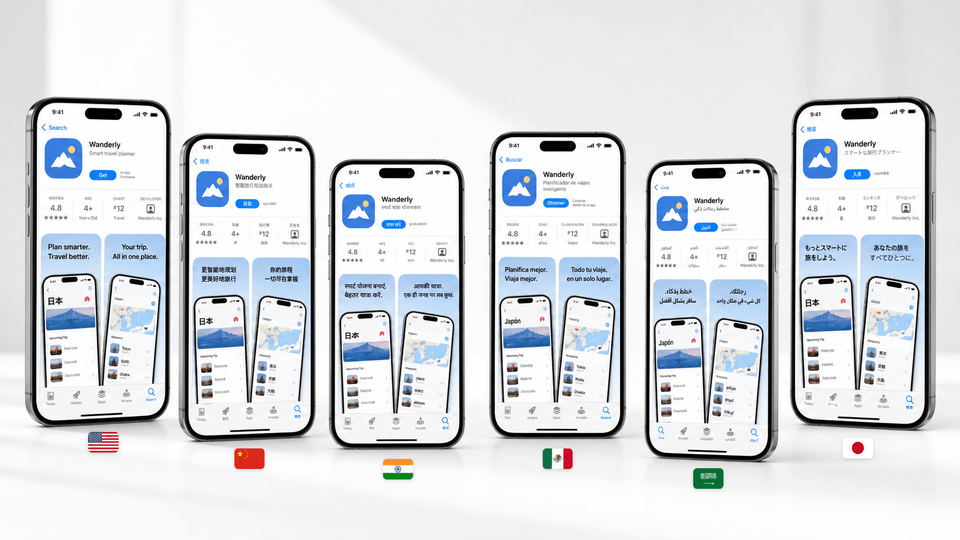
Localized screenshots are often the fastest market test because they make the store promise visible without translating every product surface first. Use that test carefully: translated captions still need to fit, localized raw app screens or images may need to change, and every target store size needs export or upload. If the first market improves conversion, installs, paid traffic performance, or revenue, expand into the next locale with the same project instead of rebuilding the screenshot set from copied files.
Quick Example Shortlist: High-Value Subscription App
Scenario: a $50 to $100/year subscription app, already in English, available globally, and looking for more high-value customers.
A better first pass is to target high-value customers while limiting the first production load. Start with premium English and English-tolerant markets, then translate the app where language is likely to improve trust, comprehension, checkout confidence, or paid conversion enough to justify new captions, localized app screens, per-language images, support changes, and store uploads.
This is not a regional launch plan. The app is already available globally. It is a localization investment plan.
| Play | Localization asset | App Store locale(s) | Paid markets it can unlock | When |
|---|---|---|---|---|
| EU first pass | German app translation | de-DE | 🇩🇪 Germany 🇦🇹 Austria German-speaking 🇨🇭 Switzerland | i |
| EU first pass | French app translation | fr-FR first, fr-CA later if Canada matters | 🇫🇷 France 🇧🇪 Belgium French-speaking 🇨🇭 Switzerland French 🇨🇦 Canada | i |
| EU broad reach | Spanish app translation | es-ES first, es-MX later if LatAm matters | 🇪🇸 Spain first 🇲🇽 Mexico Broader Latin America testing | i |
| EU next layer | Italian app translation | it | 🇮🇹 Italy Italian-speaking 🇨🇭 Switzerland | i |
| Premium Asia | Japanese app translation | ja | 🇯🇵 Japan | i |
| Premium Asia | Korean app translation | ko | 🇰🇷 South Korea | i |
| EN polish | Regional English App Store polish | en-GB, en-AU, en-CA | 🇬🇧 U.K. 🇦🇺 Australia English 🇨🇦 Canada | i |
| EN test | English-first premium tests | Keep app in English first. Consider nl-NL, sv, no, da later only if data supports it. | 🇳🇱 Netherlands 🇸🇪 Sweden 🇳🇴 Norway 🇩🇰 Denmark 🇸🇬 Singapore | i |
How one translation can stretch: German can cover Germany first, then help with Austria and parts of Switzerland. French can cover France first, then support Belgium, Switzerland, and a French Canada variant. Spanish can start with Spain, then stretch into an early Latin America test before splitting into es-ES and es-MX.
App Store Versus Google Play
This guide is App Store-led planning, not a full Google Play localization strategy. Google Play can be the better reach play in Android-heavy markets, especially for free, ad-driven, or scale-first apps.
The App Store captured roughly 72% of reported App Store and Google Play consumer spend in Appfigures' public 2024 split, reported by TechCrunch, with $91.6B on the App Store out of $127B total. For paid apps, subscriptions, and premium positioning, that is why an App Store-first localization order can look different from a Google Play-first reach plan.
For Google Play, weigh Android-heavy markets, ad-supported reach, lower-cost user acquisition, and regional device share more heavily. A free consumer app may prioritize Hindi, Indonesian, Portuguese Brazil, Arabic, or Spanish Mexico earlier than an App Store-first subscription app. Use both store datasets and a Google Play screenshot workflow when the app ships on iOS and Android.
When Google Play Should Lead
Lead with Google Play when the app depends on Android-heavy countries, free downloads, ad revenue, high-volume consumer reach, emerging-market growth, or lower-cost paid acquisition. That often moves Hindi, Indonesian, Portuguese Brazil, Arabic, Spanish Mexico, Vietnamese, Thai, Turkish, and regional English variants higher on the shortlist than they would be for an App Store-first subscription plan.
Google Play localization still needs store-ready creative, not only translated text. Check the local keywords, first screenshot promise, feature graphic, translated captions, Android UI captures, local examples, export sizes, upload mapping, and Google Play Store Listing Experiment variants before scaling more languages.
Store Page First Or Full App First?
You can test a market by localizing the App Store listing before fully localizing the app, especially for early validation. A good test can include translated metadata, localized screenshots, local keywords, and market-specific captions.
Good-quality localized screenshots are where that value becomes visible. They make the first benefit clear, fit translated captions, use local examples, and give store visitors a reason to install. For planning, use +15% to +40% more downloads as a practical range in strong-fit markets, with screenshot-localization examples reporting +33% to +36% conversion gains and broader localization examples reaching +101% to +128% more downloads. Use the localization download lift guide to estimate upside, then localize screenshots with AppScreens when the market is worth testing.
Be clear if the app itself is still mostly English. If the store page promises a local experience and the app opens in English, users may feel misled. For serious launches, localize the listing, screenshots, onboarding, in-app text, support path, and trust signals together.
Localization Gotchas That Change The Language Order
Choosing languages is not just a traffic exercise. A market can look large and still be the wrong first localization if the app is not ready, the screenshots cannot support the promise, or every file must be rebuilt by hand. Run a free ASO review to check the base listing before localizing, use the app screenshot localization checklist before publishing, and use AppScreens localization when captions need text fitting, localized layouts need adjusting, per-language screenshots or images need swapping, store sizes need exporting, uploads need mapping, and future changes need to stay editable.
| Mistake | Use this rule | Why it matters |
|---|---|---|
| Choosing by population only | Match audience size with revenue, category demand, paid traffic, support readiness, and product fit. | A smaller premium market can beat a larger language when willingness to pay and support fit are stronger. |
| Treating language and locale as the same decision | Choose exact locales and storefronts, not just broad language names. | Spanish Mexico and Spanish Spain, Chinese Simplified and Chinese Traditional, and Portuguese Brazil and Portugal can need different screenshots, wording, pricing, and proof. |
| Translating metadata but leaving screenshots behind | Localize the visible screenshot story: captions, feature graphics, app UI, examples, units, currencies, and trust signals. | Users see screenshots before they read deeply. If the visual story still feels generic or English-first, the localized listing loses trust. |
| Uploading raw localized captures as final creative | Use raw captures as source material, then add benefit-led captions, visual hierarchy, local examples, and store-ready design. | Raw screenshots show the interface, but they rarely explain the outcome, localize the pitch, or give visitors a strong reason to install. |
| Ignoring text expansion, fonts, and RTL | Check caption length, line breaks, font coverage, automatic text resizing, and right-to-left layout before export. | A screenshot that looks clean in English can become cramped, broken, or unreadable after translation. |
| Promising a localized app before the product is ready | Use store-page localization for market validation, but keep the promise honest if onboarding, billing, support, or in-app UI is still English-only. | A localized store page can win the tap, but a mismatched app experience can hurt trust, reviews, retention, and paid traffic learning. |
| Managing each language as cloned files | Use one editable project with text fitting, per-language screenshots and images, store-ready exports, uploads, localization, variants, and future updates. | One caption, screenshot, or product update can otherwise create repeated edits across device sizes, languages, CPP/PPO variants, Play experiments, export folders, and upload mapping. |
Solution: Localize And Test Store Screenshots With AppScreens
Use AppScreens when you want downloads, automation, quick production, lower design and production cost, correct store sizes without guesswork, and polished screenshots without becoming a designer.
AppScreens turns localization planning into concrete screenshot production. Use it to localize App Store and Google Play screenshots from one editable project, then create upload-ready screenshot sets for each supported language, device size, and store target without rebuilding localized layouts, re-exporting store sizes, mapping uploads, and replacing files by hand.
The hard part comes after the shortlist: translated captions, longer text, RTL checks, localized raw app screens, market-specific images, store-size exports, upload mapping, and QA. AppScreens keeps the production pieces inside one editable screenshot project across 80+ localizations with AI translation, automatic text fitting, RTL support, per-language screenshot and image changes, store-ready exports, uploads, variants, and future updates.
AppScreens can translate screenshot captions for each supported store language with AI, and you can add translation guidelines so the output keeps the right tone, product vocabulary, claims, and market context before you check caption fit, localized UI, RTL layouts, store-size exports, and upload-ready files.
Languages from one project
Create localized screenshot sets from a single source project, with per-language captions, app screens, layouts, text fitting, and export targets kept together.
Export or upload assets
Produce store-ready images for App Store Connect and Google Play, then export files or upload localized sets without sorting every file by locale, device, and store target.
Test markets with CPP and PPO
Duplicate sets for Custom Product Pages, Product Page Optimization, paid campaigns, and localized market tests while keeping captions, sizes, per-language assets, exports, uploads, and winners editable.
FAQ
What languages give my app the most global reach?
For broad reach, start by reviewing large language strategies such as Chinese, Spanish, Hindi, Arabic, Portuguese, and Indonesian. In App Store and Google Play work, choose exact locales such as zh-Hans, es-MX, hi, ar, pt-BR, and id based on storefront data, revenue potential, paid traffic plans, support readiness, and product fit.
Which app screenshot languages should I localize first?
Localize screenshots first for markets where users already show intent: impressions, product page views, installs, revenue, paid campaign spend, or competitor demand. AppScreens is built for this job: teams can localize App Store and Google Play screenshots, adapt layouts, override raw screenshots per language, check RTL markets, and export or upload localized assets from one editable project. Start with one market, prove the lift, then scale.
Should I count English as one of my localizations?
Count English as the base language if the app is already written in English. Regional English variants are still useful when spelling, currency, screenshots, legal wording, reviews, pricing, or trust signals need to feel local.
Should I localize by language or by country?
Localize by App Store or Google Play locale and target country, not just broad language name. Spanish Mexico and Spanish Spain are separate decisions. French and French Canada are separate. Portuguese Brazil and Portuguese Portugal are separate. The right locale depends on storefront demand, wording, screenshots, pricing, examples, support, and local trust signals.
Should I start with Spanish Mexico or Spanish Spain?
Use Spanish Mexico when the goal is broad Spanish-speaking Latin America. Use Spanish Spain when Spain matters as its own market. Do not count the same global Spanish audience twice when estimating reach.
Should I translate the app first or the App Store listing first?
Use localized store assets first when you need market validation, but keep the promise honest if the app itself is still mainly English. For serious launches, localize the app experience, onboarding, screenshots, support flow, feature graphic, and store listing together. For uplift examples, see localization download lift guide.
What languages should a paid app or subscription app localize into first?
Paid apps and subscription apps should prioritize market value, category demand, support readiness, and payment behavior over population alone. Good candidates often include Japanese, German, Italian, Dutch, Korean, French, French Canada, Spanish Spain, Chinese Traditional, regional English variants, and selected Nordic languages.
What languages should a free app localize into first?
For broad free apps, population reach matters more. Start with the English base, then consider high-reach strategies such as Chinese, Spanish, Hindi, Arabic, Portuguese, and Indonesian after checking App Store analytics, Google Play data, category demand, screenshots, support, and product readiness.
Which languages should I localize my Android app into first?
For Android and Google Play, start with markets where Android share, free downloads, ad revenue, low-cost paid acquisition, or high-volume consumer demand match the app. Hindi, Indonesian, Portuguese Brazil, Arabic, Spanish Mexico, Vietnamese, Thai, Turkish, and regional English variants can move higher for Android-first apps, but validate them against Google Play impressions, store listing visitors, installs, revenue, retention, support readiness, and screenshot production. Use the Google Play screenshot generator when you need localized Android screenshots and Play Console-ready assets.
How many app localization languages should I start with?
Start with one to three high-fit locales. Pick one market with clear demand, one market with strong monetization fit, and one strategic reach market only if the team can support the app, screenshots, pricing, uploads, and QA properly. AppScreens lets you test localized screenshots first, then expand the same editable project into more languages when conversion, installs, paid traffic performance, or revenue supports the next pass.
Is Hindi enough for India?
No. Hindi is a major opportunity, but it is not the same as localizing for all of India. India has many important regional languages, including Bangla, Tamil, Telugu, Marathi, Gujarati, Kannada, Malayalam, Punjabi, Odia, and Urdu.
Is Chinese Simplified enough for all Chinese-speaking users?
No. Use zh-Hans for mainland China and zh-Hant for Taiwan, Hong Kong, and Macau. These are written-locale and market decisions, not just spoken-language decisions.
Is Portuguese Brazil enough for Portugal?
Use Portuguese Brazil first when reach is the goal, because Brazil is the largest Portuguese-language storefront opportunity. Add Portuguese Portugal when Portugal matters commercially or when wording, spelling, pricing, proof points, screenshots, or trust signals need to feel local.
Do I need to localize app screenshots too?
Yes. Screenshots are one of the highest-impact localization surfaces because users scan them before they read the full description. Use AppScreens localization to translate the intent, fit captions, swap per-language screenshots or images, use local examples, check currencies and names, and make visible app UI match the promise.
Can I start with a small screenshot localization test?
Yes. Start with one strong market and one screenshot set instead of translating everything at once. AppScreens lets you begin from the same template-based project used for one-off screenshots, then scale into localized screenshot sets when the market proves demand.
How does AppScreens make screenshot localization faster?
AppScreens keeps one editable screenshot project, translates it into 80+ localizations, fits text automatically, checks RTL layouts, changes raw screenshots or images per language, then exports or uploads localized store assets. Start with localized screenshot sets and compare scale needs on pricing.
How do I know if a localization is worth it?
A localization is worth testing when the country already sends impressions, installs, or revenue, paid traffic is planned, competitors are weakly localized, the category has local demand, and support, pricing, onboarding, screenshots, and compliance are ready. Use localization download lift guide to estimate upside and keep unready markets on the next-pass list.
What mistakes should I avoid when choosing app localization languages?
Avoid choosing by population only, treating language and locale as the same decision, translating metadata without localized screenshots, ignoring text expansion or RTL, promising a localized app before the product is ready, and managing each language as cloned files. Cloned files turn one caption, screenshot, or product update into repeated edits across device sizes, languages, CPP/PPO variants, Play experiments, export folders, and upload mapping. Use the app screenshot localization checklist before publishing.
Where should I start after choosing languages?
Start with AppScreens localization for screenshot translation, text fitting, RTL layouts, and per-language screenshots or images, then use the app screenshot localization checklist to check exports, upload mapping, and store listing assets before publishing.
Read on
Sources
- Apple's App Store localization table for supported locales and language display behavior.
- Ethnologue for broad first-language speaker estimates.
- Instituto Cervantes for Spanish native-speaker estimates.
- Statistics Canada for French Canada and Canada-specific French audience estimates.
- World Bank SP.POP.TOTL where country or storefront population signals are shown.
- Sensor Tower State of Mobile 2026 for global IAP context and methodology.
- Sensor Tower State of Mobile 2026 PDF for the iOS-only China Mainland note and report methodology.
- Nairametrics summary of Sensor Tower 2026 data for public top-10 country-level 2025 IAP revenue values and YoY calculations.
- TechCrunch reporting on Appfigures' 2024 app-store split for the App Store versus Google Play consumer-spend context.
- Sensor Tower Q2 2025 Market Index for regional IAP growth context.
- StatCounter mobile OS market share for iOS share signals used in the additional-market prioritization.
Native speaker estimates, storefront population signals, and consumer-spend figures are rounded planning aids. They are not exact counts, download forecasts, revenue forecasts, or guaranteed customer numbers.
