
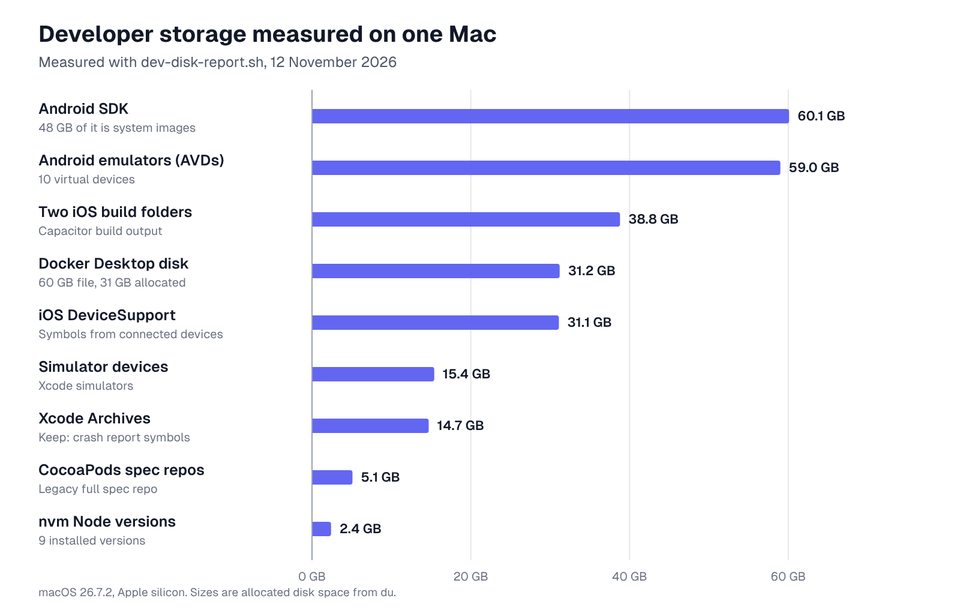
Measure first, then clean in three passes: generated build output, which tools rebuild by themselves; downloaded caches and toolchains, which are fetched again when needed; and only then data you might want to keep, such as emulators, Docker volumes and Xcode archives. On the Mac we measured, the biggest items were the Android SDK (60.1 GB), Android emulators (59.0 GB), two iOS build folders (38.8 GB), Docker's disk (31.2 GB) and Xcode's device support files (31.1 GB).


Quick Take
bash dev-disk-report.sh ~/code measures Xcode, Android, Docker, Node, Homebrew, CocoaPods, Python and editor caches, plus the largest node_modules and build folders in your projects. It deletes nothing. Each section below gives the inspect command, the cleanup, and what comes back.
We do not promise a number: recovered space depends on what you build. The figures here are from one working Mac.
Measure what your tools are storing
Copy the developer disk report script at the end of this section, type pbpaste > dev-disk-report.sh in Terminal to save it, then run it with the folder that holds your projects. Large folders take a minute or two to measure.
bash dev-disk-report.sh ~/code$ bash dev-disk-report.sh ~/projects
SIZE GROUP ITEM KIND PATH
60.1 GB Android Android SDK download ~/Library/Android/sdk
59.0 GB Android Emulator images (AVDs) your data ~/.android/avd
31.2 GB Docker Docker Desktop data your data ~/Library/Containers/com.docker.docker
31.1 GB Xcode iOS DeviceSupport download ~/Library/Developer/Xcode/iOS DeviceSupport
15.4 GB Xcode Simulator devices your data ~/Library/Developer/CoreSimulator/Devices
14.7 GB Xcode Archives keep ~/Library/Developer/Xcode/Archives
5.1 GB Ruby CocoaPods spec repos download ~/.cocoapods/repos
3.0 GB Editors JetBrains caches generated ~/Library/Caches/JetBrains
2.4 GB Node nvm Node versions download ~/.nvm/versions
...
164 MB Node npm cache download ~/.npm/_cacache
138 MB Xcode DerivedData generated ~/Library/Developer/Xcode/DerivedData
KIND: generated = rebuilt automatically, download = fetched again when needed,
keep = needed later (crash symbols), your data = state you may want to keep.
Docker (docker system df)
TYPE TOTAL ACTIVE SIZE RECLAIMABLE
Images 88 0 12.97GB 5.222GB (40%)
Containers 0 0 0B 0B
Local Volumes 0 0 0B 0B
Build Cache 3039 0 24.54GB 15.81GB
Homebrew (brew cleanup --dry-run)
==> This operation would free approximately 757.8MB of disk space.
Project build output under ~/projects (largest 15)
21.9 GB ~/projects/cookbook/cookbook-app/capacitor-cb-ios/build
16.9 GB ~/projects/cookbook/cookbook-app/capacitor-fbm-ios/build
3.4 GB ~/projects/cookbook/cookbook-app/capacitor-cb-and/android/app/build
2.2 GB ~/projects/cookbook/cookbook-app/capacitor-fbm-and/android/app/build
1.5 GB ~/projects/cookbook/cookbook-ai-tagging/tf-ingredient-entity/node_modules
1.4 GB ~/projects/cookbook/cookbook-framework/app-ionic-ws/node_modules
...
Nothing was deleted. Safe cleanup steps for each item:
https://appscreens.com/blog/free-up-disk-space-developer-macFor a quick look without the script:
du -sh ~/Library/Caches/* ~/Library/Developer/* ~/Library/Android ~/Library/Containers/com.docker.docker ~/.[!.]* 2>/dev/null | sort -h | tail -20The full script. It measures and lists, and never deletes anything:
#!/bin/bash
# dev-disk-report.sh
# Measures the developer caches, toolchains, emulators and build output that
# usually fill a development Mac: Xcode, Android, Docker, Node, Homebrew,
# CocoaPods, Gradle, Python and more. Read-only: it measures and lists, and
# never deletes anything.
#
# Usage:  bash dev-disk-report.sh                # caches and tools
#         bash dev-disk-report.sh ~/code         # also list node_modules,
#                                                # build and .build folders there
# Guide:  https://appscreens.com/blog/free-up-disk-space-developer-mac
# Tested: macOS 26.7 (bash 3.2). Large folders can take a minute to measure.
# SPDX-License-Identifier: MIT
# Copyright (c) 2026 AppScreens. Free to use, copy and change; please keep
# this header, including the guide link.

set -u
SCAN=${1:-}
kb() { if [ -e "$1" ]; then du -skx "$1" 2>/dev/null | awk '{print $1}'; else echo 0; fi; }
human() { awk -v k="$1" 'BEGIN { if (k >= 1048576) printf "%.1f GB", k / 1048576; else if (k >= 1024) printf "%.0f MB", k / 1024; else printf "%d KB", k }'; }
short() { case "$1" in "$HOME"*) printf '~%s' "${1#"$HOME"}" ;; *) printf '%s' "$1" ;; esac; }
TMP=$(mktemp -t dev-disk-report); trap 'rm -f "$TMP"' EXIT
add() {  # group, label, kind, path
  [ -e "$4" ] || return 0
  printf "%s\t%s\t%s\t%s\t%s\n" "$(kb "$4")" "$1" "$2" "$3" "$4" >> "$TMP"
}
L="$HOME/Library"

add Xcode "DerivedData" generated "$L/Developer/Xcode/DerivedData"
add Xcode "Archives" keep "$L/Developer/Xcode/Archives"
add Xcode "iOS DeviceSupport" download "$L/Developer/Xcode/iOS DeviceSupport"
add Xcode "macOS DeviceSupport" download "$L/Developer/Xcode/macOS DeviceSupport"
add Xcode "watchOS DeviceSupport" download "$L/Developer/Xcode/watchOS DeviceSupport"
add Xcode "Simulator devices" "your data" "$L/Developer/CoreSimulator/Devices"
add Xcode "SwiftPM cache" download "$L/Caches/org.swift.swiftpm"
add Xcode "Xcode cache" generated "$L/Caches/com.apple.dt.Xcode"
add Android "Android SDK" download "$L/Android/sdk"
add Android "Emulator images (AVDs)" "your data" "$HOME/.android/avd"
add Android "Gradle caches" download "$HOME/.gradle/caches"
add Android "Gradle wrappers" download "$HOME/.gradle/wrapper"
add Java "Maven repository" download "$HOME/.m2/repository"
add Docker "Docker Desktop data" "your data" "$L/Containers/com.docker.docker"
add Node "npm cache" download "$HOME/.npm/_cacache"
add Node "Yarn cache" download "$L/Caches/Yarn"
add Node "pnpm store" download "$L/pnpm/store"
add Node "Bun cache" download "$HOME/.bun/install/cache"
add Node "nvm Node versions" download "$HOME/.nvm/versions"
add Ruby "CocoaPods cache" download "$L/Caches/CocoaPods"
add Ruby "CocoaPods spec repos" download "$HOME/.cocoapods/repos"
add Homebrew "Homebrew downloads" download "$L/Caches/Homebrew"
add Python "pip cache" download "$L/Caches/pip"
add Python "Conda packages" download "$HOME/miniconda3/pkgs"
add Python "Conda packages" download "$HOME/miniconda/pkgs"
add Flutter "Pub cache" download "$HOME/.pub-cache"
add Rust "Cargo registry" download "$HOME/.cargo/registry"
add Go "Go build cache" generated "$L/Caches/go-build"
add Go "Go modules" download "$HOME/go/pkg/mod"
add Browsers "Playwright browsers" download "$L/Caches/ms-playwright"
add Browsers "Puppeteer browsers" download "$HOME/.cache/puppeteer"
add Editors "JetBrains caches" generated "$L/Caches/JetBrains"
add Editors "VS Code cache" generated "$L/Application Support/Code/Cache"
add AI "Ollama models" "your data" "$HOME/.ollama/models"

printf "%-9s  %-9s %-24s %-10s %s\n" SIZE GROUP ITEM KIND PATH
sort -rn "$TMP" | while IFS=$'\t' read -r k g label kind p; do
  [ "$k" -lt 10240 ] && continue
  printf "%-9s  %-9s %-24s %-10s %s\n" "$(human "$k")" "$g" "$label" "$kind" "$(short "$p")"
done
printf "\nKIND: generated = rebuilt automatically, download = fetched again when needed,\n"
printf "keep = needed later (crash symbols), your data = state you may want to keep.\n"

if command -v docker >/dev/null 2>&1 && docker info >/dev/null 2>&1; then
  printf "\nDocker (docker system df)\n"; docker system df 2>/dev/null | sed 's/^/  /'
fi
if command -v brew >/dev/null 2>&1; then
  printf "\nHomebrew (brew cleanup --dry-run)\n  %s\n" "$(brew cleanup --dry-run 2>/dev/null | tail -1)"
fi

if [ -n "$SCAN" ]; then
  printf "\nProject build output under %s (largest 15)\n" "$(short "$SCAN")"
  find "$SCAN" \( -name node_modules -o -name .build -o -name build -o -name .gradle -o -name Pods -o -name .next -o -name dist -o -name DerivedData \) -type d -prune -print 2>/dev/null |
    while read -r d; do printf "%s\t%s\n" "$(kb "$d")" "$d"; done | sort -rn | head -15 |
    while IFS=$'\t' read -r k d; do printf "  %-9s %s\n" "$(human "$k")" "$(short "$d")"; done
fi
printf "\nNothing was deleted. Safe cleanup steps for each item:\n"
printf "https://appscreens.com/blog/free-up-disk-space-developer-mac\n"
Generated output, downloads and data you keep
| Kind | Examples | Cost of deleting | Clean when |
|---|---|---|---|
| Generated | Xcode DerivedData, build/, .build/, dist/, .next/, Gradle build folders | One slower build | Any time the tool is not running |
| Downloaded | node_modules, npm and pnpm caches, Homebrew downloads, CocoaPods, Gradle caches, Android system images, Node versions | Network time on the next install | You are online and do not need it offline |
| Your data | Android emulators, simulator devices, Docker volumes and images, Xcode archives, local AI models | App state, test data or crash symbols you cannot regenerate | You have checked what is inside |
Clean up by tool
Xcode and simulators
On this Mac Xcode accounted for about 98 GB: device support files, simulator runtimes and devices, and archives. The Xcode cleanup reference covers each one, including which archives to keep for crash reports, and the worktree guide finds build data left behind by removed Git worktrees. The two quickest wins:
xcrun simctl list devices unavailable
du -sh ~/Library/Developer/Xcode/"iOS DeviceSupport"/*
Project build folders and node_modules
The largest single items here were two Capacitor iOS build folders at 21.9 GB and 16.9 GB, and each JavaScript project's node_modules held 0.9 to 1.5 GB. List them, largest last:
find ~/code \( -name node_modules -o -name build -o -name .build -o -name dist \) -type d -prune -exec du -sh {} + 2>/dev/null | sort -h | tail -20 Delete the ones in projects you are not working on, but skip any that Git tracks: some projects commit build/ resources or a dist/ bundle, and git ls-files build | head -1 prints a file if so. npm install or the next build recreates the rest. git clean -ndX previews every Git-ignored file in a repository, but check the list before running git clean -fdX: ignored files often include .env files and local configuration.
Node: package caches and old Node versions
npm cache clean --force
pnpm store prune
For Yarn 1, yarn cache clean empties the global cache. In a Yarn 2 or later project it empties that project's .yarn/cache, which zero-install repositories commit; use yarn cache clean --mirror for the global one.
The npm cache was only 164 MB here, while nine Node versions installed with nvm used 2.4 GB, the largest 855 MB including its global packages. List them, then remove versions no project's .nvmrc or engines field still asks for:
$ du -sh ~/.nvm/versions/node/* | sort -rh
855M	/Users/you/.nvm/versions/node/v18.20.3
312M	/Users/you/.nvm/versions/node/v20.18.0
278M	/Users/you/.nvm/versions/node/v16.13.0
...
 81M	/Users/you/.nvm/versions/node/v12.22.1
nvm lsFor example:
nvm uninstall 16.13.0Docker Desktop
Start with Docker's own accounting. On this Mac the build cache was the biggest reclaimable part:
docker system dfThen prune the parts you can rebuild:
docker builder prune --all
docker image prune -a
docker builder prune removes dangling build cache, and --all extends it to all unused build cache. docker image prune -adocker image prune -a removes every image no container uses, so the next docker pull or build downloads them again. Neither touches volumes; docker system prune --volumes does, and volumes often hold databases.
Finder can overstate Docker's size. Its virtual disk is a sparse file: listed at 60 GB, but only 31 GB was allocated on disk:
$ ls -lsh ~/Library/Containers/com.docker.docker/Data/vms/0/data/Docker.raw
65233344 -rw-r--r--  1 you  staff    60G 12 Nov 11:09 Docker.raw

$ du -sh ~/Library/Containers/com.docker.docker
 31G	/Users/you/Library/Containers/com.docker.docker
Pruning gives the space back to macOS, usually within a few minutes. The disk usage limit in Docker Desktop's Settings > Resources only caps how large the file can grow, and Docker's Mac FAQ warns that lowering it deletes the disk image with every container, image and volume in it. Back up anything you need first.
Android SDK, emulators and Gradle
System images were 48 GB of the 60.1 GB SDK, and each emulator was 0.5 to 12 GB:
$ du -sh ~/Library/Android/sdk/* | sort -rh | head -5
 48G	/Users/you/Library/Android/sdk/system-images
6.4G	/Users/you/Library/Android/sdk/ndk
1.7G	/Users/you/Library/Android/sdk/sources
1.6G	/Users/you/Library/Android/sdk/platforms
1.1G	/Users/you/Library/Android/sdk/emulator

$ du -sh ~/.android/avd/*.avd | sort -rh | head -4
 12G	/Users/you/.android/avd/Pixel_8_API_35.avd
 11G	/Users/you/.android/avd/Pixel_8_API_34_3.avd
8.7G	/Users/you/.android/avd/Pixel_XL_2.avd
7.4G	/Users/you/.android/avd/Pixel_8_API_34.avd
~/Library/Android/sdk/cmdline-tools/latest/bin/sdkmanager --list_installed
~/Library/Android/sdk/emulator/emulator -list-avdsThen, for example, uninstall an unused system image and delete an emulator you no longer use:
~/Library/Android/sdk/cmdline-tools/latest/bin/sdkmanager --uninstall "system-images;android-30;google_apis;x86"~/Library/Android/sdk/cmdline-tools/latest/bin/avdmanager delete avd -n Pixel_XL_2 On Apple silicon, x86 system images cannot run in the emulator, so they are pure waste; this Mac still had one. Deleting an AVD removes its installed apps and data, while Android Studio's Device Manager can wipe data and keep the device. Gradle's downloaded dependencies live in ~/.gradle/caches and its distributions in ~/.gradle/wrapper/dists (634 MB here); stop the daemons with ./gradlew --stop before deleting either.
CocoaPods
CocoaPods switched to a CDN for its spec index in version 1.8, but Macs that used it earlier can still hold the old full spec repository. Here it was 5.0 GB against 96 MB for the CDN index:
$ du -sh ~/.cocoapods/repos/*
5.0G	/Users/you/.cocoapods/repos/cocoapods
  0B	/Users/you/.cocoapods/repos/Spec_Lock
 96M	/Users/you/.cocoapods/repos/trunk
pod repo list Remove the old repository only if your Podfiles do not name https://github.com/CocoaPods/Specs.git as a source. It is often called master instead of cocoapods; use the name pod repo list shows. Then clear the download cache:
pod repo remove cocoapods
pod cache clean --all
Homebrew
brew cleanup --dry-run
brew autoremove --dry-run
Then run the cleanup:
brew cleanup --prune=all
brew autoremove
The dry run here offered 757.8 MB, including old copies of Homebrew's bundled Ruby. autoremove uninstalls dependencies nothing needs any more.
Python, editors and everything else
pip cache dir
conda clean --all --dry-run
ollama list
Then clear the caches you checked:
pip cache purge
conda clean --all
Conda's package cache was 473 MB here. JetBrains IDEs keep a cache folder per version in ~/Library/Caches/JetBrains (3.0 GB), so folders for versions you no longer run can go. Puppeteer's browser downloads (711 MB here) and Playwright's come back with npx puppeteer browsers install chrome or npx playwright install, and local AI models can be several gigabytes each; remove unused ones with ollama rm.
Check before deleting
- Docker volumes and images you cannot rebuild, such as a database seeded by hand.
- Emulators and simulators holding test accounts, keychains or data you set up manually.
- Xcode archives of builds you shipped: their dSYM files symbolicate crash reports.
- Ignored files such as
.envbefore anygit clean -X. - Anything a running tool is using: quit Xcode, Android Studio and Docker Desktop before deleting their folders by hand.
FAQ
What takes up the most space on a developer Mac?
It depends on what you build. On the Mac we measured, the Android SDK used 60.1 GB, Android emulators 59.0 GB, two iOS build folders 38.8 GB, Docker Desktop 31.2 GB and Xcode device support files 31.1 GB.
Is it safe to delete node_modules?
Yes for projects you are not working on. npm install, pnpm install or yarn recreates it from the lockfile. Expect the next install to take network time.
Why does Docker use so much disk space on a Mac?
Docker Desktop stores images, containers, volumes and build cache inside one virtual disk. Run docker system df to see each part, then docker builder prune --all and docker image prune -a. Pruning returns the space to macOS. The disk file is sparse, so Finder can show its maximum size rather than the space it uses. Lowering the disk usage limit in Settings > Resources deletes the disk image with every container, image and volume.
Can I delete Android system images?
Yes for API levels and variants you no longer test. Emulators built on a deleted image stop working. On Apple silicon, x86 system images cannot run in the emulator at all, so they can go.
Is git clean -X safe for freeing space?
Preview with git clean -ndX first. It removes every Git-ignored file, which often includes .env files and local configuration as well as build output.
How much space will I recover?
There is no typical number. Measure with the report script before and after. The Mac in this guide was 98% full, with the largest items from Android, Docker, iOS build folders and Xcode.
Quote this guide
You can quote sections, tables, commands and charts from this guide in your own posts, documentation or answers, as long as you link to this page. Please do not republish the whole guide. The scripts are MIT licensed, so you can copy and change them freely.
AppScreens.com, "Free Up Disk Space on a Developer Mac: Xcode, Node, Docker and More", 10 November 2026. https://appscreens.com/blog/free-up-disk-space-developer-macSources
- Docker: docker system df and pruning unused objects
- Android: sdkmanager and avdmanager
- Homebrew: brew cleanup
- npm: npm cache and pnpm store
- CocoaPods 1.8: CDN as the default spec source
- Git: git clean
Sizes measured on macOS 26.7.2, Apple silicon. They will differ on your Mac.